
Demo: Oracle SelfService Hyper-Automation Platform (ServiceNow Implementation)
This is the ServiceNow version of the demo .For the JIRA version click here.
The demo code can be downloaded from our GitHub Repository
Purpose: To automate the delivery of the most frequent ServiceNow project tasks and Change Requests.
Automation loop: Closed-loop automation. No human interaction is required for normal operation, but if the workflow fails, it opens a follow up DBA Change Request to repair the issue with logs attached.
Implementation: ServiceNow ITSM (Information Technology Service Management)
Technology products: ServiceNow (Cloud) ServiceNow Certified Ansible ITSM Collection (running on s Cloud or On-prem VM) ó Assets (on-prem and Cloud-provisioned Oracle & SQL Server in need of provisioning and maintenance).
Cost of product licenses: $0. ServiceNow operates as it is currently, no additional premium features enablement is necessary. The Ansible ITSM collection running from a LINUX automation control node is free. Ansible, a RedHat product, doesn’t charge for its simplest CLI core form – which is what is used in this POC, but charges for its Cloud Automation Platform – which is out the scope.
Operational cost: The only expense is a LINUX automation control node running our custom workflows to handle all Oracle and SQL Server tickets and incidents. Alternatively, an on-premises LINUX server with 4CPUs and at least 64GB or RAM and 2TB storage will suffice.
ServiceNow status progression: New, Assess, Authorize, Schedule, Implement, Review, Closed. The intent is to automate not just the DBA execution steps, but the entire ServiceNow Change Request and Incidents life cycle: from user opening a Change Request or probe detecting an operational SQL Server or Oracle failure all the way to resolving the incident and executing the requested change and to, finally, closing the CR or INC within SNOW, entirely unattended.
ServiceNow task status progression: To Do, Pending Approval, In Progress, Done. The entire project life cycle executed automatically.
Accessibility: The ServiceNow automation workspace is accessible in all browsers and most cell devices. The Change Requests may be opened, immediately auto executed and closed from a hand-held device:
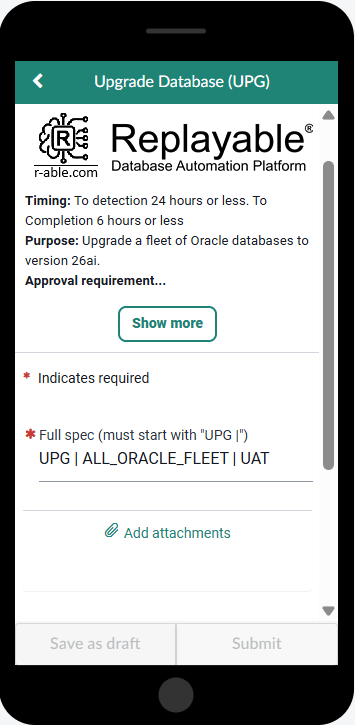
Pic 1. An example of Oracle upgrade intake form, as seen on an iPhone screen.
BENEFITS
1. Tool Consolidation
· Centralized Management: This solution provides a single interface to manage all ticketing, access, CMDB, approval, and automation workflows.
· Reduced Complexity: The current alternative relies on fragmented systems (e.g., access handled by one tool, approvals by another, and monitoring/automation via Oracle Enterprise Manager).
· Streamlined Operations: Consolidating these tools reduces system failure points, minimizes maintenance overhead, and eliminates communication gaps between disparate platforms.
2. License Cost Optimization
· Vendor Lock-In Relief: Fragmented ecosystems require separate licensing fees for each tool.
· Strategic Flexibility: Even with heavily discounted pricing, maintaining multiple tools locks the organization into specific vendors, making it difficult to pivot to better-suited products.
3. TCO Reduction
· Operational Savings: Software licensing typically represents only 20–30% of Total Cost of Ownership (TCO). The remaining 70–80% is driven by personnel-heavy maintenance, including patching, upgrades, bug fixes, data migrations, and ongoing support.
· Efficiency Gains: Transitioning to this automated platform can reduce overall TCO by 50–70% by eliminating repetitive manual labor.
· Process Optimization: Currently, employees must navigate lengthy Change Advisory Board (CAB), Jira, Agile, and Kanban approval cycles before executing scripts. Automating triaging, assignments, and tracking reclaims this lost time and effort.
4. Cloud Operational Cost Reduction
· Agentless Architecture: Traditional tools like Oracle Enterprise Manager (OEM) rely on heavy, platform-specific agents that constantly poll assets, generating expensive and unnecessary cloud traffic.
· Reduced Overhead: Ansible is agentless and operates on a push-only model. It connects on demand via standard protocols (SSH or WinRM), executes tasks, and immediately removes its footprint.
· Enhanced Security: Eliminating permanent local agents significantly reduces administrative overhead and minimizes the infrastructure's attack surface.
· Drift Prevention: This push-only architecture ensures configuration changes are only initiated by a centralized control node. This simplifies firewall configurations and prevents unauthorized local configuration drift.
5. Idempotency
· Predictable Execution: Ansible is idempotent by default. Running the same playbook multiple times on a target system will only execute changes if the current state deviates from the desired state.
· Risk Mitigation: In contrast, standard scripts execute blindly regardless of the system's current state, which introduces a high probability of operational failure.
6. Immutability
· Future-Proof Design: Conventional automation is rarely designed to support immutable infrastructure.
· Golden Image Deployment: While full immutability is a long-term goal, we can immediately leverage Ansible alongside Packer to bake packages, security updates, and application code directly into golden images. These can then be deployed as disposable, immutable instances, drastically reducing future code modification needs.
7. Scalability
· Eliminating Burnout: A conventional Database Administrator (DBA) handles an average of 20–30 tasks and incidents per week. If request volume spikes or priorities double, the workload quickly becomes unsustainable for a manual team, leading to burnout and turnover.
· Infinite Scaling: The automated solution scales up a thousand-fold instantly without requiring an upgrade to the control node. It can execute thousands of parallel tasks across thousands of databases simultaneously.
· Strategic Resource Shift: This automation elevates IT personnel from manual script runners to high-value infrastructure architects.
8. Speed
· Proven Performance: In a live test of a Database Change Request (DCR) project, the automated system successfully processed 1,000 migration Change Requests in 2 minutes and 52 seconds.
· Exponential Time Savings: For a team of five DBAs to complete the same workload manually, it would take an estimated month of continuous 24/7 operation, assuming zero interruptions from other incidents.
· Workflow Closed-Loop: Traditional open-loop workflows require manual intervention at every phase: request, route, approve, assign, execute, review, and close. Automation transitions this into a rapid, closed-loop process.
· Manual Delays: Under the current manual framework, the assessment, routing, approval, and implementation stages require days or even weeks to complete.
· Resource Constraints: Actual execution is frequently delayed by hours or days because administrators must prioritize critical production incidents, or may become unexpectedly unavailable. These resource dependencies create operational bottlenecks and force escalation managers to scramble for alternative coverage.
· End-to-End Resolution: Integrating ServiceNow ITSM automation eliminates these human bottlenecks. The entire change or incident lifecycle is automated end-to-end, executing tasks instantly once predefined criteria are met.
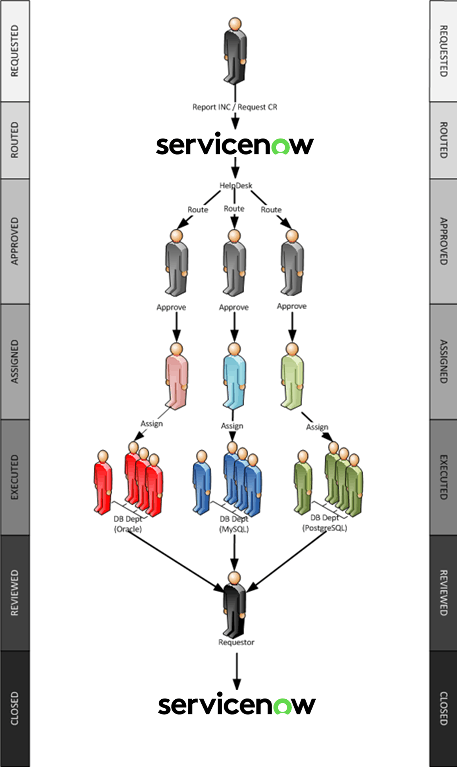
Pic 2. The Life Cycle of a Conventional ServiceNow Change Request
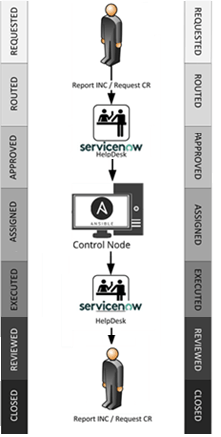
Pic 3. The Life Cycle of an Auutmated ServiceNow Change Request
9. Quality of Service
· The Cost of Downtime: For large enterprises, IT service delivery errors cost an average of $9,000 per minute. Major operational failures can be catastrophic; for example, the high-profile scheduling crisis at Southwest Airlines resulted in up to $825 million in total losses and a $140 million civil penalty.
· Reputational Impact: Beyond direct financial losses, system errors trigger stock price volatility and drive customer churn. Market research indicates that 85% of shoppers will abandon a retailer after a single poor delivery experience.
· Competitive Disadvantage: Manual processing introduces feature deployment delays, causing the organization to lag behind sufficiently automated competitors.
· The Baseline Error Rate: The average human input error rate sits at 4%, compounding with an additional 4% error rate during complex task execution (8% total). Common points of failure include executing scripts against the wrong database environment, entering incorrect credentials, or lacking the correct runtime components.
· The Log-Parsing Bottleneck: While Database Administrators (DBAs) attempt to check output logs for runtime errors (such as Oracle ORA- codes), manual verification is mathematically impossible when logs scale into gigabytes and staff must prioritize competing production incidents. This risk multiplies further during complex, inter-departmental operations due to communication gaps.
· Automated Precision: The proposed solution lowers the operational error rate to 0.01%. Remaining anomalies are restricted to input parameters (e.g., a user inputting an incorrect date or schema name) rather than automation execution failures.
· Closed-Loop Quality Control: The system executes workflows precisely, uniformly, and on schedule according to vendor best practices. It scans thousands of execution logs in parallel and in real time. If an anomaly is detected, it automatically generates a ticket, attaches the relevant error log fragment, and alerts the DBA for targeted intervention.
10. Security
· Current Vulnerabilities: Our existing manual framework requires a DBA password for script execution. Storing plaintext credentials on a server hard drive—even temporarily—violates basic database security compliance. Unencrypted network communications pose a similar risk.
· Industry-Standard Encryption: Ansible Vault leverages AES-256 symmetric encryption to secure sensitive files, certificates, API keys, and individual runtime variables.
· Zero-Trust Credential Handling: By shifting to automated password handling, sensitive parameters are hidden from the local server and the transit network.
· Encrypted Secrets Management: Entire connection strings—including usernames, passwords, runtime variables, and cloud endpoints—are fully encrypted in the vault. The automation engine can safely ingest these payloads to execute tasks without exposing raw credentials to human operators or log outputs.
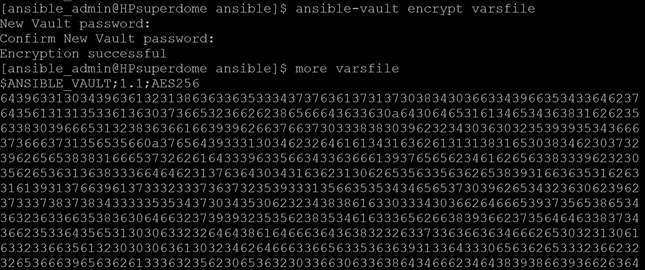
Pic 4. A variables and passwords file encrypted by Ansible vault
11. Accountability
· Managing Cloud Complexity: In traditional on-premises environments, manual errors were isolated. In multi-cloud ecosystems, the rapid pace of change across diverse vendor platforms makes relying on human memory an operational risk.
· Single Source of Truth: Automation centralizes governance by consolidating infrastructure code into a single repository (e.g., GitHub or GitLab), securing secrets within an encrypted vault, and logging execution trails directly inside the ticketing system (e.g., Jira or ServiceNow).
· Vendor-Agnostic Governance: Because the framework is vendor- and technology-agnostic, it establishes a transparent audit trail. Every deployment clearly documents what action was taken, where it occurred, when it executed, and why it was triggered, ensuring total accountability and predictable results.
12. Ownership
· Eliminating Institutional Knowledge Silos: Traditional, open-loop automation scripts typically exist as siloed knowledge held by individual authors. When a team member leaves the organization, that operational knowledge departs with them.
· Reducing Onboarding Overhead: Inheriting legacy shell or CLI scripts forces replacement DBAs to spend significant time decrypting custom code, which frequently leads to rewriting tools from scratch. This creates a repetitive, costly cycle of throwaway engineering.
· Institutional Asset Retention: Closed-loop automation transforms individual knowledge into corporate assets via version-controlled configuration files. All operational logic is permanently stored, versioned, and tagged within a central repository.
· Modular Continuity: Because the infrastructure definition is modular and declarative, incoming engineers can safely run, maintain, and scale the workflows without navigating undocumented, bespoke scripting logic.
Database Hyper-Automation Platform: The Use
To simplify, there is a custom workspace within a ServiceNow instance. It is a collection of custom ServiceNow forms connected to prepared Change Request templates for most requested work. The user accesses the main site via his/hers ServiceNow URL, finds the Database Automation Platform by either searching the ServiceNow filter, or by accessing it from a previously saved Favorites link:
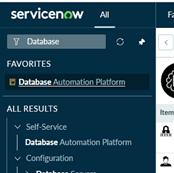
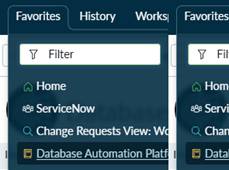
Pic 5. Access to the main automation Workspace
The main menu contains nine Change Request intake forms, one for each of the most frequently requested Change Requests and Tasks, as evidenced from the past 2 months’ use.
- Change Database Password (CDP)
- Create Application User (CAU)
- Database/Schema Refresh (REF)
- Drop/Decommission Database (DDP)
- Fix Performance (PRF)
- Migration/Data Change Request (DCR)
- Patch Database (PAT)
- Provision Database (PDB)
- Upgrade Database (UPG)
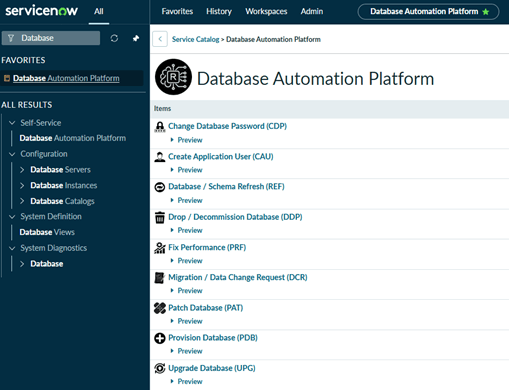
Pic 6. The 9 Change Request intake forms accessible from the main Workspace
The purpose of the CR intake forms is twofold - to make sure that the user supplies the required automation runtime parameters, and to make sure that only the absolute minimum of information is requested from the user, with all additional data prefilled by the CR template.
Let’s pick one of the nine database CR intake forms, “Migration / Data Change Request”. Here is the intake form that opens from the main Workspace link.
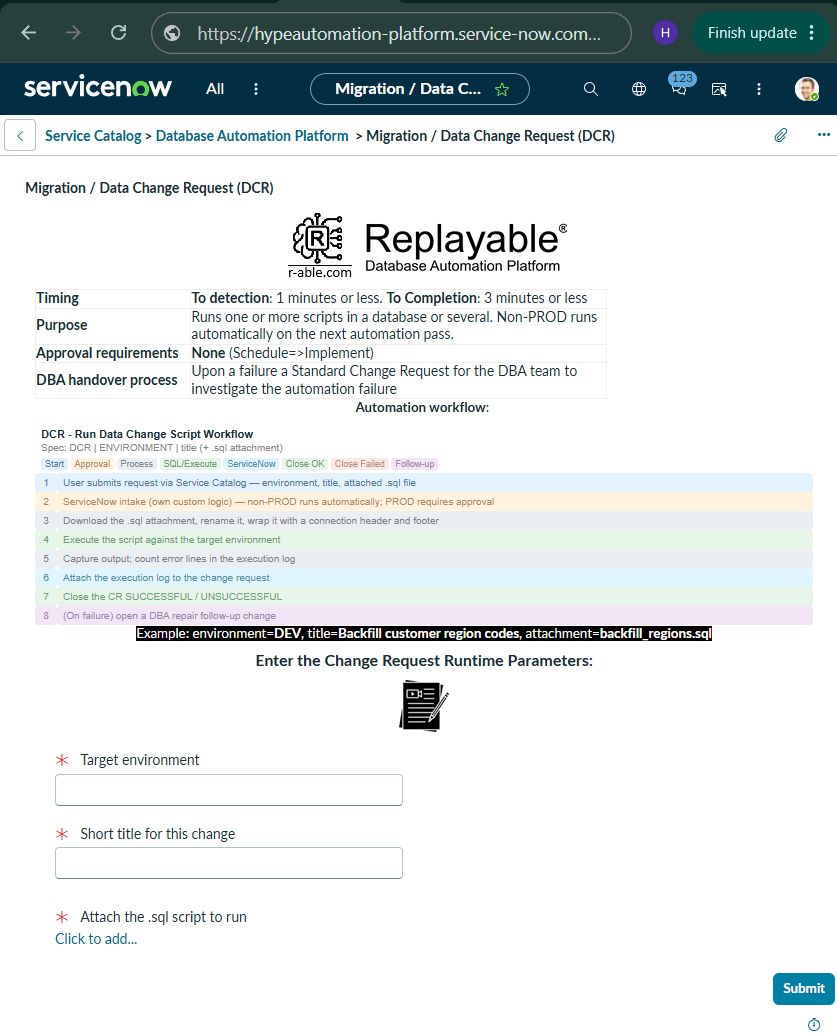
Pic 7. Migration /Data Change Request (DCR) Change Request intake form
The user enters the three required parameters:
Target Environment: DEV
Short title for the Change Request: Main site migration script run
Uploads the script or multiple scripts to be run against the database by clicking on the Click to add an attachment link (expenses.sql)
Some Change Request intake forms require database instance or user metadata to be executed. This happens every 60 seconds without any human input. The automation control node simply queries the database when the CR must be open. Rest assured, the metadata is the single source of truth (derived directly from the asset) and it is no more than 60 seconds old.
Here is a view of a performance resolution Change Request, which pulls the database instances list on opening. The PRE database on that list was created exactly two minutes ago!
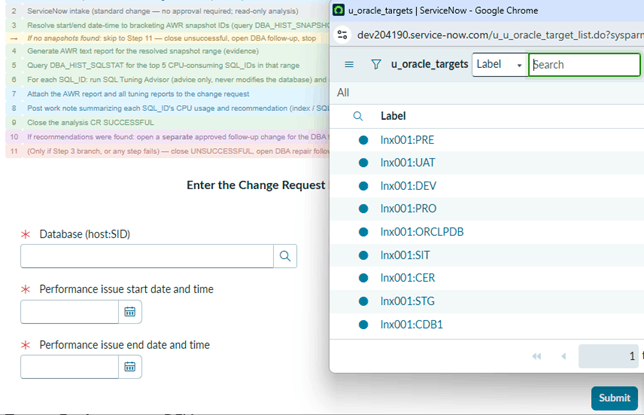
Pic 8. Real-time parameters (a list of current databases)
Next, the user clicks on the Submit button. The form is feeding the parameters into a ServiceNow Change Request template created for this type of change only.
The next screen opens the actual Change Request with all the data already inside.
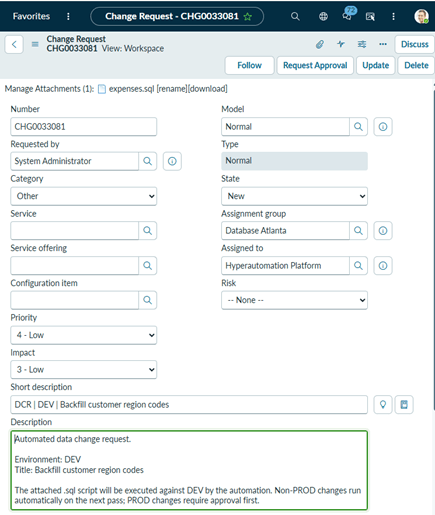
Pic 9. An automated Change request opened by initial intake form from the Database Automated Platform
Depending on the type of Change Request, it may not require approval or require several of those (management and/or full CAB approvals). After filling out the intake form, the user then clicks on Request Approval. The Change Request is sent to the approvers queue and will remain there until approved. If it requires CAB approval it will meet the same fate. For the most destructive or irreversible Change Requests all CAB members’ approval is necessary before execution commences.
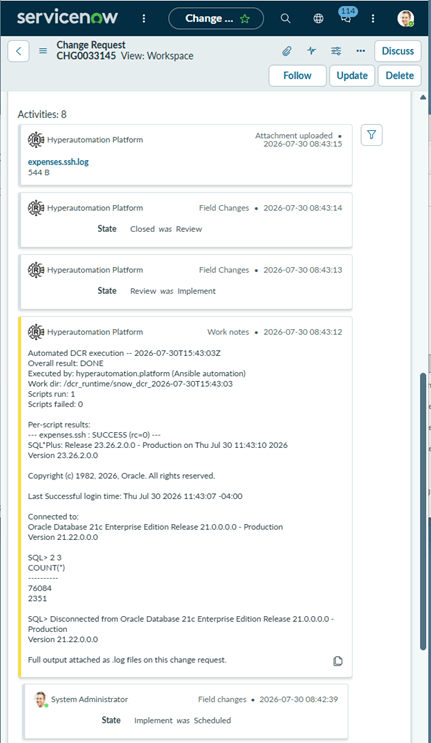
Pic 10. The view of the notes the automation posted. The CR was opened at 08:42, executed and closed at 8:43, one minute later
Here is what happens behind the scenes. The LINUX Ansible automation control node polls the ServiceNow API every 60 seconds to detect new Change Requests. If a CR is opened and approved, the control node executes it immediately. It pulls the relevant Ansible automation YML playbook.
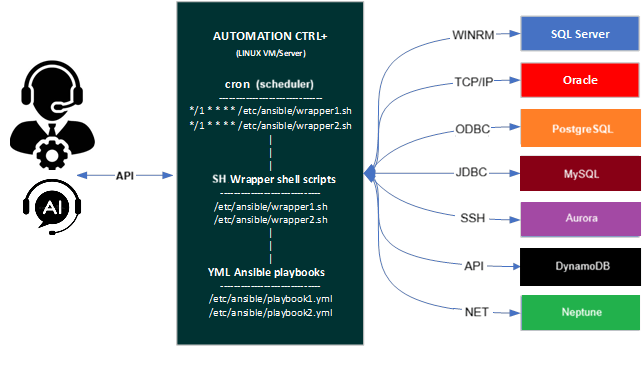
Pic 11. Product Architecture.
If the Change Request has a scheduled implementation day and time (and, again, the necessary approvals) it will wait till the indicated time. Some long-term Change Requests are instructed to only be executed off business hours or during weekends, such as Oracle patching or upgrades to 26ai.
If the automation control inventory specifies a thousand database servers as targets, as in the case of such bulk CR executions as fleet upgrades (for example, the Ansible inventory shows “NA_FLEET” with a thousand unique AWS RDS instance names), it executes the task on all of them at the same time. For the Change Requests executed successfully, the control node enters a success message to the Change Request. For the failed hosts the control node opens a follow-up Change Request for the human DBA team (at that should be the only extent of their involvement in all 9 types of activities on the main Workspace page).
Here is a normal Change Request queue for the automated ServiceNow Workspace Database Automation Platform. All these requests were handled by automation, from detecting their existence and the state of approvals, all the way to execution, verification and user notification upon a closure.
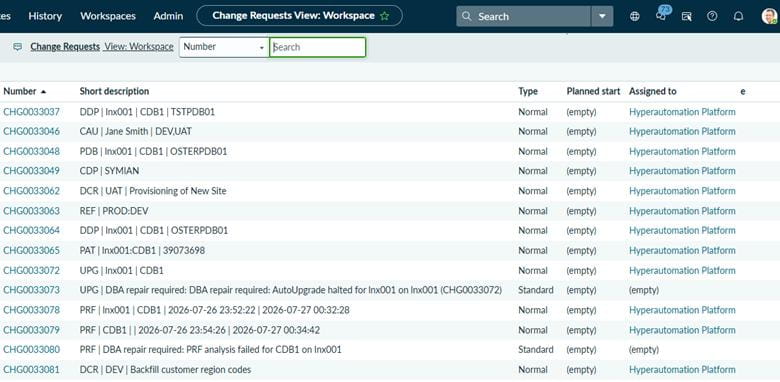
Pic 12. A standard view of an automated Change Request queue
All of them were opened by actual users, but executed by automation, except for CHG0033073 and CHG0080. Those two were open by the automation control node as follow-up Change Requests for the DBA team to investigate own automation failure.
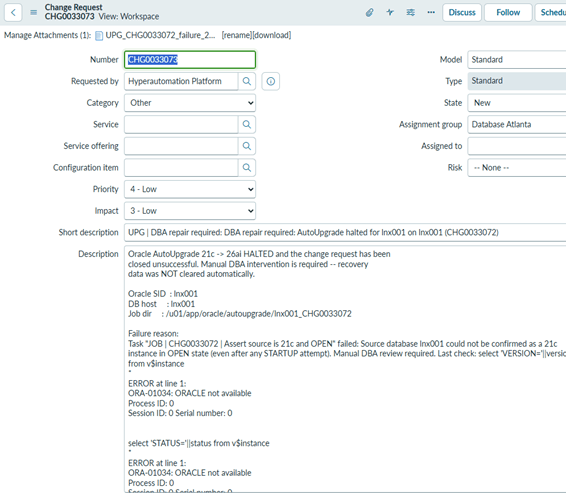
Pic 13. An example of a DBA follow up Change Request the automation opens if it fails a database upgrade
Here is a view of the Notes section of a closed and successfully executed Change Request:
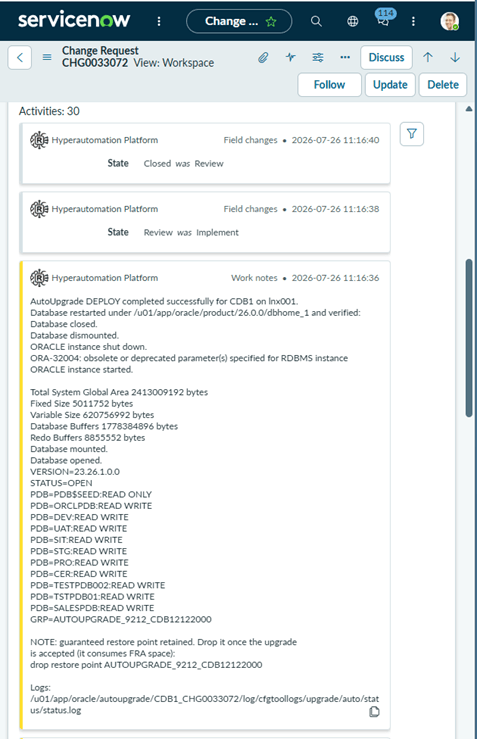
Pic 14. A view of the Notes section of a closed Oracle database upgrade Change Request
The intent is for all, or at least most routine work, to be executed by automation, with only the failures to be repaired by humans; and the fixes factored into the automation logic later, so the failures do not re-occur. The DBAs should handle no more than 5% of their normal load during the first 4-6 months, when automation bugs are common, but the number decreases to 0.5% or lower afterwards.
Although the number of the automated Change Requests may increase over time and expand to other areas, tasks or products (Exadata, GoldenGate, etc.), not everything may or should be automated. For example, all activities involving exploratory intervention (those requiring intuition, rather than a predefined sequence of known tasks with already tested set of outcomes and possible error resolutions) are poor ITSM automation candidates. Those require too much automation coding for very little to show for it long-term.
Change Requests Automation Workflows
Each Change Request intake form has a simplified version of the relevant workflow. Here is an example:
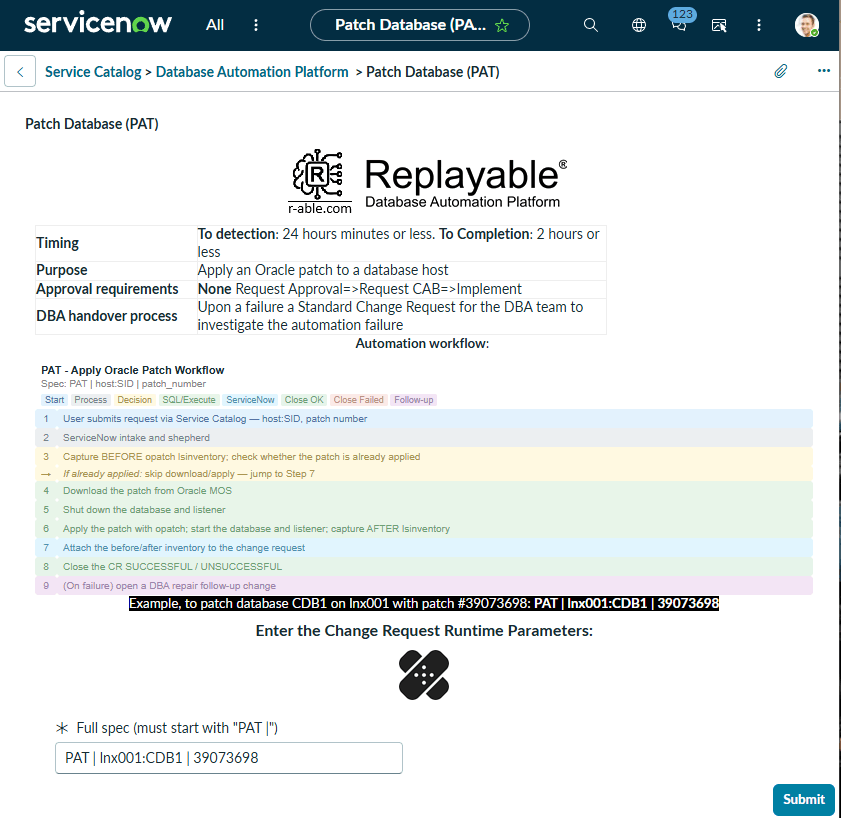
Pic 15. A view of a Change Request intake form for patching a database with Oracle patch with the simplified automation workflow shown in color
The following are detailed automated workflows coded in Ansible YML.
The following are simplified automation workflows coded in Ansible YML. ServiceNow implementation.
REF - Environment Refresh Workflow (SIMPLIFIED, ITIL-ALIGNED)  Spec: REF | SOURCE:TARGET (legacy: SRC_SVC:SRC_SCHEMA=>TGT_SVC:TGT_SCHEMA) 3-play structure: PLAY1/PLAY3 run on the controller, PLAY2 runs directly on the Oracle host. Includes ITIL change classification and documented risk-mitigation controls |
|
| Start Process ServiceNow Decision SQL/Execute ITIL Alignment Cost Containment Risk Mitigation Best Practice Close OK Close Failed Follow-up | |
| 1 | PLAY1: fetch changes, parse refresh spec |
| 2 | PRE-FLIGHT: remove stale outcomes file from any aborted previous run |
| 3 | 0-1: ServiceNow intake and shepherd for REF (standard, NO APPROVAL) |
| 4 | 1: show 'No Tasks Found' and exit cleanly when queue is empty |
| → | WARN: missing or invalid refresh spec — skipped |
| 5 | 2: parse refresh spec (legacy vs new format, service aliases) |
| 6 | 2: show parsed refresh jobs |
| 7 | 2: write refresh job list to temp file for PLAY 2 |
| 8 | PLAY2-INIT: read + decode refresh job list |
| 8b | ITIL alignment: classify this refresh — link the CMDB Configuration Item to the target service, set risk=Low/impact=Low, and record a planned 4-hour change window |
| 9 | PRE-FLIGHT: confirm expdp binary exists — fail if not |
| 10 | PRE-FLIGHT: confirm impdp binary exists — fail if not |
| 11 | PRE-FLIGHT: confirm DATA_PUMP_DIR exists and is writable |
| → | Risk mitigation: confirming the tools and destination directory exist before touching any schema avoids a half-completed export with nowhere to land |
| 12 | JOB: set per-job file names + full paths |
| 13 | JOB: confirm source schema exists — fail if not |
| 14 | JOB: export source schema — fail if export failed |
| 15 | JOB: drop target schema (idempotent) |
| → | Best practice: the drop is written to be idempotent, skipping cleanly if the target schema doesn't already exist, rather than erroring on a fresh target |
| 16 | JOB: import target schema |
| 17 | JOB: count objects in target schema |
| → | Risk mitigation: counting imported objects verifies the refresh actually landed data, rather than trusting a clean import exit code alone |
| 18 | JOB: post export/import results as work note |
| 19 | JOB: remove dump + log files (success only) |
| → | Cost containment: removing the export dump file after a successful refresh avoids accumulating storage from repeated refresh cycles |
| 20 | JOB: preserve export/import output on controller (failed only) |
| 21 | JOB: write outcome to controller temp file |
| 22 | PLAY3-INIT: read + decode job outcomes |
| 23 | 7: show outcome per issue |
| 24 | 8: move SUCCESSFUL to review, Close SUCCESSFUL |
| 25 | 8: work-note FAILED changes with failure summary |
| 26 | 8: close FAILED changes (close_code unsuccessful) |
| 27 | 8b: create DBA repair follow-up change |
| 28 | 9: print final summary + clean up temp files |
|
PDB - Create Pluggable Database Workflow (SIMPLIFIED, ITIL-ALIGNED) Spec: PDB | host | CDB_NAME | NEW_PDB MANAGEMENT approval required. Includes ITIL change classification and documented risk-mitigation controls |
|
| Start Process ServiceNow Decision Approval SQL/Execute ITIL Alignment Risk Mitigation Best Practice Close OK Close Failed Follow-up | |
| 1 | 0: pre-flight: verify instance awake + credentials |
| 2 | 0: abort with clear message if unreachable |
| 3 | 0: query change requests tagged 'PDB |' |
| 4 | 0: collect tagged change requests |
| 5 | 0: intake summary |
| 6 | 0: exit cleanly when there is nothing to do |
| → | WARN: unusable spec — skipped |
| 7 | 1: build the PDB creation job list |
| → | Nothing valid to process — ends here |
| 8 | 1: jobs queued |
| 8b | ITIL alignment: classify each job — link the CMDB Configuration Item to the target CDB, set risk=Medium/impact=Low, and record a planned 1-hour change window |
| 9 | 2: new change: request approval (state=assess) |
| 10 | 2: work note: awaiting approval |
| 11 | 2: advance: Assess → Authorize |
| 12 | 2: advance: Authorize → Scheduled |
| 13 | 2: advance: Scheduled → Implement |
| → | WARN: if a change could not be advanced |
| 14 | 2: re-query for CRs genuinely at Implement now |
| 15 | 2: filter pdb_jobs to only genuinely-implemented ones |
| → | Risk mitigation: re-querying live state rather than trusting a cached approval status prevents creating a PDB against a request that isn't genuinely approved yet |
| → | Nothing ready this pass (still pending approval) |
| 16 | 2: work note: PDB creation started |
| 17 | 3: capture container state, OMF setting, seed datafile path |
| 18 | 3: fold pre-check results into each job |
| 19 | 3: show what the pre-check found |
| 20 | 4: generate a PDB admin password for each job |
| 21 | 4: create datafile directory when OMF is not in use |
| 22 | 4: create, open and save the state of the PDB |
| 23 | 4: show the creation outcome (no credentials) |
| → | Best practice: the admin password never appears in this outcome log — it's disclosed exactly once, in a dedicated work note, never written to disk logs |
| 24 | 5: capture v$pdbs after the operation |
| 25 | 5: determine the outcome for each change |
| 26 | 5: per-change outcome |
| 27 | 6: ensure the log directory exists |
| 28 | 6: set the run timestamp |
| 29 | 6: write the evidence log for each change |
| 30 | 6: attach the evidence log to the change request |
| → | WARN: if evidence log could not be attached |
| 31 | 7: post the result work note |
| → | Confirm the work notes were posted |
| 32 | 8: move changes to review |
| 33 | 8: close SUCCESSFUL changes (close_code successful) |
| 34 | 8: close FAILED changes (close_code unsuccessful) |
| → | WARN: if a change could not be closed |
| 35 | 9: create DBA repair follow-up change |
| 36 | 10: final summary |
|
DDP - Drop / Decommission Pluggable Database Workflow (SIMPLIFIED, ITIL-ALIGNED) Spec: DDP | host | CDB | PDB_TO_DROP MANAGEMENT+CAB approval always required (destructive). Includes ITIL change classification and documented risk-mitigation controls |
|
| Start Process ServiceNow Decision Approval SQL/Execute ITIL Alignment Risk Mitigation Best Practice Close OK Close Failed Follow-up | |
| 1 | Drop Pluggable Database (DDP) — ServiceNow-driven decommission |
| 2 | Parse DDP spec: 'DDP | host | CDB | PDB' |
| 3 | Extract spec fields |
| → | Malformed spec — skip this CR |
| → | Unknown host — skip this CR |
| 4 | Resolve oracle_home/SID/user from oracle_instance_map |
| 4b | ITIL alignment: classify this drop — link the CMDB Configuration Item to host:CDB:PDB, set risk=High/impact=Medium, and record a planned 1-hour change window |
| 5 | Set ready-to-execute flag default |
| 6 | New change: promote to Assess, hold for approval |
| 7 | Pending approval or mid-walk: advance if approved |
| 8 | Already at Implement — ready to execute |
| → | Not ready this pass — stop here |
| 9 | Check for required confirmation line |
| 10 | Escalate block reason if target is protected |
| → | Risk mitigation: a literal 'CONFIRM DROP <PDB>' phrase requirement plus a protected-name blocklist together prevent an accidental or automated drop of the wrong or a protected database |
| → | Handle blocked drop — close unsuccessful with follow-up |
| 11 | Ensure base working directory exists, world-traversable |
| 12 | Ensure remote working directory exists |
| 13 | Write pre-drop snapshot SQL |
| → | Best practice: capturing a full pre-drop snapshot (DBA_PDBS, tablespaces, datafiles) before an irreversible operation preserves evidence of exactly what existed beforehand |
| 14 | Write drop SQL — close then drop including datafiles |
| 15 | Write execution wrapper (explicit ORACLE_SID export — sudo strips env) |
| 16 | Post work note — drop starting |
| 17 | Execute snapshot + drop as oracle user |
| 18 | Read drop log |
| 19 | Determine outcome (splitlines only) |
| 20 | Refine outcome by scanning log lines for ORA- errors |
| 21 | Downgrade to failure if any ORA- error line is present |
| → | Risk mitigation: scanning the actual log content for error patterns, not just the shell exit code, catches a drop that partially failed but still returned success |
| 22 | Attach snapshot + drop logs to the change request |
| → | WARN: if any log failed to attach |
| 23 | Post work note — outcome summary |
| 24 | Walk Implement → Review |
| 25 | Walk Review → Closed successful |
| 26 | Walk Review → Closed unsuccessful |
| → | WARN: if this CR could not be closed |
| 27 | Open DBA follow-up on failed drop |
|
DCR - Run Data Change Script Workflow (SIMPLIFIED, ITIL-ALIGNED) Spec: DCR | ENVIRONMENT | title (+ .sql attachment) MANAGEMENT approval for PROD only. Includes ITIL change classification and documented risk-mitigation controls. Own custom intake (not COMMON_snow_intake.yml) |
|
| Start Process ServiceNow Decision Approval SQL/Execute ITIL Alignment Risk Mitigation Best Practice Close OK Close Failed Follow-up | |
| 1 | 0: create timestamped working directory (snow_work_dir) |
| 2 | 0: pre-flight: verify instance awake + credentials valid |
| 3 | 0: abort with clear message if instance unreachable (HIBERNATING PDI / 401 check) |
| 4 | 0: query DCR-tagged CRs in new/assess/authorize/scheduled/implement |
| 5 | 0: collect tagged CRs, parse target environment |
| 6 | 0: annotate each change: env + is_prod flag from short_description |
| 7 | 0: intake summary |
| 7b | ITIL alignment: classify each change — link the CMDB Configuration Item by environment, set risk=Medium/impact=Medium, and record a planned 1-hour change window |
| 8 | 0: promote NON-PROD new → scheduled (step 1 of 2) |
| 9 | 0: promote NON-PROD scheduled → implement (step 2) — no approval needed |
| → | WARN: NON-PROD change could not advance to implement |
| 10 | 0: PROD: request approval (state=assess, no CAB) |
| → | Risk mitigation: PROD-only approval gating reserves the highest-consequence environment for human review while non-PROD stays fast-moving and low-friction |
| 11 | 0: note PROD changes awaiting approval |
| 12 | 0: APPROVED PROD: assess → authorize → scheduled → implement |
| 13 | 0: re-query executable queue (state=implement) |
| 14 | 0: build snow_work + snow_cr_map (reject approval in [requested, rejected]) |
| 15 | 0: executable queue summary |
| 16 | 1: end play when snow_work length == 0 |
| 17 | 3: create per-change subdirectory in snow_work_dir |
| 18 | 4: list attachments on each CR (GET /api/now/attachment) |
| 19 | 4: build change → attachment pairs |
| → | WARN: duplicate .sql filenames on a change (community.general.counter) |
| 20 | 4: download .sql attachments (case-insensitive regex, mode 0755) |
| 21 | 4b: rename .sql → .ssh (bash param expansion, case-insensitive) |
| 22 | 5: build scripts_to_run (issue_key, script_path), only successful downloads |
| → | WARN: if none downloaded |
| 23 | 5b: insert connection header at top of each script |
| 24 | 5c: insert ORACLE_HOME shell heading wrapper at top |
| 25 | 5d: append 'EOF' footer at bottom of each script |
| 26 | 6: execute shell scripts (bash script_path, ignore_errors) |
| 27 | 6a: write combined stdout/stderr/exit-code to .log file |
| 28 | 6b: build stdout tail lookup (last 10 non-empty lines) + show per-script results |
| 29 | 6c: read log file per script (slurp) + extract/count error lines |
| → | Best practice: scanning execution logs for error patterns (ORA-/SP2-/ERROR/WARN) rather than trusting exit codes alone catches partial or silent failures |
| 30 | 6d: show detailed error report for failed scripts |
| 31 | 7: mark issue FAILED if any script rc≠0, else DONE |
| 32 | 7: show final per-issue outcomes |
| 33 | 7b: post work-note summary per change |
| 34 | 8: move SUCCESSFUL to Review + Close SUCCESSFUL |
| 35 | 9: move FAILED to Review (required before closing) + Close FAILED |
| → | WARN: if FAILED change could not be closed |
| 36 | 10: upload execution logs as ServiceNow attachments |
| 37 | 10b: write failure report per FAILED issue |
| 38 | 10b: COMMON_snow_create_followup.yml (fu_tag=DCR) |
| 39 | 11: build + print summary (per-issue outcomes, per-script error details) |
| 40 | 12: rename snow_work_dir to _failed (failed runs only), confirm final path |
|
CAU - Create Application User Workflow (SIMPLIFIED, ITIL-ALIGNED) Spec: CAU | Full Name | DB1,DB2,... MANAGEMENT approval required. Includes ITIL change classification and documented best-practice controls |
|
| Start Process ServiceNow Decision Approval SQL/Execute ITIL Alignment Best Practice Close OK Close Failed Follow-up | |
| 1 | 0-1: ServiceNow intake and shepherd for CAU |
| 2 | 1: show 'No Tasks Found', end play when queue empty |
| → | WARN: missing user name or databases — skipped |
| 3 | 2: build change → user + target databases mapping |
| 4 | 2: show user → Oracle username → databases mapping |
| 4b | ITIL alignment: classify each job — link the CMDB Configuration Item to the primary target database, set risk=Low/impact=Low, and record a planned 1-hour change window |
| 5 | 3: generate random password for each issue |
| → | Best practice: a single generated 16-character password (upper/lower/digit/special) replaces any hand-typed or reused credential, and never touches Ansible logs (no_log) |
| 6 | 3: attach generated password to each issue entry |
| 7 | 4: create Oracle user + grant privileges in each target database |
| 8 | 4b: show create-user outcome per issue per database |
| 9 | 4c: set log run timestamp |
| 10 | 4c: ensure the CAU log directory exists |
| 11 | 4c: write the execution log for each change |
| 12 | 4c: upload the execution log to the change request |
| → | WARN: if execution log could not be attached |
| 13 | 5: write worklog payload JSON to a temp file |
| 14 | 5a: write worklog-posting Python script to temp file |
| 15 | 5b: execute the work-note-posting script against payload |
| 16 | 5c: show work-note posting outcome (no credentials) |
| → | WARN: if the work-note script failed |
| 17 | 5d: clean up temp payload and script files |
| 18 | 6: mark issues DONE (all databases succeeded) |
| 19 | 6: mark issues FAILED (any database failed) |
| 20 | 6: move SUCCESSFUL to review, Close SUCCESSFUL |
| 21 | 6: work-note FAILED changes with failure summary |
| 22 | 6: close FAILED changes (close_code unsuccessful) |
| 23 | 6c: write failure report per FAILED issue |
| 24 | 6c: create DBA follow-up task for FAILED issues |
| 25 | 7: build + print final summary |
|
PAT - Apply Oracle Patch Workflow (SIMPLIFIED, ITIL-ALIGNED) Spec: PAT | host:SID | patch_number MANAGEMENT+CAB approval required. Includes orchestration dependency gating, ITIL change classification, and documented risk-mitigation controls |
|
| Start Process ServiceNow Decision Approval SQL/Execute Orchestration ITIL Alignment Cost Containment Risk Mitigation Best Practice Close OK Close Failed Follow-up | |
| 1 | PLAY1: fetch ServiceNow PAT changes and build patch job list |
| 2 | 0: remove stale per-issue and combined outcome files from any prior run |
| 3 | 0-1: ServiceNow intake and shepherd for PAT (MANAGEMENT+CAB) |
| 4 | 1: show 'No Tasks Found' and exit cleanly when queue is empty |
| 5 | 2: WARN and skip changes with a missing or unknown patch target |
| 6 | 2: build patch job list from change requests |
| 7 | 3: write patch job list to temp file for PLAY 2 + ServiceNow credential sidecar |
| 8 | ORCHESTRATION GATE CHECK per job: any unsatisfied 'pre' dependency registered? (e.g. app server not yet stopped) |
| → | First encounter: spawn dependent CR (e.g. APPSTOP), insert orchestration_run + step — gate NOT clear this pass |
| → | Nothing left this pass: end play, retry next cron cycle |
| 8b | ITIL alignment: classify each remaining job — link the CMDB Configuration Item, set risk=Medium/impact=Medium, and record a planned 2-hour change window |
| 9 | PLAY2-INIT: read + decode patch job list |
| 10 | JOB: set Oracle environment for target host |
| 11 | JOB: work note: patching started |
| 12 | JOB: run opatch lsinventory (BEFORE patching, full output) |
| 13 | JOB: flag whether the patch is already applied |
| → | Best practice: checking whether the patch is already applied avoids a redundant, risk-bearing re-application against a system already in the target state |
| 14 | JOB: write + upload BEFORE inventory to the change request |
| 15 | JOB: create patch staging directory on target host |
| 16 | JOB: download patch from Oracle MOS (on controller) — fail if download failed |
| 17 | JOB: copy zip to target host, unzip — fail if unzip failed |
| 18 | JOB: check current vs. required OPatch version (from patch README) |
| 19 | JOB: download + install new OPatch (6880880) if upgrade needed |
| 20 | JOB: stop listener (if running) |
| 21 | JOB: shut down Oracle database — fail if not clean |
| → | Risk mitigation: refusing to proceed on an unclean shutdown prevents applying a binary patch underneath a database that hasn't fully released its files |
| 22 | JOB: kill remaining oracle processes using ORACLE_HOME (CheckActiveFilesAndExecutables) |
| 23 | JOB: ensure + verify patch directory readable by oracle |
| 24 | JOB: apply patch with opatch |
| 25 | JOB: start Oracle database, start listener |
| 26 | JOB: opatch lsinventory AFTER (confirm patch listed) |
| → | Risk mitigation: confirming the patch actually appears in the inventory after applying it, rather than trusting a clean exit code alone |
| 27 | JOB: write + upload AFTER inventory to the change request |
| 28 | JOB: determine overall job outcome |
| 29 | JOB: remove patch zip + extracted directory |
| → | Cost containment: removing the downloaded patch archive and staging files immediately after use avoids accumulating unnecessary disk consumption across repeated patch cycles |
| 30 | JOB: write per-issue outcome JSON, merge into combined outcomes file on controller |
| 31 | ORCHESTRATION FIRE POST for successful issues: check dependency_registry, open dependent CR (e.g. APPSTART) automatically |
| 32 | PLAY3-INIT: read + decode patch outcomes |
| 33 | 10: post worklog entry per issue |
| 34 | 11: move SUCCESSFUL to review, Close SUCCESSFUL |
| 35 | 11: work-note FAILED changes with failure summary |
| 36 | 11: close FAILED changes (close_code unsuccessful) |
| 37 | 11b: write failure report per FAILED issue |
| 38 | 11b: create DBA repair follow-up change |
| 39 | 12: print final summary + clean up temp files |
|
CDP - Change Database Password Workflow (SIMPLIFIED, ITIL-ALIGNED) Spec: CDP | Full Name NO APPROVAL. Includes ITIL change classification and documented best-practice controls |
|
| Start Process ServiceNow Decision SQL/Execute ITIL Alignment Risk Mitigation Best Practice Close OK Close Failed Follow-up | |
| 1 | 0-1: ServiceNow intake and shepherd for CDP |
| 2 | 1: abort if no work found, end play gracefully |
| → | WARN: missing user name — skipped |
| 3 | 2: build change → Oracle user mapping |
| 4 | 2: show reporter → Oracle user mapping |
| 4b | ITIL alignment: classify each reset — link the CMDB Configuration Item to the Oracle user account, set risk=Low/impact=Low, and record a planned 1-hour change window |
| 5 | 3: generate random password for each Oracle user |
| 6 | 3: attach generated password to each issue entry |
| 7 | 4: reset Oracle password for each user in each database |
| 8 | 4b: show password-reset outcome per issue per database |
| 9 | 5: post new temporary password as work note (all databases succeeded) |
| → | Best practice: the new password is disclosed only once all environments confirm success — a partial failure never leaves the requester with a password that only works in some databases |
| → | WARN: if the password work note could not be posted |
| 10 | 6: mark issues DONE (all databases succeeded) |
| 11 | 6: mark issues FAILED (any database failed) |
| 12 | 6: move SUCCESSFUL to review, Close SUCCESSFUL |
| 13 | 6: post failure work note and close FAILED changes |
| 14 | 6c: set follow-up run timestamp |
| 15 | 6c: ensure follow-up log dir exists |
| 16 | 6c: write failure report (no stdout — may contain credentials) |
| → | Risk mitigation: the failure report deliberately omits raw stdout, which could contain a partially-applied password, keeping credentials out of any log a wider audience might read |
| 17 | 6c: create DBA follow-up task for FAILED issues |
| 18 | 7: build + print final summary |
|
UPG - Oracle 21c → 26ai Upgrade Workflow (SIMPLIFIED, ITIL-ALIGNED) Spec: UPG | host | ORACLE_SID MANAGEMENT+CAB approval required. Includes ITIL change classification, cost containment gate, and documented risk-mitigation controls |
|
| Start Process ServiceNow Decision Approval SQL/Execute ITIL Alignment Cost Containment Risk Mitigation Best Practice Close OK Close Failed Follow-up | |
| 1 | Check 26ai Oracle home exists on target host |
| 2 | PRE: Assert 26ai home is installed |
| 3 | PRE: Check autoupgrade.jar exists in 26ai home |
| → | Risk mitigation: validating the target software exists before any change work begins prevents a doomed run from ever reaching production data |
| 4 | PRE: ServiceNow intake and shepherd for UPG (MANAGEMENT+CAB) |
| 5 | PRE: nothing to do? end play when queue is empty |
| 6 | PRE: build upgrade job list from change requests |
| 7 | JOB: dispatch upgrade job per issue |
| 8 | JOB: set per-job facts |
| 9 | JOB: work note: upgrade started |
| 10 | JOB: write source DB check script |
| 11 | JOB: check source DB version and state |
| 12 | JOB: detect whether the database is already upgraded |
| → | If already upgraded: work note + close successful when already upgraded — done, no further action |
| → | Best practice: idempotency check prevents a duplicate upgrade attempt against an already-upgraded database |
| 13 | JOB: determine whether a STARTUP is needed |
| 14 | JOB: bring the database to OPEN when it is not |
| 15 | JOB: assert source is 21c and OPEN |
| 15b | ITIL alignment: classify this change — link the CMDB Configuration Item, set risk=High/impact=High, and record a planned change window (Forward Schedule of Change) |
| 16 | Cost containment gate: estimate out-of-place clone storage cost (size_gb × cost_storage_per_gb_onetime) |
| 17 | Cost containment gate: check/request cost approval (COMMON_snow_cost_check.yml) — creates a u_cost_approval record on first encounter |
| → | If budget not yet approved: stop here for this issue, retry next pass (meta: end_host) — no clone or disk work begins until a budget owner approves |
| → | Cost containment: gating the storage-heavy clone behind explicit budget approval prevents surprise infrastructure charges before they're incurred, not after |
| 18 | JOB: create job directories |
| 19 | JOB: write autoupgrade.cfg |
| 20 | JOB: write AutoUpgrade analyze script |
| 21 | JOB: run AutoUpgrade ANALYZE phase (pre-upgrade check) |
| 22 | JOB: parse analyze summary |
| 23 | JOB: assert analyze passed |
| → | Risk mitigation: the ANALYZE phase surfaces upgrade-blocking issues before any irreversible change is attempted |
| 24 | JOB: read analyze status.log |
| 25 | JOB: work note: analyze complete |
| 26 | JOB: write AutoUpgrade deploy script |
| 27 | JOB: launch AutoUpgrade DEPLOY (async) |
| 28 | JOB: wait for deploy to finish (can take hours) |
| 29 | JOB: parse deploy summary |
| 30 | JOB: assert deploy succeeded |
| 31 | JOB: write post-upgrade bounce/verify script |
| 32 | JOB: restart database under 26ai home and verify |
| 33 | JOB: assert database is on 26ai and OPEN |
| 34 | JOB: ensure /etc/oratab points at 26ai home |
| 35 | JOB: work note: upgrade complete (Guaranteed Restore Point retained deliberately) |
| → | Best practice: the Guaranteed Restore Point is deliberately kept after success, not dropped immediately — a real rollback path stays available through the post-upgrade observation window |
| 36 | JOB: move change to review |
| 37 | JOB: close change (close_code successful) |
| 38 | JOB: WARN if the change could not be closed |
| → | Any of the assertions above failing: JOB: classify failure (special-cases stale recovery data, with resume/clear guidance) |
| → | Best practice: failure classification distinguishes a genuinely new failure from stale recovery data left behind by an earlier interrupted run, avoiding a misleading diagnosis |
| 39 | JOB: work note: upgrade failed, DBA review required |
| 40 | JOB: close change (close_code unsuccessful) |
| 41 | JOB: write failure report for follow-up |
| 42 | JOB: fetch AutoUpgrade status.log from host |
| 43 | JOB: create DBA repair follow-up task |
| 44 | JOB: clean up temp scripts |
|
PRF - AWR Performance Analysis Workflow (SIMPLIFIED, ITIL-ALIGNED) Spec: PRF | host | ORACLE_SID | START_DATETIME | END_DATETIME NO APPROVAL — read-only analysis. Includes ITIL change classification and documented risk-mitigation controls |
|
| Start Process ServiceNow Decision SQL/Execute ITIL Alignment Risk Mitigation Best Practice Close OK Close Failed Follow-up | |
| 1 | PRE: ServiceNow intake and shepherd for PRF |
| 2 | PRE: nothing to do? end play when queue empty |
| 3 | PRE: build job list (split short_description: host/SID/start_dt/end_dt) |
| → | WARN: unusable spec — expects date-times like '2026-02-21 21:02:00' |
| → | Unknown host — skip this CR |
| 4 | JOB: resolve oracle_home/user from oracle_instance_map |
| 5 | JOB: set per-job facts |
| 5b | ITIL alignment: classify this analysis — link the CMDB Configuration Item to host:SID, set risk=Low/impact=Low, and record a planned 1-hour change window |
| 6 | JOB: work note: analysis started |
| 7 | JOB: ensure base working directory exists |
| 8 | JOB: ensure per-job working directory writable |
| 9 | JOB: write snapshot-resolution SQL |
| 10 | JOB: write snapshot-resolution wrapper (explicit ORACLE_SID) |
| 11 | JOB: resolve snapshot IDs as oracle |
| 12 | JOB: parse resolved snapshot IDs |
| → | Fail cleanly if no bracketing snapshots found |
| 13 | JOB: show resolved snapshot range |
| 14 | JOB: write AWR report SQL |
| 15 | JOB: write top-5 CPU SQL_ID query |
| 16 | JOB: write execution wrapper (explicit ORACLE_SID) |
| 17 | JOB: run AWR report + top-5 query as oracle |
| 18 | JOB: parse top-5 SQL_IDs from output |
| → | Determine whether top-5 extraction succeeded |
| 19 | JOB: show top SQL_IDs found |
| 20 | JOB: write tuning advisor script per SQL_ID |
| 21 | JOB: execute tuning advisor per SQL_ID (ALTER SESSION SET CONTAINER first) |
| → | Risk mitigation: the SQL Tuning Advisor only ever produces advice — execute_tuning_task never modifies the database, so this entire analysis carries zero write risk to production data |
| 22 | JOB: read each tuning advisor report |
| 23 | JOB: build one-line recommendation summary per SQL_ID |
| 24 | JOB: attach AWR report to the change request |
| 25 | JOB: attach each tuning report to the change request |
| 26 | JOB: post analysis summary work note |
| 27 | JOB: walk Implement → Review |
| 28 | JOB: close successful |
| 29 | JOB: close unsuccessful |
| 30 | JOB: open follow-up for DBA team to implement fixes |
| → | Best practice: any recommended fix (new index, SQL Profile) is routed through a separate, approval-gated follow-up change rather than applied automatically — analysis and implementation stay cleanly separated |
| 31 | JOB: open DBA repair follow-up on total failure |
| 32 | JOB: clean up temp files |
Please download this code from https://github.com/r-able/Oracle-SelfService . The code is free.
Other Demos
Execution of Oracle JIRA-Integrated Tasks
ServiceNow-Integrated Change Requests Execution
Oracle GoldenGate Deployment Provisioning / GoldenGate Incident Auto-Resolution
What About Migrating Off Oracle Entirely?
This same governance extends to the migration itself — assessing risk, tracking conversion, and managing cutover for teams moving off Oracle onto AWS. See our approach to Oracle-to-AWS migration →