Hyperautomation Technology

View our "1,000 Change Requests (Un)done in Under a Minute" challenge!

First off, Open Loop vs Closed Loop Automation - What is the Difference?

We make closed-loop automation software. The following video explains the difference between open (all current automation) and closed loop automation. Please view the demo for more details.

Definition: Open-loop automation is when an infrastructure is provisioned, deployed, and maintained without necessarily receiving feedback; and if feedback is received, an Open-loop will not take action on it, instead, it will require a human to look into it and take action; i.e. the loop is not only open, but it also REQUIRES HUMAN INTERVENTION to succeed. Closed-loop hyper automation, on the other hand, is when feedback is received and is taken into account for further action to be taken automatically by the controller WITHOUT ANY HUMAN INTERVENTION (other than the initial design of the automation logic itself, but not the task the said logic automates).

The Unique Benefits of Our Closed-Loop Hyper-Automation Modules
Definition: Open-loop automation is when an infrastructure is provisioned, deployed, and maintained without necessarily receiving feedback; and if feedback is received, an Open-loop will not take action on it, instead, it will require a human to look into it and take action; i.e. the loop is not only open, but it also REQUIRES HUMAN INTERVENTION to succeed. Closed-loop hyper automation, on the other hand, is when feedback is received and is taken into account for further action to be taken automatically by the controller WITHOUT ANY HUMAN INTERVENTION (other than the initial design of the automation logic itself, but not the task the said logic automates).

Replayable Closed-Loop Hyper Automation Modules, Versions & Core Features

(Click on the table below to expand)

The difference hyper-automation makes:

Blazing Speed

How would you like your six-months-long projects completed in under two?      Under budget? What if you only had to wait seconds for a complex technical problem to be solved, instead of the weeks it usually takes for people to get around to it? Or a change request delivery that is faster than a vending machine selling you a Cola?       > Click

< Click to collapse

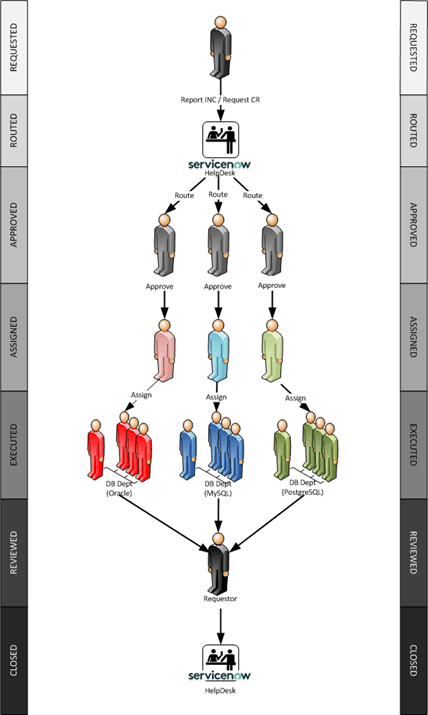
Here is the life cycle of a conventional IT change.

Life Cycle of an IT Change

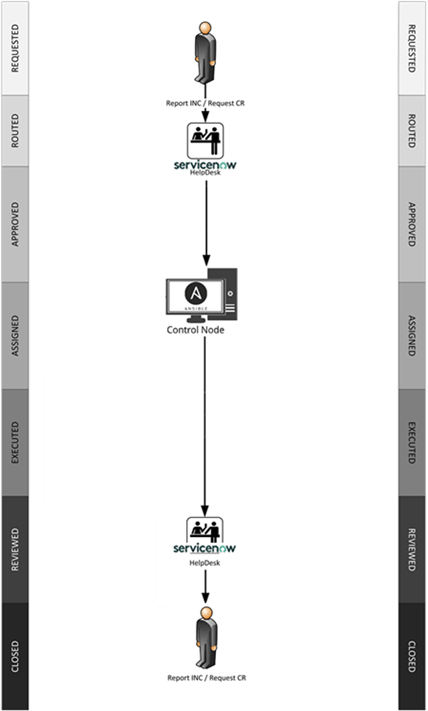
The assessment, routing, approval, and implementation stages alone may take weeks. The execution stage also often takes hours or even days. In some cases, the administraor may become ill or unavailable, prompting the escalation manager to seek an alternative. In the case of hyper-automation, however, there is no waiting. The delivery starts in seconds - be it an Incident resolution or a Change Request execution. 

Life Cycle of a Hyper-automated IT Change

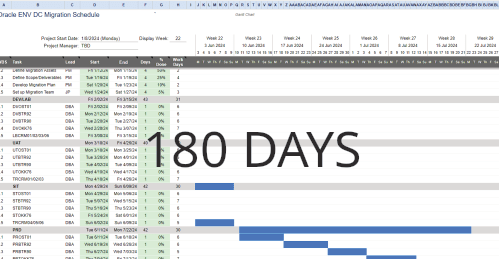
Here is another example: a long-running project, like fleet upgrade or DC migration (depicted below).  

Project Duration Conventional 

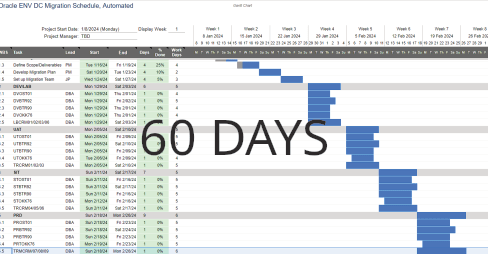
These take time for two reasons. Unlike robots, people don’t work 24x7x365. They are also terrible at multi-tasking and tracking dependencies, especially if the project involves multiple parallel tasks executed by disparate teams, departments or business units. That is why hyper-automation is perfectly capable of condensing the same 6-month-long DC Migration project to just two short months.

Replayable, Automated project duration

Low Cost

What if you didn't have to hire a team of professionals to manually manage resource provisioning, asset configuration, issue troubleshooting, hardware setup, and so on? Automation saves time and money. How much money? Click to see just one example of what hyper-automation can do.     > Click

< Click to collapse

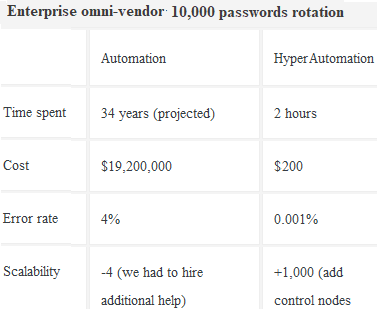
Here is a comparison of an omni-vendor enterprise-wide emergency password rotation, performed on 10,000 database assets at the same time to address an immediate security threat. It compares a conventionally automated activity with a hyper-automated one. Apart from the duration of the task dropping from 34 years (yes, that is how long the activity would take for a team of professionals to do this!) to only a couple of hours, the cost falls from $19.2 miliion dollars to $200.

Password rotation automated vs hyper-automated.

You may ask: how is that even possible?

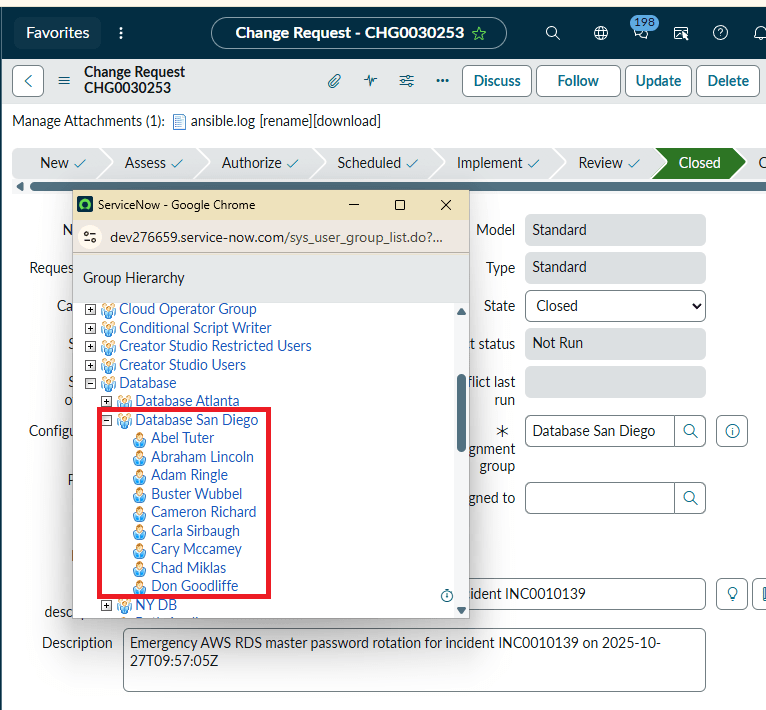
It became possible as soon as the manager assigned the emergency password rotation Change Request to a hyper-automated group, instead of a regular database team like the San Diego Database department group hown below. This department is not automated, of course.

the San Diego database group, un-automated

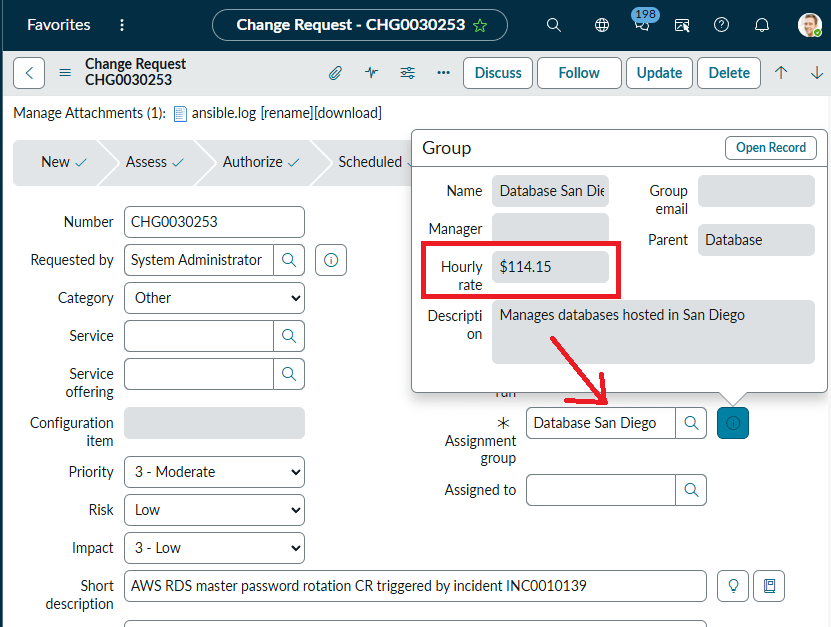
The conventional San Diego DBA team employs 9 top-notch database administrators at a cost of slightly over $1 million per year, plus benefits. These people work only certain hours a day and certain days a week. Their knowledge and experience are not interchangeable, meaning that what one employee knows and does, the next may not be able to replicate immediately. However, they are getting paid whether they are working, coasting, or entirely at rest. Even ServiceNow shows the hourly rate for the San Diego database administrator as $114/hr.

the San Diego database group, un-automated

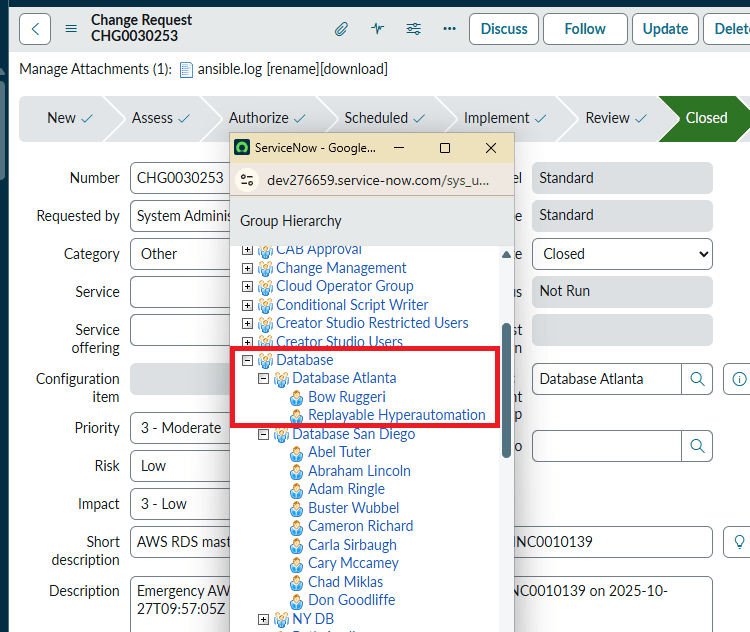
But that San Diego team was a conventional, unautomated department. Let's assign the same Change Request to a hyper-automated team instead. This department is the perfect candidate: "Database Atlanta". It employs only one administrator, Bow Ruggeri, and the second employee is a hyper-automation module ("Replayable" is the name of a product).

the hyper-automated Database Atlanta group

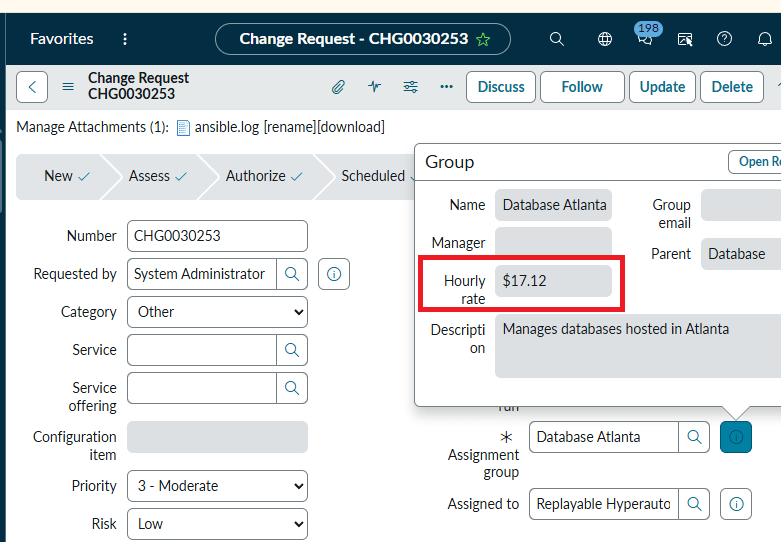
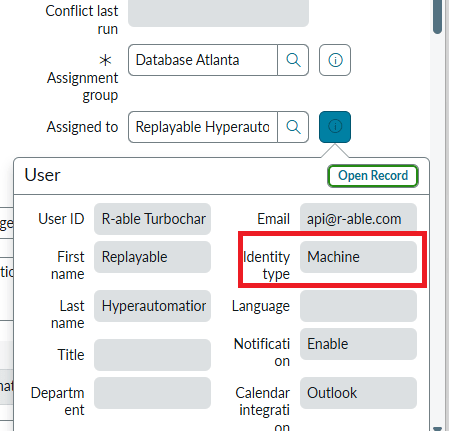
Yes, hyper automation software appears as an employee in ServiceNow, but a very special one. This employee never eats, sleeps, never has personal issues, or asks for a raise. It works round'the'clock, 24 by 7. It is 1,000 times more productive than the 9-count San Diego database administration team. Here is how much the hyper-automated Database Atlanta group costs the enterprise: $17.12 an hour.

the hyper-automated Database Atlanta group description

Here is the hyper-automation module's HR entry in ServiceNow.

the hyper-automated Database Atlanta group description.


< Click to collapse

High Quality

The accepted human error rate is around 4%. Hyper-automation operates in an error-free reality. Unlike humans, it runs precisely what must be run, where it must be run at the right time. That means projects are delivered faster, way below budgets, features released ahead of schedule - that means competitive edge, that means new customers, that means bonuses for all involved (except for the automation software that made that possible, of course!)       > Click

< Click to collapse

People commit mistakes. That's a fact. No matter how much effort your team puts in, they are bound to make errors, several of them, in fact. This includes situations like running the wrong script, on the wrong database, not running it on time, not being prepared (not having the right password or connect string), not understanding the prerequisites or the handover process, and so on. In the case of Closed-Loop Automation, the execution logic remains unchanged. It doesn't depend on how much sleep the admin got the night before. It scans execution logs (sometimes thousands of them, in parallel) in real time as they are written. If it detects an error, it immediately opens an Incident in ServiceNow for the DBA to investigate the failed CR and attach the error log. It does not understand the concept of "good enough" and honestly thinks that 9-5 is just a number. Another way to describe hyper automation is that it is always at its best, 24x7x365. Forget that —not just at ITS best, but at the INDUSTRY's best, because whatever the technology or vendor, hyper-automation modules have vendors' best practices embedded. You execute the Change Requests and Resolve Incidents repeatedly, and get predictable results every single time. Automation=Quality=Control.
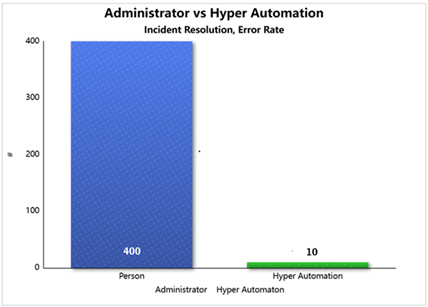
Here is the yearly error rate for Incident resolution, compared between a team of DBAs and a hyper-automation software.

Error rate comparison


Ownership

Resource configuration is a labor- and skill-intensive task, usually handled by highly paid and sought after resources. When one of them leaves the organization, they take their knowledge with them. Not only that, the years of training you've invested in the person will start benefiting your competition from then on. The replacement you hire will require time, effort, and even more training to understand the predecessor's code, which he will ultimately discard to write his own. His effort, in turn, won't be reused either. With hyper-automation, the code always remains with the organization.      > Click

< Click to collapse

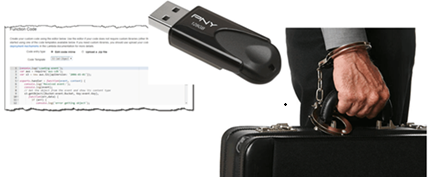
What used to be physical (the servers) is now just definition code that explains to the Cloud what it is. You owe it to yourself to protect your investment. With hyper-automation, the task definitions and automation workflows never leave your repository, always properly secured, versioned, and tagged. The administrators don't even see the low level code, which runs by itself when the end-user clicks the "Submit" button in ServiceNow. The code doesn’t require DBA understanding, because it is modular.  Replayable code


Accountability

There is never any pointing fingers with our software. When you need to trace changes to definition files, you can do it with ease. They are versioned, so all changes are recorded for your review at a later time. So, once again, there's never any confusion on which module did what, when, where, and why.      > Click

< Click to collapse

With the advent of the Cloud, it became almost impossible to keep up with different vendors and technologies. In the case of automation, the code is in a single source of truth.

Replayable, ServiceNow

There is one centralized code repo (Github, Gitlab or similar), one encryption Vault for storing passwords/certificates, and one location for execution logs (ServiceNow ticketing), no matter which Cloud vendor or product is used. There’s never any confusion about what the automation did, where, when and why. You execute it repeatedly and get predictable results every single time. There is never any finger-pointing, when it comes to IT services automation.

Replayable, ServiceNow

Infinite Scalability

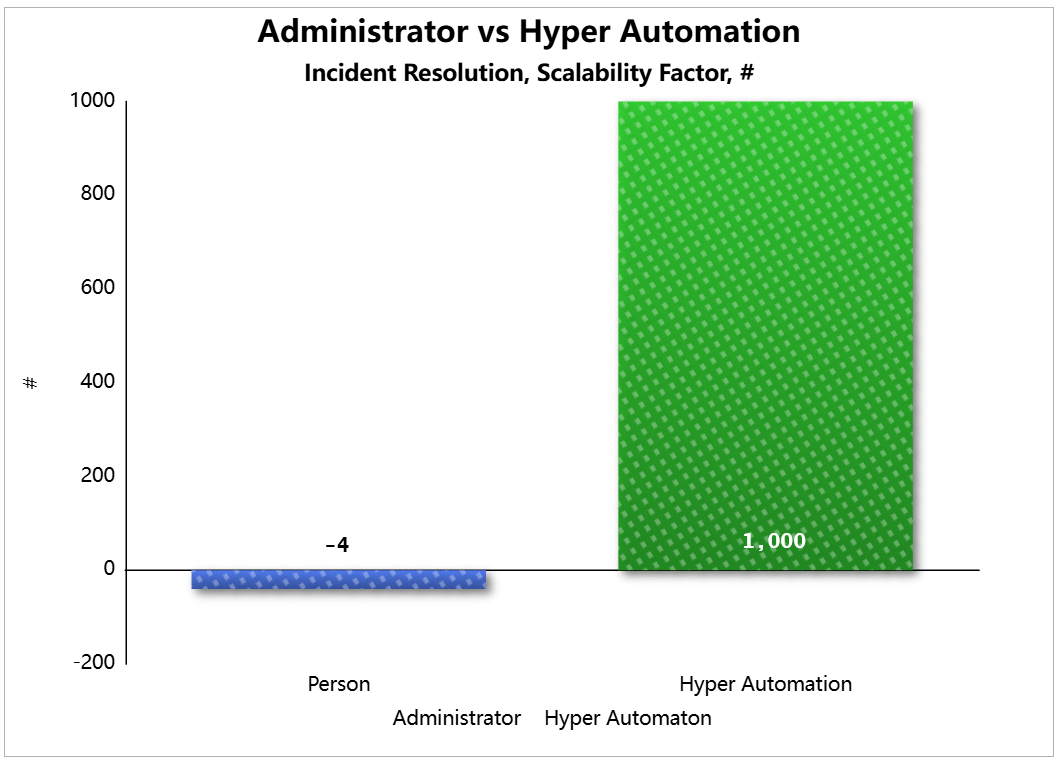
The automated solution can run 1,000 Change Requests at the same time, elevating admins from low-level button pushers and script runners to a more prestigious status as architects. With a Closed-Loop implementation, you may increase your workload exponentially before there is even a need for a Control Node upgrade.       > Click

< Click to collapse

Replayable, DBA rested

The load a current IT service management team carries can be increased by 5%-10%, and only for a few days. If the number or the priority of the requests is to double today, the process becomes unmanageable by the current headcount. It doesn’t matter how much money you throw at your employees. Overworked, they will eventually burn out and quit to serve your competitor.

Replayable, DBA tired

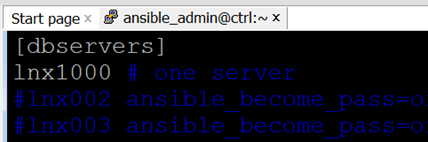
Our closed-loop automation software will do an equally brilliant job whether it runs on one server or a thousand at the same time. The image below runs a Change Request on a server named "lnx1000" (that is a screenshot of the automation inventory file).

Replayable, scalability settings

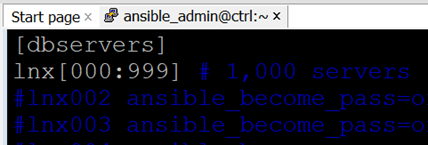
If you want the same task run on a thousand servers, all you have to do is to replace the "lnx1000" with "lnx[000:999]". The automation software will run the same CR on servers lnx000, lnx001, lnx002 ... and all the way to lnx999. A thosand of them!

Replayable, scalability settings

That is the equivalent of hiring a thousand DBAs on a moment's notice and releasing them just as quickly during a busy period, or when your company expands. Our automation software will do an equally brilliant job, whether it works on one server or a thousand at the same time.

Replayable, scalability settings

Secure Encryption

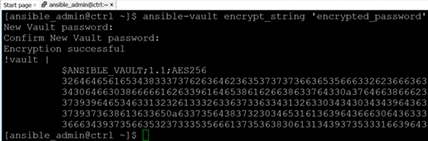
The automation uses the AES-256bit symmetric encryption algorithm. That means all sensitive data, whether in transit or at rest, is always encrypted: passwords, variables, certificates, API keys, and other credentials. The automation Vault prevents any sensitive data exposure, even once. The automation never leaves execution logs on the servers it manages; all logs are stored centrally in ServiceNow and Ansible.     > Click

< Click to collapse

Replayable, vault

What is the best way of ensuring your mission-critical passwords are never distributed to unauthorized personnel? The answer is obvious. Do not distribute to any personnel at all. Let the robots handle the sensitive data. That is what they are best at.

Each instance of storing that password on a hard drive in clear text, even for a second, violates basic database security auditing rules. The same applies to unencrypted network communication. For a small company that may not pose a credible threat. However, large enterprises are often under strict auditing rules. Security violations are a matter of life and death. For example, if a quaterly audit finds elevated passwords stored on a server o transmitted via network, the auditing entity may revoke a long-standing contract. Hundreds of millions of dollars are at stake, and countless jobs are on the line. 

Replayable, Ansible vault


Supported Modules, Manifest

AWS
Azure
Google Cloud
MySQL
Oracle OCI
PostgreSQL


Technical Description and Intellectual Property

(click to expand/collapse)

PATENT: REUSABLE AUTOMATION MODULES FOR CONFIGURATION CHANGES OF IT ASSETS


Application # 63/856,135


USPTO Receipt

COOPERATIVE PATENT CLASSIFICATION (CPC): G06F9/06 - Arrangements for program control, e.g. control units using stored programs, i.e. using an internal store of processing equipment to receive or retain programs
G PHYSICS
G06 COMPUTING; CALCULATING OR COUNTING
G06F ELECTRIC DIGITAL DATA PROCESSING

Int. C. : G06F 15/16 (2006.01) H04L 2/24 (2006.01) H04L 12/26 (2006.01) HO4L 12/28 (2006.01) HO4L 12/58 2006.01) HO4L 29/06 (2006.01)
U.S. C.: H04L 12/24 (2013.01); H04L 12/2602 (2013.01); H04L 12/2801 (2013.01); H04L 41/00 (2013.01); H04L 41/046 (2013.01); H04L 41/048 (2013.01); H04L 41/0654 (2013.01); H04L 41/0813 (2013.01); H04L 41/082 (2013.01); H04L 41/0803 (2013.01); H04L 41/0806 (2013.01); H04L 51/00 (2013.01); H04L 51/04 (2013.01); H04L 51/046 (2013.01); H04L 65/40 (2013.01); H04L 65/403 (2013.01)
USPC.: 709/223; 709/201; 709/202; 709/203; 709/205; 709/206; 709/217; 709/218; 709/219; 709/224; 709/225; 709/227; 705/305; 705/30; 705/32; 705/7.13; 705/7.14; 705/7.16; 718/100; 718/102
FIELD OF THE INVENTION: This invention relates generally to information technology (IT) systems, and more specifically to systems and methods for automating and deploying IT solutions.

ABSTRACT

A system and methods for automating the provisioning, administration and maintenance of information technology (IT) assets within an enterprise is described. The method comprises the fixed steps of once defining a configuration change within the IT ticketing system and identifying the necessary tasks to enable the change; as well as the repeating dynamic steps of assigning the tasks their specific variables at run time, and then executing the resulting output scripts, and closing the main configuration change ticket. The method allows round the clock, vendor-agnostic unattended execution of changes in disparate systems, spanning multiple IT departments in real-time.

BACKGROUND OF THE INVENTION

The role of the ticketing systems has changed over time. Originally, in the physical on-premises world, the purpose of the helpdesk was three fold: making sure the ticket is approved by the rightful asset owner; then routing the work item to the correctly privileged team in full possession of the necessary technical knowledge; and finally, there is a record of the configuration change preserved in the ticket after it has been closed.  The process worked as follows. A user would open a change request, for example to refresh a database from another. The ticket then would be routed to the database administration team. The management would approve the request and assign it to a person. The DBA then would schedule and execute the configuration change, upload the output logs and close the change request. In the physical world the Helpdesk was a digital switchboard, a place for a user to raise an incident, or for the IT professional to resolve it.
With the advent of the cloud, the paradigm shifted.  The physical server became a snippet of JSON definition code. The administrator also became obsolete.  The technical knowledge was replaced by automated decision workflows.  The Cloud afforded us the opportunity for automating long running business processes spanning multiple departments or even companies. For example, a Cloud automation service that allows a company to create workflows as visual diagrams and coordinate multiple cross-Clouds services. Such Cloud automation is well-suited for long-running workflows with complex logic, error handling, and parallel executions of serverless applications, requiring close integration with the Cloud services.
The following outlines such challenges for the enterprise automation.

INFLEXIBILITY OF CURRENT AUTOMATION OFFERINGS

Slow, Compartmentalized, Single-Use Automation: It takes months or even years to properly automate a process (new versions come out, new requirements are raised, new API’s tested, etc.) When such a process is successfully automated, the effort and the code are rarely reused by other departments or business units. That means when it is time to automate the following application or business process, the enterprise automation department has to start from scratch. The ROI from the current automation offerings by the Cloud vendors may be described as “too little, too late and for too few”.

SKILL GAP

Lack of Expertise: Organizations struggle to find qualified cloud automation and DevOps engineers, delaying initiatives and leading to potential security vulnerabilities.
Rapid Evolution of Technology: Cloud technologies change quickly, making it challenging for professionals to stay updated and adapt to new tools and practices.

MULTI-CLOUD AND HYBRID COMPLEXITY

Unified Management: Managing and governing infrastructure, data, and applications across various cloud platforms (multi-cloud) and environments (hybrid cloud) remains a significant hurdle.
Integration Challenges: Integrating automation tools across different cloud providers, each with its unique APIs and frameworks, can be complex and time-consuming.
Lack of Standardization: Multi-cloud environments often result in disparate configurations, creating inconsistencies and security gaps.

SECURITY AND COMPLIANCE CHALLENGES

Attack Surface Expansion: Cloud environments expand the attack surface, requiring more robust security measures and automation for detection and response.
Misconfigurations and Human Error: Cloud infrastructure misconfigurations are a common cause of data breaches, highlighting the need for automated remediation and proactive monitoring.
Lack of Visibility: Limited visibility into cloud infrastructure and application behavior makes it difficult to detect and respond to threats in real time.
Regulatory Compliance: Ensuring compliance with data privacy regulations (e.g., GDPR, HIPAA) across complex cloud environments presents a significant challenge.

COST OPTIMIZATION

Cloud Waste: Identifying and eliminating unused or underutilized cloud resources is crucial to control costs and maximize the return on investment.
Dynamic Cloud Pricing: Fluctuations in cloud pricing and service options require continuous monitoring and adjustments to optimize costs effectively.

AUTOMATION WORKFLOW MANAGEMENT

Current Automation Software Inflexibility: All pre-packaged software or Cloud services need time to become fully integrated into an enterprise’s current platform.
Lack of Internal Standards: Before a process may be automated, it has to follow certain internal conventions; their absence prolongs the automation project or makes it impossible. It is of paramount importance to develop and adopt standardized processes and best practices for building, deploying, and managing automation workflows.
Complex Workflows: Designing and managing complex automation workflows with multiple steps and dependencies can be challenging, especially in multi-cloud environments.
Monitoring and Observability: Gaining comprehensive insights into the behavior and performance of automated systems requires robust monitoring and observability tools and strategies.

Without a doubt, in the context of the Cloud, automation plays a big role. However, while the services automate a large portion of traditional IT tasks, they don't entirely eliminate the need for technical expertise. Instead, they shift the focus of the administrator’s role from routine low level operational tasks to higher-level architectural decisions, performance optimization, and data governance. That is a business side of the IT industry that may not be appealing to the former on-prem DBA, and even if it is, it takes years to begin to understand that side of the IT business and decades to master it. Also, the Cloud DBA is expected to be very diverse in his/her knowledge, sometimes unreasonably so. After all, such complex automated workflows rarely include just one database vendor or service. There are hundreds of them now, all mutate and change every day, and a Cloud professional is actually expected to be an expert in all. The second factor that presents a significant challenge for the enterprise automation is its cost. Even if a company hired a small team of top notch DevOps professionals that worked exclusively on automating one business process, such an automation effort would require months or even years to document and code. All other work will have to be put on hold while that happens. A smaller company may not have enough time and resources for such a long running and expensive undertaking. A larger enterprise suffers as well, as almost none of the automation efforts are reusable. That implies an automation effort for one project or department is almost never reused by another. Consequently, the smaller companies can’t even afford to enter the custom enterprise automation market, while the larger enterprises are extremely inefficient at it. What is needed, therefore, are systems and methods of reducing the administrative and cost burden associated with IT tasks automation.
While there are other inventions addressing the deficiencies above, they all are too piece-meal (partial and unsystematic) and designed to aid the administrator, instead of replacing him/her entirely. Such inventions usually do not benefit the enterprise as a business entity. For example, let’s say a database team gets some new software feature that may flash a screen with suggestions prior to an execution, or verifies passwords. Will that small feature speed up major product releases or long running projects? Will it put the company as whole ahead of its competition? The answer is a resounding “no”.  It doesn’t matter how many features or shortcuts the conventional automation methods introduce. They all rely on a human being somewhere in the chain of the IT maintenance and human are not a very efficient, scalable or secure resource. The only way to automate the IT process or task delivery is to automate it end to end, from opening a service ticket to closing it. The present invention addresses such challenges.


BRIEF SUMMARY OF THE INVENTION

Essentially, the current invention takes advantage of the fact that in the cloud everything is code. All configuration change requests are either raised on a schedule, or requested to be run once by a user. Both of these triggers may be coded in a Cloud-readable format. Once the task is raised, the system performs all the necessary organizational and functional pre-checks, obtains valid approvals, assigns the task an automation module, which performs all the tasks in their correct sequence.  The invention consists of three resources: an existing ticketing system, an automation software unit and the actual asset, be it a service or an instance.


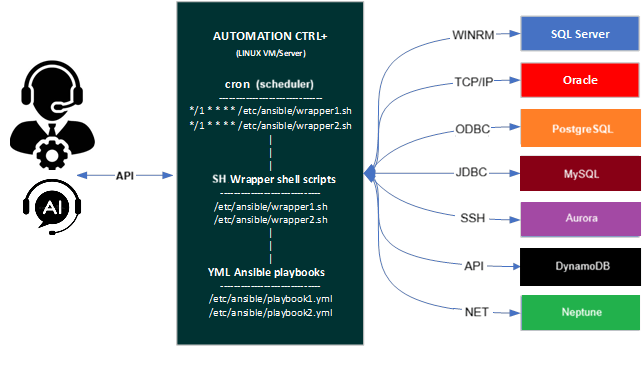
Pic.1. High Level Architecture, Tools and Their Purpose

Conventionally, the work item was assigned to a person.  Each such task iteration is considered entirely different in the conventional automation systems. For example, a refresh executed this quarter has a different task ID than the previous quarter. In ours, there is only one refresh, be it an Oracle database, Sybase, SQL Server or any other software. The role of the ticketing system is extended in our case. Our system stores reusable  task templates for all major time consuming, repeating, hard to control tasks and processes – upgrades, refreshes, migrations, etc. Except, in our implementation, there is no administrator. Rather, the ticketing system assigns the work to automation software instead of a person (Ansible in our implementation). The automation software contacts the Cloud to get the asset tags, then contacts the Vault to securely retrieve the passwords, fills out the Ticketing System task template with its automation logic stored in YML playbooks, runs the resulting script iterations on disparate systems the second the task was opened and approved.


Pic. 2. Example of Process Automation (A vendor-Agnostic Multi-Cloud Database Refresh)


Pic. 3. Example of Oracle Implementation of the Refresh Logic in Ansible.


DETAILED DESCRIPTION AND BEST MODE OF IMPLEMENTATION

A list of common database task modules is developed – upgrades, patching, refreshes, code migrations, custom jobs, etc. Each such task is assigned a unique identifier. So, a RFRSH_DBS means a database refresh of some sort, for example, or an UPGRD_DBS implies a database upgrade. Then for every variation of the specific task - type, vendor, Cloud, version, etc – a workflow of general automation roles is pre-written. For example, if a company uses only two vendor and two version variations of database software, all four RFRSH_DBS task automation roles have to be pre-created. Each automated refresh role is a logical answer to the question “if money were no object, what would be the most efficient possible way to execute this job? In this case, there will be one Ansible playbook called RFRSH_DBS with four roles inside, each will work with a specific asset. At run time, the Ticketing System (ServiceNow in our example) determines which task template should be filled out with what Cloud asset tags to successfully run. The system then creates specific scripts and runs them in parallel on multiple assets, need be. Essentially, the Ticketing System decides whether or not to run, what to run, when and where; the automation unit decides how to do the job efficiently, in general, by what methods, in which order; and the Cloud asset tags, or the Ticketing System, feed the run-time variables. It is Ansible automation that runs the scripts, not a person. The logs then are uploaded to the Ticketing System. There is no administrator in our implementation. The modern IT enterprise is too diverse, complex and ever-changing to efficiently maintain with people’s knowledge. In addition to opening, approving, auto-assigning and executing a specific configuration change, the system keeps track of dependencies between tasks. Such dependencies may span multiple departments or IT teams. The following describes such task dependencies.

Start to Finish (SF): is a logical relationship (or dependency) in which a finishing event of a Successor Activity is dependent on the starting event of a Predecessor Activity. Two activities L and M having SF relationship with 2 days of Lag:
M(F) = L(S) + 2 days
Finish to Start (FS): a Successor Activity cannot start until a Predecessor Activity has finished. Two activities J and K having FS relationship with 1 day of Lead:
K(F) = J(F) – 1 day
Start to Start (SS):  a successor activity cannot start until its predecessor activity has started. Two activities J and K having SS relationship with 1 day of Lead:
K(S) = J(S) – 1 day
Finish to Finish (FF):  in which a successor activity cannot finish until its predecessor activity has finished. Two activities L and M having FF relationship with 1 minute of Lag:
M(F) = L(F) + 1 minute

The budgetary, operational and functional automated pre-checks may include such business rules such as “never refresh PROD from a lower environment database”.


CLAIMS

The algorithms and operations presented herein are not inherently related to any particular computer or other system or apparatus. Various general-purpose systems may also be used with programs in accordance with the descriptions herein, or it may prove convenient to construct more specialized apparatus to perform the required method steps. The required structure for a variety of these systems will be apparent to those of skill in the art, along with equivalent variations. In addition, embodiments of the invention are not described with reference to any particular programming language or software vendor. It is appreciated that a variety of programming languages may be used to implement the present teachings as described herein, and any references to specific languages are provided for disclosure of enablement and best mode of embodiments of the invention.
Embodiments of the invention are well suited to a wide variety of computer network systems over numerous topologies. Within this field, the configuration and management of large networks include storage devices and computers that are communicatively coupled to dissimilar computers and storage devices over a network, such as the Internet.
What is claimed is:

Pic. 4. Claims

REDACTED

END OF PATENT

PATENT: SYSTEM AND METHODS FOR AUTOMATED APPROVALS OF IT CONFIGURATION CHANGES


Application # 63/856,670


USPTO Receipt


COOPERATIVE PATENT CLASSIFICATION (CPC): G06F9/06 - Arrangements for program control, e.g. control units using stored programs, i.e. using an internal store of processing equipment to receive or retain programs

G PHYSICS

G06 COMPUTING; CALCULATING OR COUNTING

G06F ELECTRIC DIGITAL DATA PROCESSING


Int. C. : G06F 15/16 (2006.01) H04L 2/24 (2006.01) H04L 12/26 (2006.01) HO4L 12/28 (2006.01) HO4L 12/58 2006.01) HO4L 29/06 (2006.01)

U.S. C.: H04L 12/24 (2013.01); H04L 12/2602 (2013.01); H04L 12/2801 (2013.01); H04L 41/00 (2013.01); H04L 41/046 (2013.01); H04L 41/048 (2013.01); H04L 41/0654 (2013.01); H04L 41/0813 (2013.01); H04L 41/082 (2013.01); H04L 41/0803 (2013.01); H04L 41/0806 (2013.01); H04L 51/00 (2013.01); H04L 51/04 (2013.01); H04L 51/046 (2013.01); H04L 65/40 (2013.01); H04L 65/403 (2013.01)

USPC.: 709/223; 709/201; 709/202; 709/203; 709/205; 709/206; 709/217; 709/218; 709/219; 709/224; 709/225; 709/227; 705/305; 705/30; 705/32; 705/7.13; 705/7.14; 705/7.16; 718/100; 718/102

FIELD OF THE INVENTION: This patent application introduces a novel approach to automating and deploying IT solutions, offering unique features and benefits in the field of information technology (IT) systems.


ABSTRACT

A system and methods for pre-approving closed-loop automated configuration changes of information technology (IT) assets within an enterprise are described. The method comprises the steps of creating operational and iterative approval policies within a Helpdesk ticketing system; then using both for one time pre-approval of an automation workflow designed to run repeatedly. The method allows a continuous reuse of prior approvals and leads to increased deployment efficiency, reduced lead times, faster time to value and minimizes change failures.


BACKGROUND OF THE INVENTION


To accelerate IT tasks and changes, organizations can optimize their change approval policies by leveraging automation, defining clear approval workflows, and implementing dynamic routing based on risk and impact. This involves identifying low-risk changes that can be pre-approved, automating approvals based on predefined criteria, and routing high-risk changes to the appropriate stakeholders or Change Advisory Boards (CABs). The following are some of the recent strategies being implemented by organizations to significantly reduce the time it takes to approve and implement IT changes, leading to faster delivery of services and improved business outcomes.


Risk-based categorization: Classify changes based on their potential impact and risk level (e.g., low, medium, high).

Automated approvals: Pre-approve low-risk changes that meet specific criteria, eliminating manual intervention.

Dynamic routing: Route changes based on predefined rules to the relevant approvers, ensuring appropriate oversight and faster approvals.

Standardized workflows: Establish clear, documented workflows for different change types to ensure consistency and efficiency.

Delegation of authority: Allow for delegation of approval authority to ensure timely approvals, even when key personnel are unavailable.

Reduce manual steps: Minimize manual intervention by automating approvals and leveraging technology.

Regularly review and refine: Continuously monitor the change approval process, identify bottlenecks, and make adjustments to improve efficiency.


The approaches above helped the enterprise in delivering a better quality of service in a shorter period of time. However, they fell short at automating of long-running, complex workflows spanning multiple departments or even BUs for two reasons, or, rather, in two domains:

a)     Time domain. The current approval methods are designed for one time execution, while automation executes tasks repeatedly, sometimes in different contexts or asset combinations, requiring a different set of necessary approvals for each such task iteration.

b)    Ownership domain. The current approval process is lacking in the sense the conventional or even open-loop automation approval is granted to a department or a person (sometimes even linked to an administrators employee ID), but closed-loop automation is neither a person or department.


Clearly, these barriers were raised to make sure only the authorized personnel in full possession of the valid credentials and the necessary technical expertise will execute the task. Otherwise, it may be done incorrectly or even not done at all. But with the advent of the Cloud automation, when everything is 01 and 1s the administrators knowledge, the asset itself, the passwords all of these barriers designed to protect the asset and technology from us is now hurting us because of its inefficiency. In the Cloud, there are thousands of assets with hundreds of tags, each ever changing. It is an insurmountable challenge to keep track of all of the new risks involved in these technologies and assets. That is why an automated method of approvals is necessary.

In an effort to resolve these deficiencies, either the workflow has to be approved in its entirety ahead of the launch of the executions as a template, or each iteration ((re)execution) of an automated workflow has to be (re)approved separately, in real-time, before it can run (the latter will slow down the automation speed significantly, even with existing pre-approval policies already in place).


BRIEF SUMMARY OF THE INVENTION


The current invention is designed to work as follows. Instead of approving each occurrence of a task separately, the process is designed to approve the task as a template (meaning its operational approval policy within the ticketing system), and additionally we also approve how this task or process is allowed to iterate (the iterative approval policy). To put it simply, instead of repeatedly approving a task every time, we simply once 1) define what a task is in a broader sense in the context of the enterprise (a refresh, for example); 2) define how it is run each time to consistently produce a desired/different result; 3) define once by what criteria a particular task iteration is either APPROVED or REJECTED. Then we simply inspect each automated workflow JSON/YML code to determine whether or not the particular iteration code should be approved or rejected automatically.

An operational policy for a database refresh, for example, would define which department may refresh its data from what other department (but not necessarily when, by what means and methods). An operational policy is a subject of discussion between two VPs, for example. An iterative policy, on the other hand, would define how this particular iteration of the main refresh is to be executed from what tools, versions, to specific asset variables, naming conventions and tags.


Replayable, diagram high level, approvals

Pic. 1. Decision flow for APPROVING or REJECTING a Close-Loop Automated Approval Process

CLAIMS

<REDACTED>