
Demo: Execution of JIRA Integrated Oracle Database Tasks
Most skilled IT labor is becoming a commodity, similar to electricity, gas or water. That means system, database, network, storage or other type of IT services administration jobs are being replaced by code. These highly paid occupations are digitized and offered as premium add-ons to a Cloud service subscription. Flip a switch, and voilà: you’ve just rented a 100-person team of top-notch system or database administrators at a fraction of the cost and the headache of a human team.
Jobs that once disappeared over time include lamplighters, telegraph operators, and human computers (the NASA employees who back in the 1940s-1950s performed calculations on graph paper — calculations that today any smart phone can do in nanoseconds, instead of weeks). Those occupations became obsolete because something— a process or device — could execute them faster, cheaper, or better (sometimes all of the above). In the on-prem IT realm, that was impossible when hardware was physical. The hardware needed a personal knowledge and experience to provision and maintain it. It needed the fingers, the eyes and the brain of a living admin, just like the graph paper needed a person to tinker with it. But now, with servers, routers, and switches all reduced to simple JSON code, the knowledge that maintained them and ran software on top of them will become the same - mere code that can be stored in an online repository. Experience doesn't count for much. It is nothing more than knowledge reinforced by mistakes made on the client's time and dollar.
The following demo showcases one such process - routine Oracle database Data Change Requests. We will compare some very basic metrics for the legacy method, and then for the its hyper automated version. We will compare the speed, cost, quality, scalability of the two and see which emerges victorious.
I already demonstrated this very DCR (or Data Change Request) process automation from a ServiceNow standpoint. This time we will demo it from the Project Management perspective (Atlassian JIRA), rather than a tick
The Current Process of Running Database Scripts
First, lets see how the legacy method plays out. The process involves the JIRA IT Service Management URL (which defines "WHAT" has to be done), a team of Oracle DBAs (which knows "HOW" to execute the task), and finally, the actually asset, an Oracle database WHERE the change is requested to take place.
Here is the sequence of events for a routine DCR (Data Change Request).
The legacy database script run process and its cost to business, video, 48 sec
- A task is opened in JIRA to run a script, or a collection of scripts.
- The DBA gets an email notification. Depending on the workload, it may take minutes to days or longer to get around to executing these scripts. Sometimes, there are more pressing production issues that require the administrator's immediate attention. In that case, the DCR JIRA task may take a day or two to close.
- The DBA gets the request processed, meaning the JIRA task attachment gets converted to a script Oracle can understand. The DBA pulls the required database credentials and connect string and executes the script. Even though the execution itself only lasts seconds to minutes, the logistical and procedural parts consume hours or days.
- The DBA verifies the run log, downloads to the laptop, then uploads it to the JIRA task URL with the note "Run successfully".
Now, lets fill out some very basic metric cards for the current state of Oracle (and not necessarily Oracle) Data Change Requests.
- DURATION. Lets say an average DCR run takes an hour to close, from the moment the JIRA task opened by the developers, to the closure. For a medium sized IT shop, there are usually 10 - 20 of such requests a day. Again, lets remain on the conservative side and pick the lower number. Lets say ten a day, an hour each?
- COST. For a small team of DBAs, the cost of running DCRs is around $1,5 million per year. For a large enterprise, with tens of different BUs, database departments and teams with different tool, vendor and technology specializations, the number rises ten fold or higher.
- QUALITY. The average human error rate is 4.2%. The busier the shop, the higher the number. Every time a DBA runs the wrong script, against the wrong database, at the wrong time, or even runs it too early or too late - that is a reduction in service quality. For large enterprises, IT service delivery errors cost an average of $9,000 per minute! In some cases, major errors can be catastrophic; for example, a high-profile operational failure at Southwest Airlines cost an estimated $725 million in lost revenue plus $140 million in fines. In addition to monetary losses, routine IT service delivery errors cause reputational damage, which results in stock prices fall and high customer churn. There is also the aspect of product or feature delays, which always leads to lagging behind the sufficiently automated competition. But, again, lets err on the side of caution. Lets stick with the small IT shop cost of errors. The average human error rate is 4.2%, or $9,828/year for DCR errors alone. But the script runs are just one out of thousand of similar error prone enterprise processes.
- SCALABILITY. Lets say there is a sudden increase in the workload. Several migrations happening at once, multiple deployments, onboardings numerous business partners at a time; how much of an increase your current team may withstand, and for how long before cracks start to appear? Here is the answer. A team of database administrators may tolerate up to 100% workload increase, but only for a short period of time, two-three days. After that, they will all start updating their resumes on this very sight, no matter how much money you throw at them. Unlike machines, people don't like being overworked and underappreciated.
That is how running scripts works, in its current form. To summarize, it is an expensive, error-prone, unscalable and repetitive process the DBAs perform day and day out, for decades. In the absence of faster, cheaper, or better alternative, all the drawbacks are considered a cost of doing business.
A Hyper Automated Version of the Data Change Request Process
First off, on the difference between IT Service Management "automation" and "hyper automation".
Conventional, or open-loop automation, aims to help the administrator in becoming more productive. For example, it runs some shell scripts on his behalf, or emails him alerts if something goes wrong, so he may take a decisive action. If were to take the admin out of the conventional automation, it will cease to exist. After all, the legacy automation method relies on the admin to write the script to be run, or to correct what the alert reports as broken.
Hyper, or closed-loop automation, on the other hand doesn't aim to make admin's life easier. Its purpose is to replace him entirely as the single weakest link in the IT services delivery chain. Lets face it. We are not the most efficient, secure, or scalable resource. Never had been.
Below is a short video explaining how a hyper automated JIRA task delivery works.
The hyper automated database script run process, video, 32 sec
Lets take a look at the Data Change Request automation workflow from a high level perspective. It is integrated with JIRA.
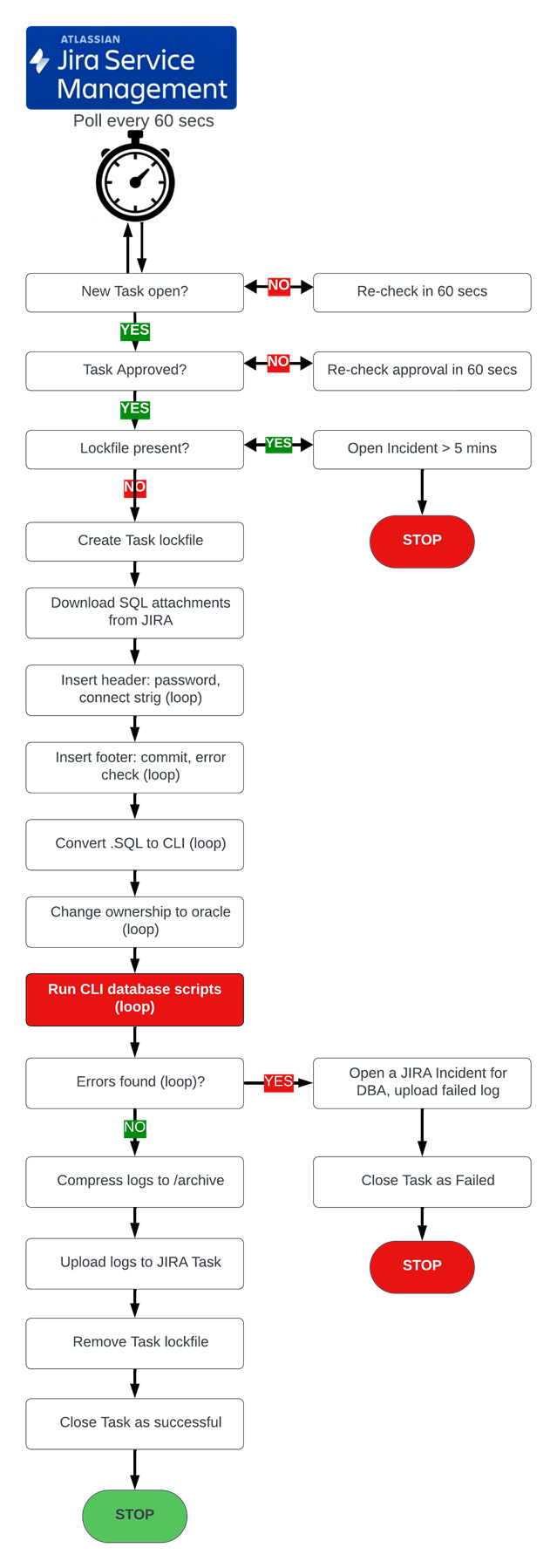
JIRA integrated Oracle database change requests automation workflow.
We will see the hyper automated JIRA Data Change Request process in all its glory below. First, lets fill out the same basic metrics.
- DURATION. Seconds instead of hours or days for one JIRA task. Minutes instead of months for a thousand of them. That is how fast hyper automation is. In the JIRA/Oracle demo below we will be executing 1,000 JIRA tasks at the same time and it will take us a minute (excluding the timing of JIRA and other maintenance and logistical steps, of course). For a team of database admins the same would require 6 months.
- COST. It would take a day or two for an automation professional to write the Ansible workflow code behind this demo. The code then can be uploaded to a repository and executed repeatedly. Write once, reuse many. Decade in, decade out. Incidentally, a decade in a conventional set up will cost $15,000,000 for the script runs alone, one of the thousands of tasks to be hyper automated. Compare that to one day of writing the code at less than a thousand dollars!
- QUALITY. The error rate of a properly hyper automated solution is in the permyriads (0.01% or 1/10,000). Quality = control. That means projects completed under budget and ahead of schedule. That means products and features released ahead of the competition, more clients signing up.
- SCALABILITY. A team of DBAs can scale up to double its workload for up to a week. A hyper automated method JIRA task delivery can scale up 1,000-fold in a matter of seconds. For example, in the demo below we will be executing a thousand scripts on one Oracle database server. But if needed, we can run the same process on thousands of database instances at the same time. All we would have to do is to change one parameter in the automation workflow, that is all. Of course, the timing will increase from minutes to hours, but compare than to years in a human set up. That is another power of hyper automation. Scaling up on demand and scaling down just as quickly. That is an equivalent of hiring a thousand of excellent DBAs a moments notice and releasing them just as quickly.
Now, lets get on with the Oracle JIRA task hyper automation, a routine script tun in this case.
The demo consists of three parts, 7-8 minutes each, with voice narration (my tiny Yorkie made some loud comments as well).
- Single JIRA task - an Oracle script run. A successful routine unattended script run.
- Single JIRA task - a controlled failure of an Oracle script with a subsequent creation of an incident for the DBAs to investigate and correct the automated failure.
- A bulk 1,000 JIRA tasks parallel execution. We will see how the hyper automated version of DCRs works in a large enterprise.
Demo 1. Single JIRA task - an Oracle script run. A successful routine unattended script run. Video, 8 minutes
Demo 1. Single JIRA task - an Oracle script run. A successful routine unattended script run. Video, 8 minutes
Demo 2. Single JIRA task - a controlled failure of an Oracle script with a subsequent creation of an incident for the DBAs to investigate and correct the automated failure.
Demo 2. Single JIRA task - a controlled failure of an Oracle script with a subsequent creation of an incident for the DBAs to investigate and correct the automated failure. Video. 8 minutes.
Demo 3. A bulk 1,000 Oracle JIRA tasks execution in parallel, TIMED
Demo 3. A bulk 1,000 JIRA tasks parallel execution
Summary
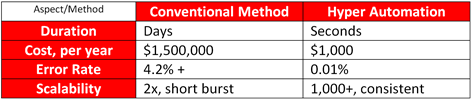
Summary. IT services hyper automation delivers outstanding results in a very short time for any size of an enterprise. Please don't hesitate to contact us if you would like to start automating yours.