
Demo: Oracle SelfService Hyper-Automation Platform (Jira Implementation)
This is the Jira version of the demo. For the ServiceNow version, click here.
Demo code can be downloaded from our GitHub Repository
Most skilled IT labor is already becoming a commodity similar to electricity or water. This means that system, database, and network administration jobs are being replaced by code. Shortly, these roles will be automated and billed hourly by cloud providers. Just as an operating system arrives preinstalled on a laptop, these highly paid occupations will be digitized and offered as premium services within a cloud subscription. Flip a switch, and voilà: you have just hired a 100-person team of top-notch system and database administrators at a fraction of the cost, and with fewer headaches than a human team. Jobs that disappeared over time include lamplighters, telegraph operators, and human computers—the NASA employees who performed calculations on graph paper that any cell phone can now execute in nanoseconds instead of weeks. Those roles became obsolete because a new process or device could perform them faster, cheaper, or better. In the IT realm, such automation was impossible when hardware was purely physical. However, now that servers, routers, and switches have been reduced to simple JSON code, the jobs maintaining them will meet the same fate. This demo shows exactly how that works.
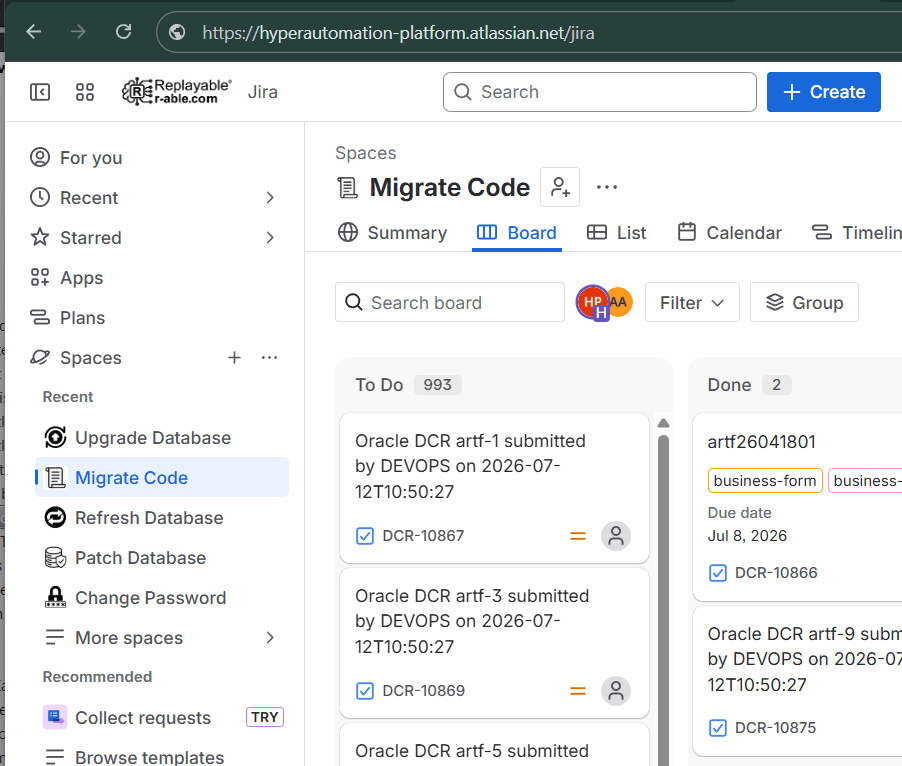
At first glance, this JIRA board looks ordinary. But it is anything but. Your JIRA board only notifies you of work yet to be done. This one does your work for you.
Here is a 30-second video explaining, in a simplified manner, the logic behind the Oracle Self-Service Hyper-Automation Platform in this demo.
The demo is relevant to Oracle database administration (but it doesn't have to be — any IT field is a candidate). It auto-executes the six most common DBA tasks requested by project managers or end users, without a DBA's intervention:
- Reset Oracle password
- Create Oracle user
- Upgrade Oracle database
- Patch an Oracle database
- Migrate code / run a data change request
- Refresh a lower environment Oracle database from PROD
Each project has a request form. This is a request to migrate a release to PREPROD database.
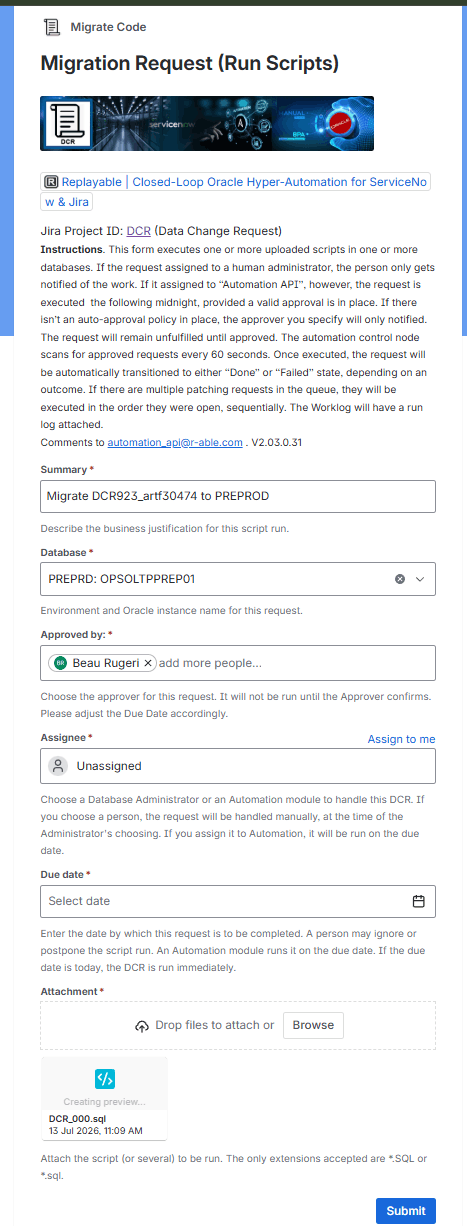
The PM or the end user submits the form from a familiar JIRA URL. If the task is assigned to a living DBA — such as Mr. Beau Rugeri below — it will remain on the JIRA board under the "To Do" banner until the DBA finds the time to switch it to "In Implementation" and then to "Done," provided they run the migration successfully.
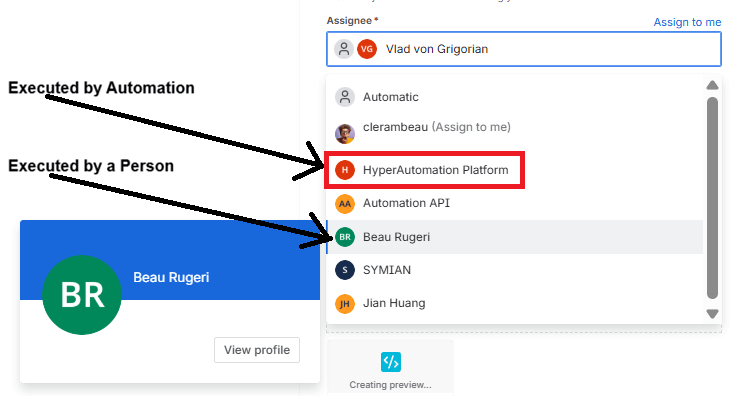
However, if the same task is assigned to the "HyperAutomation Platform" user, it will meet a different fate. First, it will wait in the queue until a valid approval is obtained, if there isn't an auto-approval JIRA policy in force. But as soon as the task is approved, the hyper-automation gets to work.
Here is a seven-minute screen capture of exactly one thousand such migration requests auto-executed by the Oracle Self-Service Hyper-Automation Platform in real time. For an expensive team of highly trained Oracle database administrators, the same number of code releases would take six months — provided they worked round-the-clock the entire time, ignoring all other issues and tasks. The hyper-automation platform takes care of the thousand in 2 minutes and 52 seconds.
There are three components to the Oracle Self-Service Hyper-Automation Platform: the JIRA cloud virtual server, the Ansible control node with the automation code on it, and one or more remote Oracle database assets.
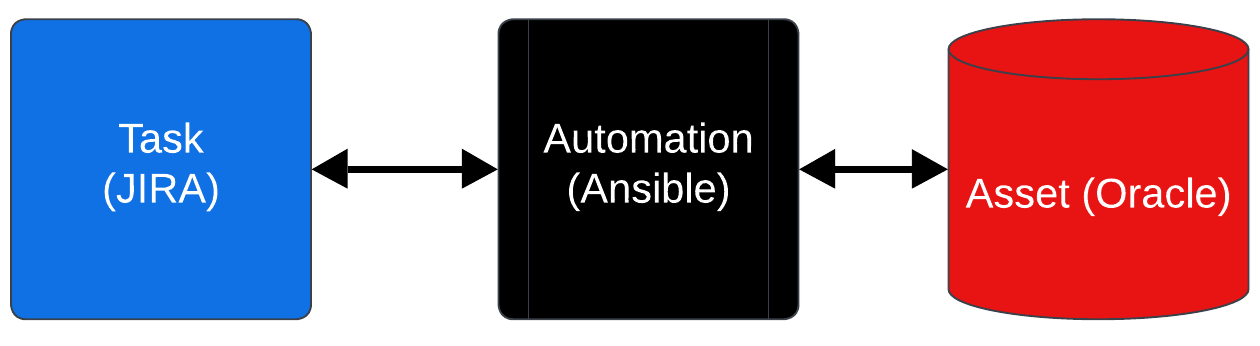
The Ansible control node polls the JIRA cloud for new tasks and issues every 60 seconds. If it detects a new request, or a collection thereof, it checks them for approvals and auto-executes them in the order they were opened. In the example above, a code migration is requested. The script is attached to the request form and uploaded to the JIRA cloud. The Ansible control node then executes the task according to the automation workflow defined at runtime.
Here is an example of an Oracle migration run automation workflow.
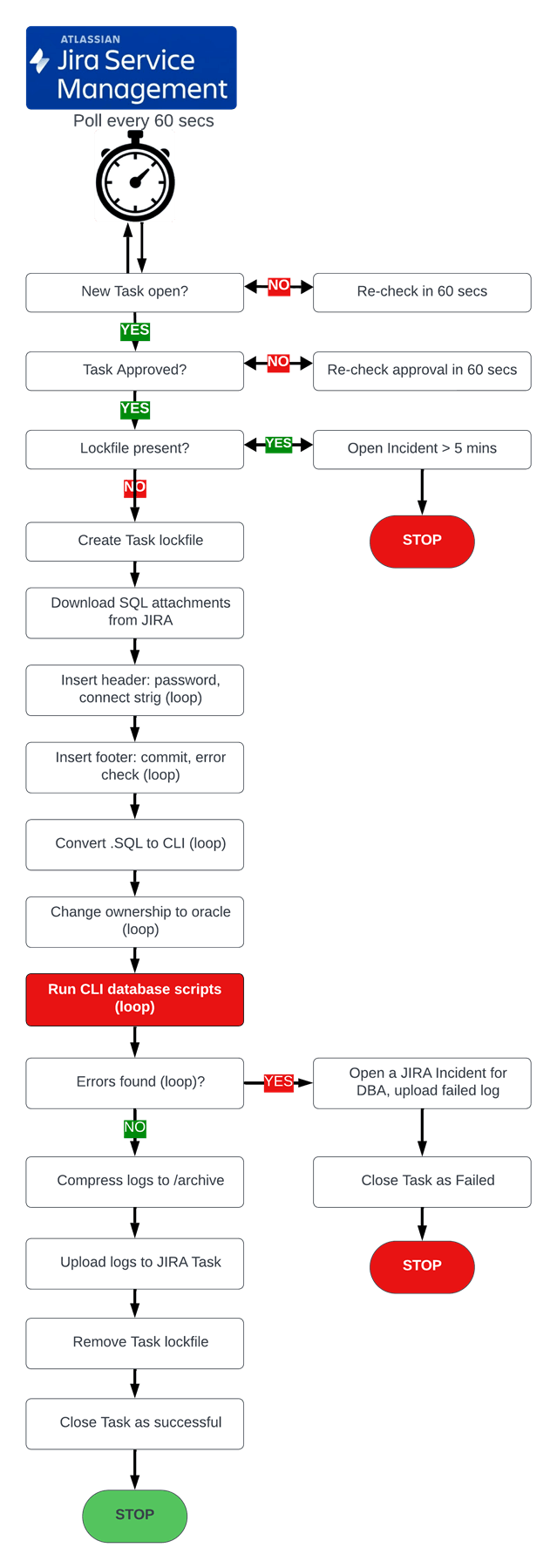
As soon as each task is completed, the control node updates its JIRA worklog with execution notes, uploads the logs, and transitions the JIRA task to either the "Done" or the "Failed" state, depending on the outcome. If the request fails, the Ansible control node opens a follow-up JIRA issue for the DBA team to investigate and repair the defect.
As already mentioned, there are six such Oracle projects in this downloadable demo, each with its own set of request forms and dedicated automated workflows integrated with JIRA.
Benefits of the Oracle Self-Service Hyper-Automation Platform
1. Scalability
The conventional DBA handles 20–30 tasks and incidents a week on average. If the number or the priority level of the requests were to double, the process would become unmanageable for a lone DBA. It doesn't matter how much money you throw at the employees. Overextended, they will eventually burn out and quit. The automated solution, on the other hand, can run a thousand tasks at the same time, against thousands of target databases in parallel. That elevates the admins from low-level button-pushers and script runners to the more prestigious status of architect.
2. Cost to Business
How would you like to cut your operational cost by almost 80%? In IT Total Cost of Ownership (TCO), software license costs represent a minority of the total spend, with personnel and operational costs for maintenance and support forming the largest component. Licensing typically accounts for only 20–30% of the total lifecycle cost, while the remaining 70–80% is attributed to personnel-heavy activities like patching, upgrades, fixing software bugs, implementations, data migrations, and ongoing support.
3. Speed
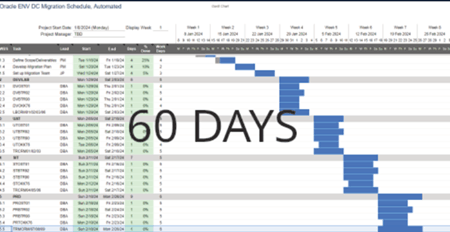
Here is the life cycle of a conventional JIRA IT change.
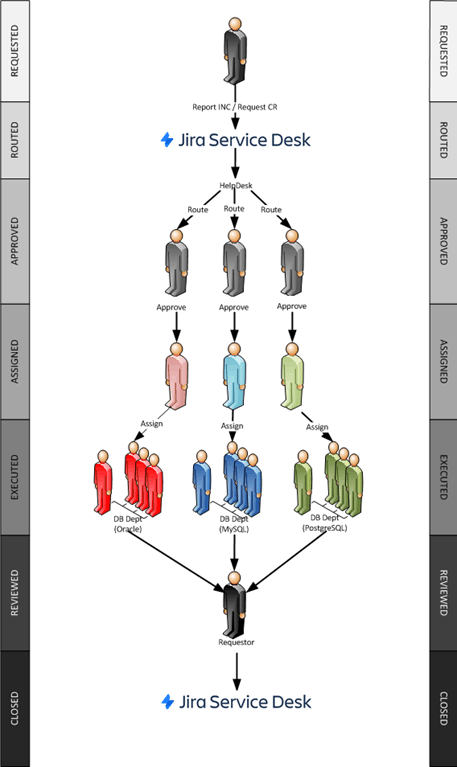
The assessment, routing, approval, and implementation stages take a week on average. The execution stage also takes hours or even days on end — the administrator may have a lot on their plate, fighting production issues, etc. In some cases, the DBA may become sick or unavailable, which leads to the escalation manager seeking an alternative DBA. Long-running projects like fleet upgrades or DC migrations, depicted below, also take time, for two reasons: people don't work 24x7x365, and they are not good at multitasking. The conventional DC migration project plan below, for example, may take six months, unautomated.
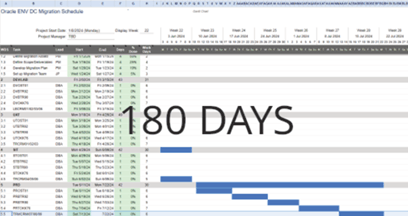
The hyper-automated Oracle Self-Service Platform takes 60 seconds to detect an open task or issue, and the start of the ticket remediation is immediate (provided a valid approval is in place). All stages are automated and run in parallel, not just the execution.
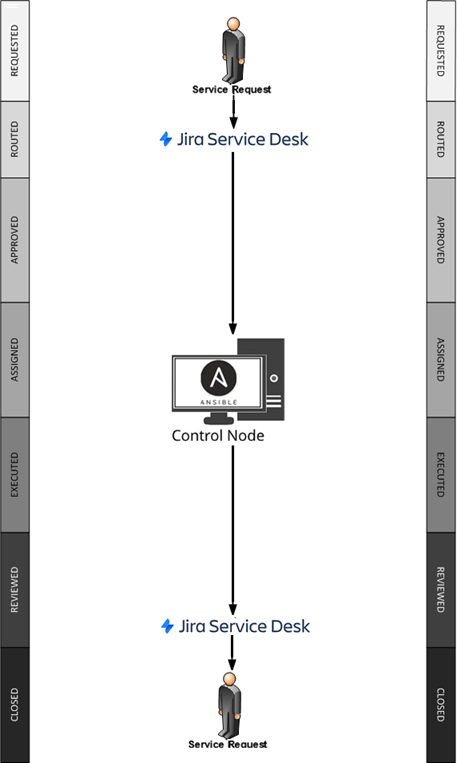
The long-running projects are also delivered three times as fast, under budget. For example, the six-month DC migration project shown above may be delivered in under two months. That is because the automation works like clockwork, 24x7x365, without errors or delays.
4. Quality of Service
For large enterprises, IT service delivery errors cost an average of $9,000 per minute. In some cases, major errors can be catastrophic; for example, a high-profile operational failure at Southwest Airlines cost an estimated $725 million in lost revenue plus $140 million in fines. In addition to monetary losses, IT service delivery errors cause reputational damage, which results in stock price falls and high customer churn. For instance, 85% of shoppers report they will not return to a retailer after a single poor delivery experience. There is also the aspect of product or feature delays, which always lead to lagging behind the sufficiently automated competition.
The average human error rate is 4%. This includes situations like running the wrong script on the wrong database, entering the wrong password, or not being prepared (not having the right password or connect string). Granted, the DBA checks the task output log for ORA- errors when possible. But in most cases the run creates large output logs (sometimes GBs in size). It becomes impossible to parse them for errors, especially when the admin is busy — which is always. The human error rate compounds when a task involves multiple teams or departments, due to the complexities of inter-departmental operations and communications.
The proposed solution reduces the error rate to 0.01%. The automation runs precisely what must be run, where it must be run, at the right time. It doesn't understand the concept of "good enough," because it has vendor best practices embedded. It scans the logs (thousands, in parallel) in real time. If it detects an error, it immediately opens an issue for the DBA to investigate the failed task, attaching the error log. That is the full extent of an Oracle DBA's involvement in the process.
5. Security
As it stands, every script we run requires a DBA password. Each occurrence of storing that password on a server hard drive in clear text, even for a second, is a violation of basic database security. The same applies to unencrypted network communication. The automated execution uses the Vault and its military-grade 256-bit AES encryption. That means neither the network nor the server can decipher the passwords. Entire connect strings (usernames, passwords, RDS endpoints) are encrypted if needed, along with certificates and sensitive API and SSH keys. Entire files may be encrypted and stored in the Vault, so even the automation engine uses them without knowing the contents.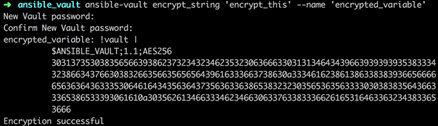
6. Accountability
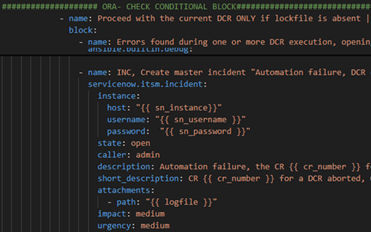
People make mistakes. That's a fact. No matter how much effort your team puts in, they are bound to make errors — several of them, in fact. This didn't matter on-prem. But now, it has become almost impossible to keep up with the different Cloud vendors and technologies. In the case of automation, the code is in a single source of truth. There is one centralized location for the code (GitHub, GitLab, or similar), for the passwords (the Vault), and for the execution logs (JIRA ticketing), no matter which Cloud vendor is used. There's never any confusion about what the automation did, where, when, and why. You execute it repeatedly and get predictable results every single time.
7. Ownership
All knowledge is in the head of the person who wrote the scripts. When they leave the organization, they take that knowledge with them. The replacement DBA will require time, effort, and training to understand and maintain the written shell/CLI scripts. For the most part, the new hire ends up rewriting the automation code anew. Their effort, in turn, will not be reused when they leave for the competition. With closed-loop automation, all code remains with the organization in the form of definition files. All the knowledge is inside one repository, promptly versioned and tagged. It doesn't even require understanding, because the underlying code is modular and immutable.

How is Hyper-Automation Implemented?
Simply download the code from the GitHub repository in the link below, use the README file to install it, and you are done.
Nothing changes from a manager's perspective, except for two aspects:
1) From here on out, you start assigning the work to the JIRA user representing automation instead of your administrators. You keep assigning it more and more tasks and incidents, until all — or at least most — of your resolutions, installations, provisioning, and maintenance tasks are automated and scheduled.
2) You do this in the same familiar JIRA dashboard. But be careful. The automation modules work hard. They never eat, sleep, or vacation. They don't understand the concept of "good enough." Everything they do will result in the best possible outcome. It will not just be some DBA's best. It will consistently be the industry's best, thanks to the best practices embedded.
Autonomous vs Automated - What is the Difference?
We have explained what this demo is. Now, let's shed some light on what it is not. The following explains the difference from autonomous databases.
While some current autonomous database software requires less or no maintenance, that "simplification" applies only to one such installed instance. True, for a small mom-and-pop shop that plays a significant role. After all, the owners no longer need to maintain their small "Orders" or "Customers" database, or even be aware of its existence in the Cloud. But in an enterprise with 100,000+ employees, such user-friendliness is of little consequence. To an enterprise, an administrator is the same as a cell to an organism ("cells are essential; a cell isn't"). On the contrary, those autonomous database offerings increase the TCO because of the legacy code integration, upgrade, migration, and training costs.
There are thousands of disparate database systems, hundreds of incompatible technologies from countless vendors, and warring departments, each locked in its own technological and procedural silo. The enterprise is more interested in ensuring that all its diverse personnel, hardware, and software are closely integrated, efficient, and flexible to change. That is usually measured by change velocity, governance, and stability. Unfortunately, none of these crucial factors are improved by the current automation offerings.
Let's consider an example. Suppose a database administrator completed a given task 10 minutes earlier because of some autonomous feature or an open-loop automated shortcut. Will the admin's manager notice? The answer is a resounding "no." The manager has already been delaying all due dates by a week, because his administrators are always busy and need a week to get to them. So, as long as the task is completed within the week, the manager will not notice the 10-minute improvement. But if the same task didn't even need to be assigned or opened, because it was handled by hyper-automation entirely — that, the manager will notice. If the work was magically done by itself, 24x7, always under budget and ahead of schedule — that, again, the manager will notice (and so will the manager's manager). This is where open-loop automation falls short and closed-loop hyper-automation delivers.
The second factor is organizational: protecting the company from this stubborn technology. Let's stay with the same configuration change script. Say the buffer week the manager has given the administrator has passed. Before an employee runs the script, they must attend torturous hours of CAB, JIRA, Agile, and Kanban approval meetings. That is another week wasted, on top of the first buffer week. What is worse, it is the same configuration change that is being discussed, approved, and executed each time — just a different iteration. This makes as much sense as disassembling your car in your garage after work, just to reassemble it again in the morning to drive back to work. It is an enormous waste of time and effort that could have been used more productively.
There is currently no technological solution to this problem of extreme organizational inefficiency (the bigger the company, the worse). We need a method that enables all the disparate departments, teams, technologies, and processes to work in tandem to implement a long-term business strategy. The current Cloud autonomous database offerings don't even begin to scratch the surface of usability there, as they're all open-loop. Asking them to reduce the database software TCO is the same as asking a Burger King restaurant to rid you of your diabetes. They are not set up for that. Selling you a Diet Coke is the best they can do.
Please download this code from https://github.com/r-able/Oracle-SelfService . The code is free.
The following are simplified automation workflows coded in Ansible YML. JIRA project management implementation.
PRF - AWR Performance Analysis Workflow (Jira, SIMPLIFIED, ITIL-ALIGNED)  Spec: Jira issue: host, ORACLE_SID/PDB, and start/end date-time fields Jira-driven, dispatcher + per-issue job include, matching the ServiceNow project's structure. Includes documented risk-mitigation and best-practice controls |
|
| Jira Process Decision SQL/Execute ITIL Alignment Risk Mitigation Best Practice Close OK Close Failed Follow-up | |
| 1 | PRE-FLIGHT: validate Jira API token via /rest/api/2/myself |
| 2 | PRE: shepherd PRF intake queue toward 'In Progress' |
| → | ITIL alignment: the shepherd's approval walk is a real ITIL change-model gate, even though this analysis itself is read-only |
| 3 | PRE: search Jira for PRF issues ready to execute |
| 4 | PRE: collect issues found |
| 5 | PRE: end play when queue is empty |
| 6 | PRE: build job list from Jira issues |
| 7 | PRE: WARN about issues with an unusable spec |
| 8 | PRE: keep only jobs with a usable spec |
| 9 | PRE: nothing valid to process |
| 10 | PRE: jobs queued |
| → | Unknown host — skip this issue |
| 11 | JOB: resolve Oracle home/user from oracle_instance_map |
| 12 | JOB: set per-job facts |
| 13 | JOB: comment: analysis started |
| 14 | JOB: ensure base + per-job working directory exists and is writable |
| 15 | JOB: write snapshot-resolution SQL + wrapper (explicit ORACLE_SID export) |
| 16 | JOB: resolve snapshot IDs as oracle |
| 17 | JOB: fail cleanly if no bracketing snapshots were found |
| → | Risk mitigation: failing cleanly with a clear reason (outside retention window, no snapshots yet) rather than a confusing downstream error |
| 18 | JOB: show resolved snapshot range |
| 19 | JOB: write AWR report SQL + top-5 CPU SQL_ID query |
| 20 | JOB: write execution wrapper (explicit ORACLE_SID export) |
| 21 | JOB: run AWR report + top-5 query as oracle |
| 22 | JOB: parse top-5 SQL_IDs from output |
| 23 | JOB: determine whether top-5 extraction succeeded |
| 24 | JOB: show top SQL_IDs found |
| 25 | JOB: write and run SQL Tuning Advisor for each SQL_ID (ALTER SESSION SET CONTAINER first) |
| → | Risk mitigation: execute_tuning_task only produces advice — this entire analysis carries zero write risk to production data |
| 26 | JOB: attach AWR report + each tuning report to the issue |
| 27 | JOB: post analysis summary comment |
| 28 | JOB: get available transitions for DONE |
| 29 | JOB: transition to 'Done' |
| 30 | JOB: get available transitions for FAILED |
| 31 | JOB: transition to 'Failed' |
| 32 | JOB: open follow-up task for the DBA team to implement fixes |
| → | Best practice: any recommended fix is routed through a separate follow-up task, never applied automatically — analysis and implementation stay cleanly separated |
| 33 | JOB: open DBA repair follow-up on total analysis failure |
| 34 | JOB: clean up temp files |
|
PDB - Create Pluggable Database Workflow (Jira, SIMPLIFIED, ITIL-ALIGNED) Spec: Jira issue: target host, container DB, and new PDB name fields Jira-driven, 3-play structure matching the ServiceNow project's shape. Includes documented risk-mitigation and best-practice controls |
|
| Jira Process Decision SQL/Execute ITIL Alignment Risk Mitigation Best Practice Close OK Close Failed Follow-up | |
| 1 | PRE-FLIGHT: validate Jira API token via /rest/api/2/myself |
| 2 | 0: shepherd PDB intake queue toward 'In Progress' |
| → | ITIL alignment: the shepherd's To Do → Pending Approval → In Progress walk is itself a real ITIL change-model gate — genuinely cannot proceed unapproved |
| 3 | 1: search Jira for PDB issues ready to execute |
| 4 | 1: collect issues found |
| 5 | 1: intake summary |
| 6 | 1: exit cleanly when there is nothing to do |
| 7 | 1: WARN and skip issues with an unusable spec |
| → | Risk mitigation: validating host, container, and PDB-name fields before any database work begins prevents a doomed run from ever reaching the Oracle host |
| 8 | 1: build the PDB creation job list |
| 9 | 1: nothing valid to process |
| 10 | 1: jobs queued |
| 11 | 1: write job list for PLAY 2 |
| 12 | 1: remove stale outcomes file from any previous run |
| 13 | 2: slurp + decode the job list from the controller |
| 14 | 2: capture container state, OMF setting and seed datafile path |
| 15 | 2: fold the pre-check results into each job |
| 16 | 2: show what the pre-check found |
| 17 | 3: generate a PDB admin password for each job |
| → | Best practice: a fresh generated admin password per job, never touching Ansible logs (no_log) |
| 18 | 3: create the datafile directory when OMF is not in use |
| 19 | 3: create, open and save the state of the pluggable database |
| 20 | 4: capture v$pdbs after the operation |
| 21 | 4: determine the outcome for each issue |
| 22 | 4: per-issue outcome |
| 23 | 5: ensure the log directory exists on controller |
| 24 | 5: write the evidence log for each issue (admin password intentionally omitted) |
| → | Risk mitigation: the evidence log deliberately excludes the admin password — it's disclosed exactly once, in a dedicated Jira comment, never written to a log file |
| 25 | 5: write outcomes + job data for PLAY 3 |
| 26 | 6: slurp + decode outcomes from PLAY 2 |
| 27 | 6: attach the evidence log to each issue |
| 28 | 7: post the result comment (admin password goes ONLY here) |
| 29 | 8: get available transitions for DONE issues |
| 30 | 8: transition DONE issues to 'Done' |
| 31 | 8: get available transitions for FAILED issues |
| 32 | 8: transition FAILED issues to 'Failed' |
| 33 | 9: create DBA follow-up task for FAILED issues |
| 34 | 10: final summary |
|
CAU - Create Application User Workflow (Jira, SIMPLIFIED, ITIL-ALIGNED) Spec: Jira issue: reporter + target databases field Jira-driven, single-play. Uses CAU_jira_create_user.yml (the confirmed-correct version). Includes documented risk-mitigation and best-practice controls |
|
| Jira Process Decision SQL/Execute ITIL Alignment Risk Mitigation Best Practice | |
| 1 | PRE-FLIGHT: validate Jira API token via /rest/api/2/myself |
| 2 | 0: shepherd CAU intake queue toward 'In Progress' |
| → | ITIL alignment: the shepherd's approval walk is a real ITIL change-model gate — the request genuinely cannot proceed until approved, not just a label |
| 3 | 1: search for open Jira issues matching JQL |
| → | End play gracefully when no issues are found |
| 4 | 2: fetch full details for each issue |
| → | Risk mitigation: WARN on issues missing the user field rather than silently skipping — a form field ID change becomes visible, not a silent no-op |
| 5 | 2: build issue → user + target databases mapping |
| → | Warn on issues with no recognised values in the databases field |
| 6 | 2: show user → Oracle username → target databases mapping |
| 7 | 3: generate random password for each issue |
| → | Best practice: a single generated 16-character password replaces any hand-typed credential, and never touches Ansible logs (no_log) |
| 8 | 3: attach generated password to each issue entry |
| 9 | 4: create Oracle user and grant privileges in each target database |
| 10 | 4b: show create-user outcome per issue per database |
| 11 | 5: write worklog payload JSON to a temp file |
| 12 | 5a: write worklog-posting Python script to a temp file |
| 13 | 5b: execute the worklog-posting script against the payload file |
|
CDP - Change Database Password Workflow (Jira, SIMPLIFIED, ITIL-ALIGNED) Spec: Jira issue: reporter's own account, target databases from project config Jira-driven, single-play. Shepherd advances issue toward In Progress before this runs. Includes documented risk-mitigation and best-practice controls |
|
| Jira Process Decision SQL/Execute ITIL Alignment Risk Mitigation Best Practice Close OK Close Failed Follow-up | |
| 1 | PRE-FLIGHT: validate Jira API token via /rest/api/2/myself |
| 2 | 0: shepherd CDP intake queue toward 'In Progress' |
| → | ITIL alignment: the shepherd's To Do → Pending Approval → In Progress walk is itself a real ITIL change-model gate — the issue genuinely cannot proceed until every required approval is granted |
| 3 | 1: search for open Jira issues matching JQL |
| → | Abort if no issues found |
| 4 | 2: fetch full details for each issue |
| 5 | 2: build issue → reporter mapping |
| 6 | 3: generate random password for each Oracle user |
| 7 | 3: attach generated password to each issue entry |
| 8 | 4: reset Oracle password for each user in each database |
| 9 | 4b: show password-reset outcome per issue per database |
| 10 | 5: post new temporary password as Jira comment (all databases succeeded) |
| → | Best practice: the new password is disclosed only once ALL environments confirm success — a partial failure never leaves the requester with a password that only works in some databases |
| 11 | 6: mark issues DONE (all databases succeeded) |
| 12 | 6: mark issues FAILED (one or more databases failed) |
| 13 | 6: get available transitions for SUCCESSFUL issues |
| 14 | 6: transition SUCCESSFUL issues to 'Done' |
| → | WARN when no 'Done' transition is available |
| 15 | 6: get available transitions for FAILED issues |
| 16 | 6: transition FAILED issues to 'Failed' |
| → | Risk mitigation: case-insensitive, uri-based transition lookup avoids a silent no-op if the workflow's exact status label ever changes |
| 17 | 6: create DBA follow-up task for FAILED issues |
|
DCR - Run Data Change Script Workflow (Jira, SIMPLIFIED, ITIL-ALIGNED) Spec: Jira issue + .sql attachment(s) Jira-driven, single-play. Includes documented risk-mitigation and best-practice controls |
|
| Jira Process Decision SQL/Execute ITIL Alignment Risk Mitigation | |
| 1 | PRE-FLIGHT: validate Jira API token via /rest/api/2/myself |
| 2 | 0: create timestamped working directory |
| 3 | 0: shepherd DCR intake queue toward 'In Progress' |
| → | ITIL alignment: the shepherd's approval walk is a real ITIL change-model gate before any script ever executes |
| 4 | 1: search for open Jira issues matching JQL |
| → | Abort if no issues found |
| 5 | 2: fetch full details for each issue |
| 6 | 3: create per-issue subdirectory in work_dir |
| 7 | 4: download .sql attachments from Jira (case-insensitive) |
| 8 | 4b: rename downloaded .sql attachments to .ssh |
| 9 | 5: build list of successfully downloaded scripts |
| → | Warn if no scripts were downloaded |
| 10 | 5b: insert connection header at top of each script |
| 11 | 5c: insert the shell heading wrapper on the SQL scripts loop |
| 12 | 5d: append EOF footer at bottom of each script |
| 13 | 6: execute shell scripts |
| 14 | 6a: write execution output to .log file |
| 15 | 6b: build stdout tail lookup (last 10 non-empty lines per script) |
| 16 | 6c: read log file for each executed script |
| 17 | 6c: extract and count error lines from each log |
| → | Risk mitigation: scanning execution logs for error patterns rather than trusting exit codes alone catches partial or silent failures |
| 18 | 6d: show detailed error report for failed scripts |
| 19 | 7: mark issue as FAILED if any script returned non-zero |
| 20 | 7: mark issue as DONE if not already marked failed |
| 21 | 7: show final per-issue outcomes |
| 22 | 7b: post worklog summary per issue |
| 23 | 8: get available transitions for SUCCESSFUL issues |
|
DDP - Drop / Decommission Pluggable Database Workflow (Jira, SIMPLIFIED) Spec: Jira issue: target PDB field + confirmation field ⚠ Known issue: the shepherd call below uses the wrong variable name (shepherd_project_key instead of shepherd_project) and an older search API pattern than the other 6 Jira projects — documented here as it actually behaves today. Because of this bug, the ITIL change-model gate claimed on the other 6 Jira workflows is NOT reliably true here and is deliberately not claimed below. Includes documented risk-mitigation and best-practice controls for the parts of the workflow that ARE working as intended |
|
| Jira Process Decision SQL/Execute Risk Mitigation Best Practice Close OK Close Failed Follow-up | |
| 1 | Pre-flight: verify Jira API token is valid |
| 2 | Shepherd DDP intake queue before searching for work — uses shepherd_project_key (inconsistent with the other 6 projects' shepherd_project) |
| 3 | 1: search Jira for DDP issues ready to execute |
| 4 | Build list of drop requests |
| → | No DDP work found — end run |
| 5 | 2: extract target PDB name from issue field |
| → | WARNING: target field empty or unrecognized, dump populated fields |
| 6 | Normalize PROD alias to PRO key |
| 7 | Block drop of a protected PDB unless explicitly overridden |
| 8 | Block drop if confirmation string is missing or mismatched |
| → | Risk mitigation: a literal confirmation phrase plus a protected-name blocklist together prevent an accidental or automated drop of the wrong or a protected database |
| → | Handle blocked issue — comment, transition to Failed, open DBA follow-up |
| 9 | Ensure working directory exists |
| 10 | Write pre-drop snapshot SQL — captured and attached before anything destructive |
| → | Best practice: capturing a full pre-drop snapshot (DBA_PDBS, tablespaces, datafiles) before an irreversible operation preserves evidence of exactly what existed beforehand |
| 11 | Write drop SQL — close then drop including datafiles |
| 12 | Write execution wrapper script (explicit ORACLE_SID export — sudo strips env) |
| 13 | Execute snapshot + drop as oracle user |
| 14 | Read drop log for success/failure parsing |
| 15 | Determine outcome (rc==0 and no 'ORA-' in drop log) |
| → | Risk mitigation: scanning the actual log content for error patterns, not just the shell exit code, catches a drop that partially failed but still returned success |
| 16 | Attach snapshot and drop logs to Jira issue |
| 17 | Post worklog summary |
| 18 | Transition to Done (case-insensitive, uri-based) |
| 19 | Transition to Failed (case-insensitive, uri-based) |
| 20 | Open DBA follow-up task on failed drop |
|
PAT - Apply Oracle Patch Workflow (Jira, SIMPLIFIED, ITIL-ALIGNED) Spec: Jira issue: host:SID + patch number Jira-driven, dispatcher + per-issue job include, real Oracle MOS download logic matching the SNOW project. Includes documented risk-mitigation, best-practice and cost-containment controls |
|
| Jira Process Decision SQL/Execute ITIL Alignment Cost Containment Risk Mitigation Best Practice | |
| 1 | PRE-FLIGHT: validate Jira API token |
| 2 | 0: shepherd PAT intake queue toward 'In Progress' |
| → | ITIL alignment: the shepherd's approval walk is a real ITIL change-model gate before any patch work ever begins |
| 3 | 1: search for open PAT issues |
| → | End play gracefully when queue is empty |
| 4 | 2: fetch full details for each issue |
| → | WARN and skip issues with a missing or unknown patch target |
| 5 | 2: build patch job list from issue details |
| 6 | 3: write patch job list to temp file for PLAY 2 |
| 7 | 3: write Jira credential sidecar for worklog script |
| 8 | JOB: run opatch lsinventory (pre-patch) |
| 9 | JOB: flag if patch is already applied (skip patching) |
| → | Best practice: checking whether the patch is already applied avoids a redundant, risk-bearing re-application against a system already in the target state |
| 10 | JOB: check current OPatch version vs. minimum required (from patch README) |
| 11 | JOB: download OPatch (patch 6880880) from MOS if upgrade needed |
| 12 | JOB: copy and install new OPatch into ORACLE_HOME |
| 13 | JOB: stop listener (if running) |
| 14 | JOB: shut down Oracle database |
| → | Risk mitigation: refusing to proceed on an unclean shutdown prevents applying a binary patch underneath a database that hasn't fully released its files |
| 15 | JOB: kill any remaining oracle processes using ORACLE_HOME (CheckActiveFilesAndExecutables) |
| 16 | JOB: ensure + verify patch directory is readable by oracle |
| 17 | JOB: apply patch with opatch |
| 18 | JOB: start Oracle database, start listener |
| 19 | JOB: run opatch lsinventory (post-patch, confirm patch listed) |
| → | Risk mitigation: confirming the patch actually appears in the inventory after applying it, rather than trusting a clean exit code alone |
| 20 | JOB: determine overall job outcome |
| 21 | JOB: remove patch zip and extracted directory |
| → | Cost containment: removing the downloaded patch archive and staging files immediately after use avoids accumulating unnecessary disk consumption across repeated patch cycles |
| 22 | JOB: write + merge per-issue outcome into combined outcomes file |
| 23 | JOB: write worklog-posting script to controller |
|
REF - Environment Refresh Workflow (Jira, SIMPLIFIED, ITIL-ALIGNED) Spec: Jira issue: refresh spec field (source/target service and schema) Jira-driven, dispatcher + per-issue job include, matching the SNOW project's structure. Includes documented risk-mitigation, best-practice and cost-containment controls |
|
| Jira Process Decision SQL/Execute ITIL Alignment Cost Containment Risk Mitigation Best Practice | |
| 1 | PRE-FLIGHT: validate Jira API token via /rest/api/2/myself |
| 2 | PRE-FLIGHT: remove stale outcomes file from any aborted previous run |
| 3 | 0: shepherd REF intake queue toward 'In Progress' |
| → | ITIL alignment: the shepherd's approval walk is a real ITIL change-model gate before any schema operation ever runs |
| 4 | 1: search for open Jira refresh issues matching JQL |
| → | End play gracefully when no issues are found |
| 5 | 2: fetch full details for each issue |
| → | Warn and skip issues with a missing or invalid refresh spec |
| 6 | 2: parse refresh spec from the configured Jira field |
| 7 | JOB: set per-job file names + full paths |
| 8 | JOB: pre-flight confirm source schema exists — fail if not |
| → | Risk mitigation: confirming the source schema exists before touching anything avoids a half-completed export with nowhere to land |
| 9 | JOB: export source schema — fail if export failed |
| 10 | JOB: drop target schema (idempotent) |
| → | Best practice: the drop is written to be idempotent, skipping cleanly if the target schema doesn't already exist, rather than erroring on a fresh target |
| 11 | JOB: import target schema |
| 12 | JOB: count objects in target schema |
| → | Risk mitigation: counting imported objects verifies the refresh actually landed data, rather than trusting a clean import exit code alone |
| 13 | JOB: post export/import results to Jira worklog |
| 14 | JOB: remove dump and log files (success only) |
| → | Cost containment: removing the export dump file after a successful refresh avoids accumulating storage from repeated refresh cycles |
| 15 | JOB: ensure follow-up log dir exists on controller (failed only) |
| 16 | JOB: preserve export/import output on controller (failed only) |
| 17 | JOB: write outcome to controller temp file |
|
UPG - Oracle 21c → 26ai Upgrade Workflow (Jira, SIMPLIFIED, ITIL-ALIGNED) Spec: Jira issue: host + ORACLE_SID Jira-driven, real AutoUpgrade analyze/deploy/verify/rescue logic matching the SNOW project. Includes documented risk-mitigation and best-practice controls. No formal cost-approval gate in this version — that mechanism is ServiceNow-only |
|
| Jira Process Decision SQL/Execute ITIL Alignment Risk Mitigation Best Practice Follow-up | |
| 1 | PRE: verify Jira API token is valid |
| 2 | PRE: check 26ai Oracle home exists on target host |
| 3 | PRE: check autoupgrade.jar exists in 26ai home |
| → | Risk mitigation: validating the target software exists before any change work begins prevents a doomed run from ever reaching production data |
| 4 | 0: shepherd UPG intake queue toward 'In Progress' |
| → | ITIL alignment: the shepherd's approval walk is a real ITIL change-model gate — a genuinely high-risk operation like this cannot proceed unapproved |
| 5 | PRE: search for open UPG issues |
| 6 | PRE: build upgrade job list from issues |
| → | Nothing to do? ends here |
| 7 | PRE: upgrade jobs queued |
| 8 | JOB: get available transitions, transition to 'In Progress' (if available) |
| 9 | JOB: worklog: upgrade started |
| 10 | JOB: check source DB version and state |
| 11 | JOB: assert source is 21c and OPEN |
| 12 | JOB: create job directories, write autoupgrade.cfg |
| 13 | JOB: run AutoUpgrade analyze phase (pre-upgrade check) |
| 14 | JOB: assert analyze passed |
| → | Risk mitigation: the ANALYZE phase surfaces upgrade-blocking issues before any irreversible change is attempted |
| 15 | JOB: worklog: analyze complete |
| 16 | JOB: launch AutoUpgrade deploy (async) |
| 17 | JOB: wait for deploy to finish |
| 18 | JOB: assert deploy succeeded |
| 19 | JOB: restart database under 26ai home and verify |
| 20 | JOB: assert database is on 26ai and OPEN |
| 21 | JOB: ensure /etc/oratab points at 26ai home |
| 22 | JOB: worklog: upgrade complete |
| → | Best practice: the Guaranteed Restore Point created earlier is deliberately retained after success, not dropped immediately — a real rollback path stays available |
| 23 | JOB: get transitions for Done, transition to 'Done' |
| → | Any assertion failing: JOB: classify failure |
| → | Best practice: failure classification distinguishes a genuinely new failure from stale recovery data left behind by an earlier interrupted run, avoiding a misleading diagnosis |
| 24 | JOB: worklog: upgrade failed, DBA review required |
| 25 | JOB: transition to 'Failed' |
| 26 | JOB: write failure report for follow-up |
| 27 | JOB: fetch AutoUpgrade status.log from host |
| 28 | JOB: create DBA repair follow-up task |
| 29 | JOB: clean up temp scripts |
Other Demos
Execution of Oracle JIRA-Integrated Tasks
ServiceNow-Integrated Change Requests Execution
Oracle GoldenGate Deployment Provisioning / GoldenGate Incident Auto-Resolution
What About Migrating Off Oracle Entirely?
This same governance extends to the migration itself — assessing risk, tracking conversion, and managing cutover for teams moving off Oracle onto AWS. See our approach to Oracle-to-AWS migration →