
ServiceNow Oracle Automation Workflows
← Back to Technology | View the Jira workflows →
The following are simplified automation workflows coded in Ansible YML for the ServiceNow implementation.
CAU - Create Application User Automation Workflow (SIMPLIFIED, ITIL-ALIGNED) 
Spec: CAU | HOST:DB,HOST:DB,... | Full_Name_or_Username
MANAGEMENT approval required. Multi-host, multi-target user provisioning with ITIL classification, risk mitigation, cost gate, orchestration gate, and documented best-practice controls
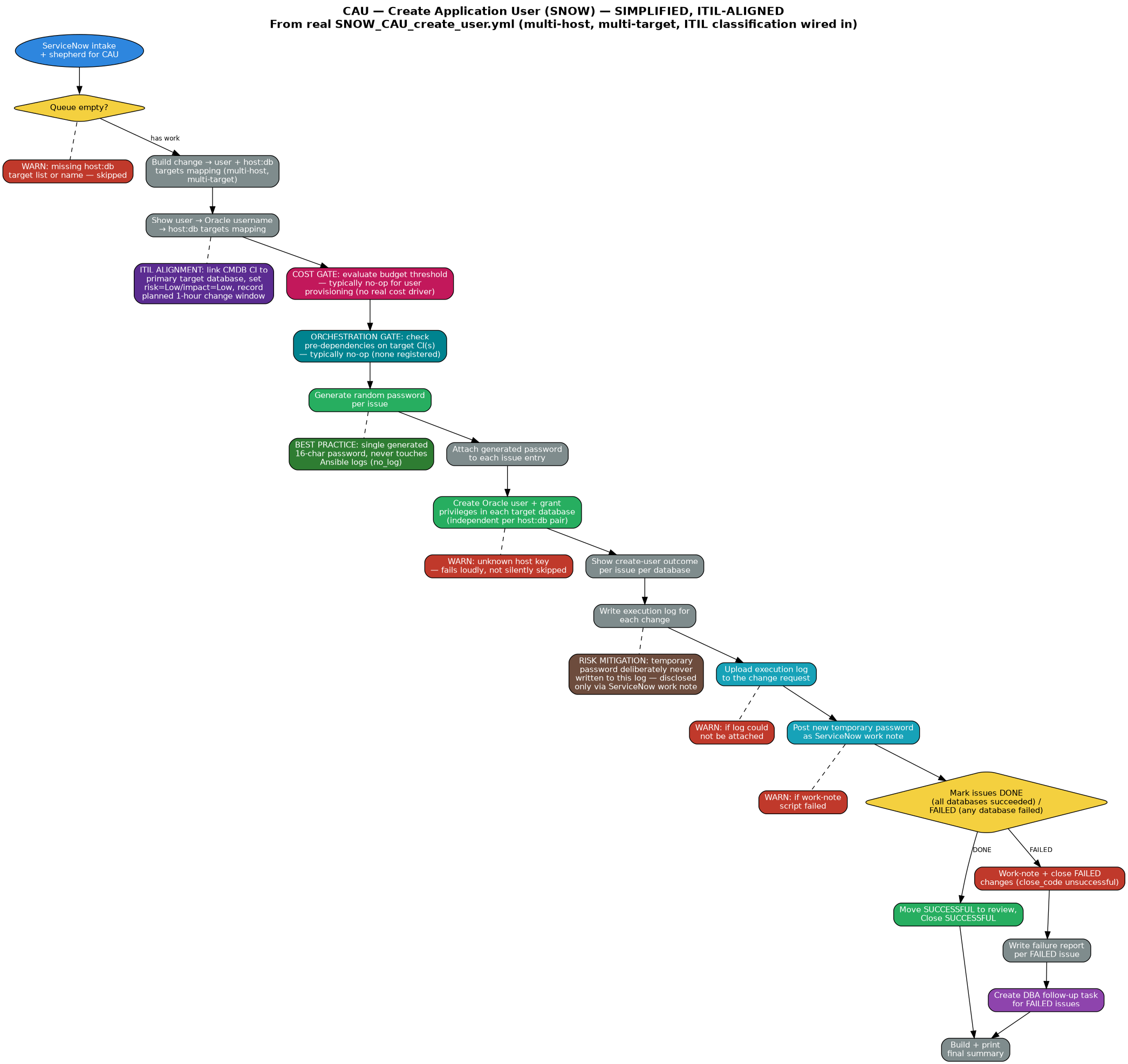
Spec: CAU | HOST:DB,HOST:DB,... | Full_Name_or_Username
MANAGEMENT approval required. Multi-host, multi-target user provisioning with ITIL classification, risk mitigation, cost gate, orchestration gate, and documented best-practice controls
Start
Process
ServiceNow
Decision
Approval
SQL/Execute
ITIL Alignment
Cost Containment
Orchestration
Risk Mitigation
Best Practice
Close OK
Close Failed
Follow-up
| 1 | 0-1: ServiceNow intake and shepherd for CAU |
| 2 | 1: show 'No Tasks Found', end play when queue empty |
| → | WARN: missing host:db target list or name — skipped |
| 3 | 2: build change → user + host:db targets mapping (multi-host, multi-target — each entry independently resolved against oracle_instance_map) |
| 4 | 2: show user → Oracle username → host:db targets mapping |
| ITIL | ITIL alignment: classify each job — link the CMDB Configuration Item to the primary target database, set risk=Low/impact=Low, and record a planned 1-hour change window |
| COST | Cost gate: evaluate whether this change crosses the budget-approval threshold — typically a no-op for user provisioning (no real cost driver); the gate blocks automatically if that ever changes |
| ORCH | Orchestration gate: check for unsatisfied pre-dependencies on the target CI(s) — typically a no-op for user provisioning (no dependency chain registered); the gate holds automatically if one ever is |
| 5 | 3: generate random password for each issue |
| → | Best practice: a single generated 16-character password (upper/lower/digit/special) replaces any hand-typed or reused credential, and never touches Ansible logs (no_log) |
| 6 | 3: attach generated password to each issue entry |
| 7 | 4: create Oracle user + grant privileges in each target database (per host:db pair, independently connected and independently succeed/fail via subelements) |
| → | WARN: unknown host key — that target fails loudly rather than being silently skipped |
| 8 | 4b: show create-user outcome per issue per database |
| 9 | 4c: set log run timestamp |
| 10 | 4c: ensure the CAU log directory exists |
| 11 | 4c: write the execution log for each change |
| → | Risk mitigation: the temporary password is deliberately never written to this log — it is disclosed only via the ServiceNow work note, keeping credentials out of any file a wider audience (or a misconfigured log shipper) might read |
| 12 | 4c: upload the execution log to the change request |
| → | WARN: if execution log could not be attached |
| 13 | 5: write worklog payload JSON to a temp file |
| 14 | 5a: write worklog-posting Python script to temp file |
| 15 | 5b: execute the work-note-posting script against payload |
| 16 | 5c: show work-note posting outcome (no credentials) |
| → | WARN: if the work-note script failed |
| 17 | 5d: clean up temp payload and script files |
| 18 | 6: mark issues DONE (all databases succeeded) / FAILED (any database failed) |
| 19 | 6: move SUCCESSFUL to review, Close SUCCESSFUL |
| 20 | 6: work-note FAILED changes with failure summary |
| 21 | 6: close FAILED changes (close_code unsuccessful) |
| 22 | 6c: write failure report per FAILED issue |
| 23 | 6c: create DBA follow-up task for FAILED issues |
| 24 | 7: build + print final summary |
CDP - Change Database Password Automation Workflow (SIMPLIFIED, ITIL-ALIGNED)
Spec: CDP | HOST:SERVICE | USERNAME_OR_FULL_NAME
NO APPROVAL. Targets exactly one host:database per change (rewritten from an earlier all-databases reset). Includes ITIL classification, risk mitigation, cost gate, orchestration gate, and documented best-practice controls
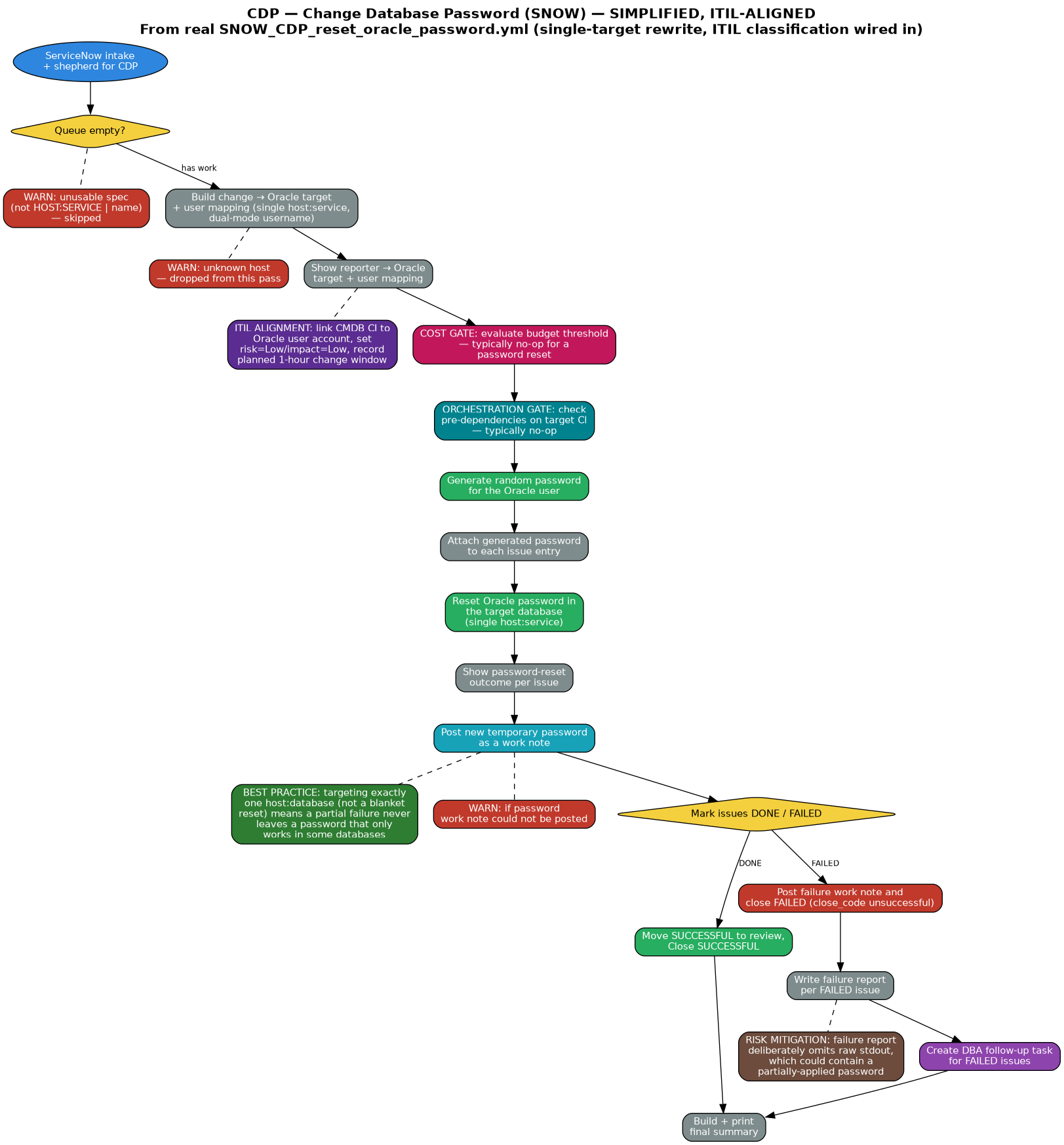
Spec: CDP | HOST:SERVICE | USERNAME_OR_FULL_NAME
NO APPROVAL. Targets exactly one host:database per change (rewritten from an earlier all-databases reset). Includes ITIL classification, risk mitigation, cost gate, orchestration gate, and documented best-practice controls
Start
Process
ServiceNow
Decision
SQL/Execute
ITIL Alignment
Cost Containment
Orchestration
Risk Mitigation
Best Practice
Close OK
Close Failed
Follow-up
| 1 | 0-1: ServiceNow intake and shepherd for CDP |
| 2 | 1: abort if no work found, end play gracefully |
| → | WARN: unusable spec (not HOST:SERVICE | username_or_name) — skipped |
| 3 | 2: build change → Oracle target + user mapping (single host:service, dual-mode username: literal or first-initial+last-name derived) |
| → | WARN: issue references an unknown host — dropped from this pass |
| 4 | 2: keep only issues referencing a known host |
| 5 | 2: show reporter → Oracle target + user mapping |
| ITIL | ITIL alignment: classify each reset — link the CMDB Configuration Item to the Oracle user account, set risk=Low/impact=Low, and record a planned 1-hour change window |
| COST | Cost gate: evaluate whether this change crosses the budget-approval threshold — typically a no-op for a password reset (no real cost driver); the gate blocks automatically if that ever changes |
| ORCH | Orchestration gate: check for unsatisfied pre-dependencies on the target CI — typically a no-op for a password reset (no dependency chain registered); the gate holds automatically if one ever is |
| 6 | 3: generate random password for the Oracle user |
| 7 | 3: attach generated password to each issue entry |
| 8 | 4: reset Oracle password in the target database (single host:service — no longer loops across all six environment databases) |
| 9 | 4b: show password-reset outcome per issue |
| 10 | 5: post new temporary password as a work note |
| → | Best practice: targeting exactly one host:database per change (instead of a blanket all-environments reset) means a partial failure can no longer leave the requester with a password that only works in some databases |
| → | WARN: if the password work note could not be posted |
| 11 | 6: mark issues DONE / FAILED |
| 12 | 6: move SUCCESSFUL to review, Close SUCCESSFUL |
| 13 | 6: post failure work note and close FAILED changes (close_code unsuccessful) |
| 14 | 6c: write failure report per FAILED issue |
| → | Risk mitigation: the failure report deliberately omits raw stdout, which could contain a partially-applied password, keeping credentials out of any log a wider audience might read |
| 15 | 6c: create DBA follow-up task for FAILED issues |
| 16 | 7: build + print final summary |
DCR - Run Data Change Script Automation Workflow (SIMPLIFIED, ITIL-ALIGNED)
Spec: DCR | HOST:SID:SCHEMA | title (+ .sql attachment)
MANAGEMENT approval for PROD only. Connects DYNAMICALLY to the specific host/PDB/schema chosen per change. Takes a schema export AND a PDB-level guaranteed restore point as a rollback safety net before every script runs (CONFIRMED WORKING end-to-end on real infrastructure, CHG0033198/CHG0033199) — not automatic rollback, since arbitrary SQL can partially succeed in legitimate ways. Includes ITIL classification, cost gate, orchestration gate, and documented best-practice controls. Own custom intake (not COMMON_snow_intake.yml)
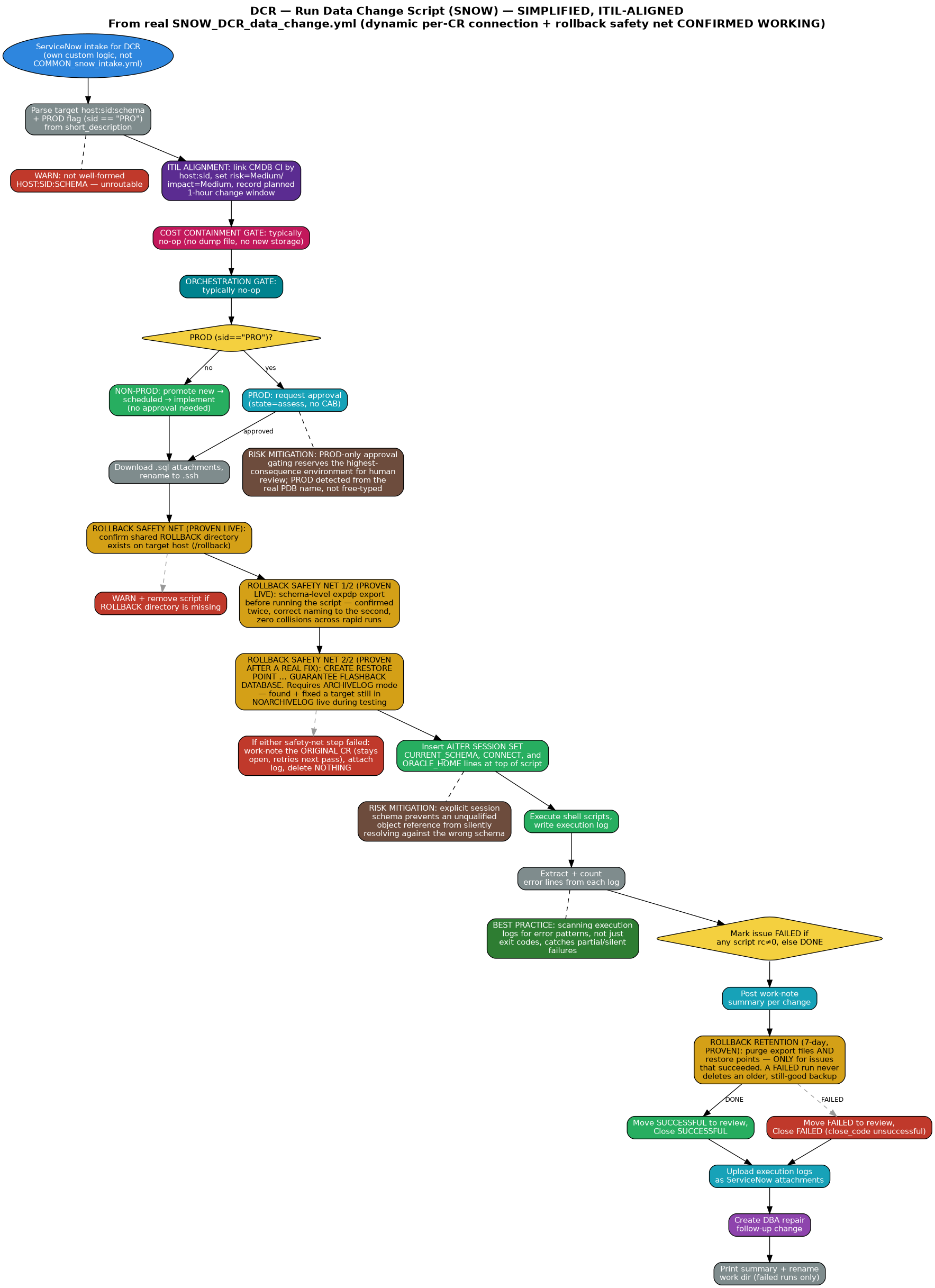
Spec: DCR | HOST:SID:SCHEMA | title (+ .sql attachment)
MANAGEMENT approval for PROD only. Connects DYNAMICALLY to the specific host/PDB/schema chosen per change. Takes a schema export AND a PDB-level guaranteed restore point as a rollback safety net before every script runs (CONFIRMED WORKING end-to-end on real infrastructure, CHG0033198/CHG0033199) — not automatic rollback, since arbitrary SQL can partially succeed in legitimate ways. Includes ITIL classification, cost gate, orchestration gate, and documented best-practice controls. Own custom intake (not COMMON_snow_intake.yml)
Start
Process
ServiceNow
Decision
Approval
SQL/Execute
ITIL Alignment
Cost Containment
Orchestration
Rollback Backup (proven)
Risk Mitigation
Best Practice
Close OK
Close Failed
Follow-up
| 1 | 0: create timestamped working directory (snow_work_dir) |
| 2 | 0: pre-flight: verify instance awake + credentials valid |
| 3 | 0: abort with clear message if instance unreachable |
| 4 | 0: query DCR-tagged CRs in new/assess/authorize/scheduled/implement |
| 5 | 0: collect tagged CRs, parse target host:sid:schema |
| 6 | 0: annotate each change: host + sid + schema + PROD flag (sid == "PRO") from short_description |
| → | WARN: target isn't well-formed HOST:SID:SCHEMA — treated as unroutable until corrected |
| 7 | 0: intake summary |
| ITIL | ITIL alignment: classify each change — link the CMDB Configuration Item by host:sid, set risk=Medium/impact=Medium, and record a planned 1-hour change window |
| COST | Cost gate: evaluate whether this change crosses the budget-approval threshold — typically a no-op for a data change script (no real cost driver); the gate blocks automatically if that ever changes |
| ORCH | Orchestration gate: check for unsatisfied pre-dependencies on the target CI — typically a no-op (no dependency chain registered); the gate holds automatically if one ever is |
| 8 | 0: promote NON-PROD new → scheduled (step 1 of 2) |
| 9 | 0: promote NON-PROD scheduled → implement (step 2) — no approval needed |
| → | WARN: NON-PROD change could not advance to implement |
| 10 | 0: PROD (sid == "PRO"): request approval (state=assess, no CAB) |
| → | Risk mitigation: PROD-only approval gating reserves the highest-consequence environment for human review while non-PROD stays fast-moving and low-friction; PROD is now detected from the real selected PDB name, not a free-typed word |
| 11 | 0: note PROD changes awaiting approval |
| 12 | 0: APPROVED PROD: assess → authorize → scheduled → implement |
| 13 | 0: re-query executable queue (state=implement) |
| 14 | 0: build sys_id → host/sid/schema lookup dict from the earlier annotation pass |
| 15 | 0: build snow_work, re-attaching host/sid/schema per item (the re-query only returns raw ServiceNow fields; annotation is deliberately not re-parsed a second time) |
| 16 | 0: build snow_cr_map (reject approval in [requested, rejected]) |
| 17 | 0: executable queue summary |
| 18 | 1: end play when snow_work length == 0 |
| 19 | 3: create per-change subdirectory in snow_work_dir |
| 20 | 4: list attachments on each CR |
| 21 | 4: build change → attachment pairs |
| → | WARN: duplicate .sql filenames on a change |
| 22 | 4: download .sql attachments (case-insensitive) |
| 23 | 4b: rename .sql → .ssh (case-insensitive) |
| 24 | 5: build issue_key → host/sid/schema lookup from snow_work |
| 25 | 5: build scripts_to_run (issue_key, host, sid, schema, script_path), only successful downloads |
| → | WARN: if none downloaded |
| → | WARN: target host not in oracle_instance_map — fails loudly at connection time instead of being silently skipped |
| 25b | 5f: compute rollback artifact names per script (naming convention: <CR#>_rollback_<SID>_<SCHEMA>_<timestamp> for the export file; a separate underscore-adapted form for the restore point, since Oracle identifiers don't accept hyphens) |
| 25c | 5f: confirm the shared ROLLBACK directory object exists on each target host (OS path /rollback, created once manually across all nodes and every PDB — NOT self-provisioned by this playbook) |
| → | WARN and remove any script whose target host is missing the ROLLBACK directory — refuses to run without a safety net rather than guessing a path |
| 25d | Rollback safety net 1/2 (CONFIRMED WORKING): schema-level expdp export before running the script, connecting to the PDB's own service — proven live twice (CHG0033198, CHG0033199), correct naming down to the second with zero collisions across rapid repeated runs |
| 25e | Rollback safety net 2/2 (CONFIRMED WORKING): CREATE RESTORE POINT ... GUARANTEE FLASHBACK DATABASE at the PDB level — confirmed live, requires ARCHIVELOG mode on the target (found and fixed a real gap: one target host was still in NOARCHIVELOG, switched live before testing) |
| → | If either safety-net step failed: post a work note directly on the ORIGINAL CR (not a separate follow-up, since this CR stays open and retries next pass once the underlying issue is fixed) and attach the possibly-partial export log. Per explicit instruction, NOTHING in /rollback is ever deleted on failure — that script is removed from this pass's run list only, the CR itself is untouched |
| 26 | 5b: insert ALTER SESSION SET CURRENT_SCHEMA at top of each script |
| → | Risk mitigation: explicitly setting the session schema before running the script prevents an unqualified object reference from silently resolving against the wrong schema |
| 27 | 5c: insert CONNECT line at top of each script (network auth, per-CR host:sid — DYNAMIC per change, no longer a single fixed global connection) |
| 28 | 5e: insert ORACLE_HOME export + sqlplus opener at top of each script (per-CR host, via oracle_instance_map) |
| 29 | 5d: append 'EOF' footer at bottom of each script |
| 30 | 6: execute shell scripts (bash script_path, ignore_errors) |
| 31 | 6a: write combined stdout/stderr/exit-code to .log file |
| 32 | 6b: build stdout tail lookup (last 10 non-empty lines) + show per-script results |
| 33 | 6c: read log file per script + extract/count error lines |
| → | Best practice: scanning execution logs for error patterns (ORA-/SP2-/ERROR/WARN) rather than trusting exit codes alone catches partial or silent failures |
| 34 | 6d: show detailed error report for failed scripts |
| 35 | 7: mark issue FAILED if any script rc≠0, else DONE |
| 36 | 7: show final per-issue outcomes |
| 37 | 7b: post work-note summary per change |
| 37b | Rollback retention (7-day, CONFIRMED WORKING): purges export files AND restore points older than 7 days for this sid+schema — MOVED to run after the outcome is known, only for issues that succeeded. A FAILED run never deletes an older, still-good safety net for the same project, even past 7 days |
| 38 | 8: move SUCCESSFUL to Review + Close SUCCESSFUL |
| 39 | 9: move FAILED to Review (required before closing) + Close FAILED |
| → | WARN: if FAILED change could not be closed |
| 40 | 10: upload execution logs as ServiceNow attachments |
| 41 | 10b: write failure report per FAILED issue |
| 42 | 10b: create DBA repair follow-up change for FAILED changes |
| 43 | 11: build + print summary (per-issue outcomes, per-script error details) |
| 44 | 12: rename snow_work_dir to _failed (failed runs only), confirm final path |
DDP - Drop / Decommission Pluggable Database Automation Workflow (SIMPLIFIED, ITIL-ALIGNED)
Spec: DDP | host | CDB | PDB_TO_DROP
MANAGEMENT+CAB approval always required (destructive). Intake uses a combined host+CDB dropdown plus a cascaded target-PDB dropdown. Takes BOTH a logical export (expdp) AND a physical RMAN backup before every drop, self-diagnosing directory pre-flight, 7-day retention, and nothing ever deleted on failure — CONFIRMED WORKING end-to-end on real infrastructure (CHG0033203). Includes ITIL classification, cost gate, orchestration gate, and documented risk-mitigation controls
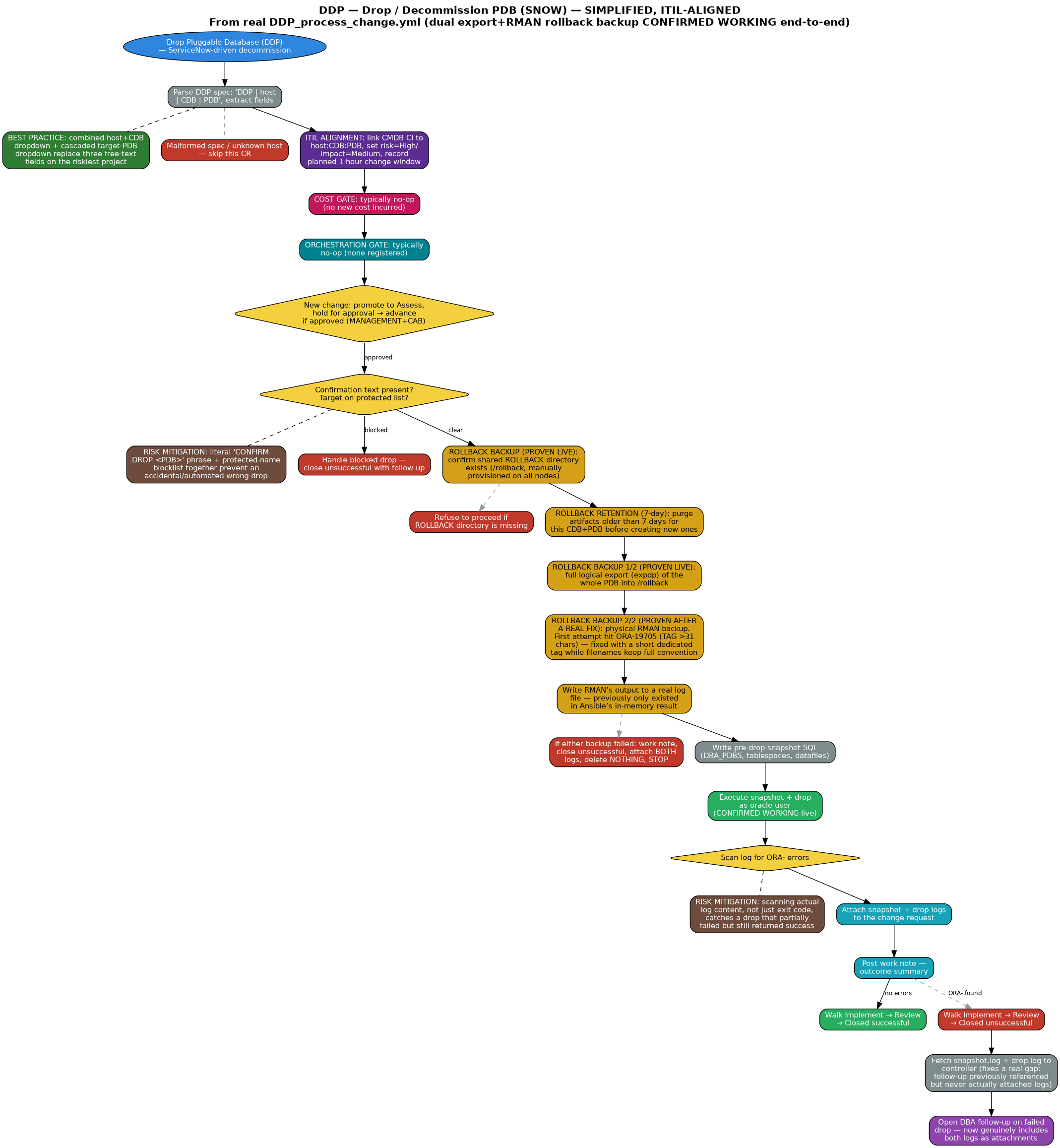
Spec: DDP | host | CDB | PDB_TO_DROP
MANAGEMENT+CAB approval always required (destructive). Intake uses a combined host+CDB dropdown plus a cascaded target-PDB dropdown. Takes BOTH a logical export (expdp) AND a physical RMAN backup before every drop, self-diagnosing directory pre-flight, 7-day retention, and nothing ever deleted on failure — CONFIRMED WORKING end-to-end on real infrastructure (CHG0033203). Includes ITIL classification, cost gate, orchestration gate, and documented risk-mitigation controls
Start
Process
ServiceNow
Decision
Approval
SQL/Execute
ITIL Alignment
Cost Containment
Orchestration
Rollback Backup (proven)
Risk Mitigation
Best Practice
Close OK
Close Failed
Follow-up
| 1 | Drop Pluggable Database (DDP) — ServiceNow-driven decommission |
| 2 | Parse DDP spec: 'DDP | host | CDB | PDB' |
| → | Best practice: the intake form's combined host+CDB dropdown, plus a target-PDB dropdown that cascades from it (via a real u_oracle_target lookup, not a plain sys_id filter), replaces three free-text fields on the most destructive project in the suite |
| 3 | Extract spec fields |
| → | Malformed spec — skip this CR |
| → | Unknown host — skip this CR |
| 4 | Resolve oracle_home/SID/user from oracle_instance_map |
| ITIL | ITIL alignment: classify this drop — link the CMDB Configuration Item to host:CDB:PDB, set risk=High/impact=Medium, and record a planned 1-hour change window |
| COST | Cost gate: evaluate whether this change crosses the budget-approval threshold — typically a no-op for a drop (no new cost incurred); the gate blocks automatically if that ever changes |
| ORCH | Orchestration gate: check for unsatisfied pre-dependencies on the target PDB (e.g. another CI that must be decommissioned first) — typically a no-op (no dependency chain registered); the gate holds automatically if one ever is |
| 5 | Set ready-to-execute flag default |
| 6 | New change: promote to Assess, hold for approval |
| 7 | Pending approval or mid-walk: advance if approved |
| 8 | Already at Implement — ready to execute |
| → | Not ready this pass — stop here |
| 9 | Check for required confirmation line |
| 10 | Escalate block reason if target is protected |
| → | Risk mitigation: a literal 'CONFIRM DROP <PDB>' phrase requirement plus a protected-name blocklist together prevent an accidental or automated drop of the wrong or a protected database |
| → | Handle blocked drop — close unsuccessful with follow-up |
| 11 | Compute rollback artifact name (naming convention: <CR#>_rollback_<CDB>_<PDB>_<timestamp> — no schema concept at whole-PDB scope, so that slot holds the PDB being dropped) |
| 12 | Confirm the shared ROLLBACK directory object exists (OS path /rollback, created once manually across all nodes and every PDB — NOT self-provisioned by this playbook) |
| → | Refuse to proceed if the ROLLBACK directory object is missing — fails loud with the exact CREATE DIRECTORY statement needed, confirmed live on a real target missing the directory before setup was complete |
| 13 | Purge rollback artifacts (export dumps AND RMAN backup pieces) older than 7 days for this CDB+PDB, before creating new ones |
| 14 | Rollback safety net 1/2 (CONFIRMED WORKING): full logical export (expdp) of the whole PDB, connecting directly to the PDB's own service name, into /rollback — proven live, ~100MB dump produced in under 2 minutes |
| 15 | Rollback safety net 2/2 (CONFIRMED WORKING after a real fix): physical RMAN backup of the whole PDB into /rollback. First live attempt hit ORA-19705 (RMAN TAG exceeds Oracle's 31-character limit) — the full naming convention is far longer than that. Fixed with a short dedicated tag (DDP_<CR#>) while the actual backup piece FILENAMES still carry the full convention (no such length limit there) |
| 16 | Write RMAN's output to a real log file on the target host — previously only existed in Ansible's in-memory result, not an actual inspectable file |
| → | Handle rollback backup failure (CONFIRMED WORKING — caught the real ORA-19705 failure live): if either artifact failed, work-note the CR, walk it to Closed unsuccessful, fetch both the export log AND the RMAN log to the controller, open a DBA follow-up with both attached, and STOP — a drop is never attempted without a verified backup. Per explicit instruction, NOTHING in /rollback is ever deleted on failure, even incomplete artifacts, so the evidence stays available for forensics |
| 17 | Ensure base working directory exists, world-traversable |
| 18 | Ensure remote working directory exists |
| 19 | Write pre-drop snapshot SQL |
| → | Best practice: capturing a full pre-drop snapshot (DBA_PDBS, tablespaces, datafiles) before an irreversible operation preserves evidence of exactly what existed beforehand — a lightweight metadata companion to the full export+RMAN backup above |
| 20 | Write drop SQL — close then drop including datafiles |
| 21 | Write execution wrapper (explicit ORACLE_SID export — sudo strips env) |
| 22 | Post work note — drop starting |
| 23 | CONFIRMED WORKING: execute snapshot + drop as oracle user — real "Pluggable database altered" / "Pluggable database dropped" confirmed on CHG0033203 after the RMAN fix |
| 24 | Read drop log |
| 25 | Determine outcome (splitlines only) |
| 26 | Refine outcome by scanning log lines for ORA- errors |
| 27 | Downgrade to failure if any ORA- error line is present |
| → | Risk mitigation: scanning the actual log content for error patterns, not just the shell exit code, catches a drop that partially failed but still returned success |
| 28 | Attach snapshot + drop logs to the change request |
| → | WARN: if any log failed to attach |
| 29 | Post work note — outcome summary |
| 30 | Walk Implement → Review |
| 31 | Walk Review → Closed successful |
| 32 | Walk Review → Closed unsuccessful |
| → | WARN: if this CR could not be closed |
| 33 | Fetch snapshot.log and drop.log to the controller (fixes a real gap found today: the DBA follow-up previously referenced these logs by remote path but never actually attached them — the attachment mechanism only accepts controller-local files) |
| 34 | Open DBA follow-up on failed drop — now genuinely includes both logs as attachments, and references where the intact rollback backup remains on disk |
PAT - Apply Oracle Patch Automation Workflow (SIMPLIFIED, ITIL-ALIGNED)
Spec: PAT | host:SID | patch_number
MANAGEMENT+CAB approval required. Includes orchestration dependency gating, ITIL change classification, cost containment, and documented risk-mitigation controls
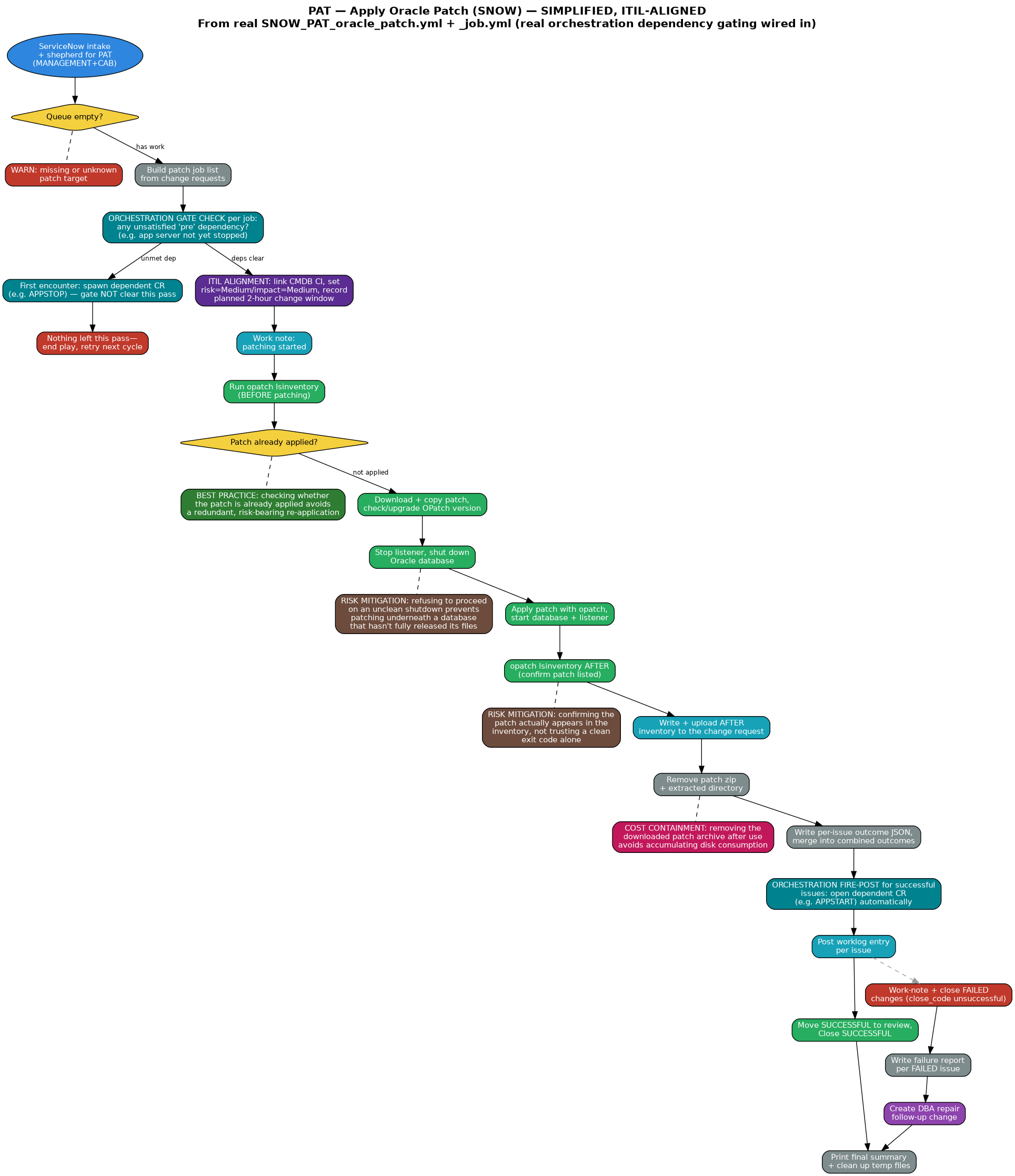
Spec: PAT | host:SID | patch_number
MANAGEMENT+CAB approval required. Includes orchestration dependency gating, ITIL change classification, cost containment, and documented risk-mitigation controls
Start
Process
ServiceNow
Decision
Approval
SQL/Execute
Orchestration
ITIL Alignment
Cost Containment
Risk Mitigation
Best Practice
Close OK
Close Failed
Follow-up
| 1 | PLAY1: fetch ServiceNow PAT changes and build patch job list |
| 2 | 0: remove stale per-issue and combined outcome files from any prior run |
| 3 | 0-1: ServiceNow intake and shepherd for PAT (MANAGEMENT+CAB) |
| 4 | 1: show 'No Tasks Found' and exit cleanly when queue is empty |
| 5 | 2: WARN and skip changes with a missing or unknown patch target |
| 6 | 2: build patch job list from change requests |
| 7 | 3: write patch job list to temp file for PLAY 2 + ServiceNow credential sidecar |
| ORCH | Orchestration gate check per job: any unsatisfied 'pre' dependency registered? (e.g. app server not yet stopped) |
| → | First encounter: spawn dependent CR (e.g. APPSTOP), insert orchestration_run + step — gate NOT clear this pass |
| → | Nothing left this pass: end play, retry next cron cycle |
| ITIL | ITIL alignment: classify each remaining job — link the CMDB Configuration Item, set risk=Medium/impact=Medium, and record a planned 2-hour change window |
| 9 | PLAY2-INIT: read + decode patch job list |
| 10 | JOB: set Oracle environment for target host |
| 11 | JOB: work note: patching started |
| 12 | JOB: run opatch lsinventory (BEFORE patching, full output) |
| 13 | JOB: flag whether the patch is already applied |
| → | Best practice: checking whether the patch is already applied avoids a redundant, risk-bearing re-application against a system already in the target state |
| 14 | JOB: write + upload BEFORE inventory to the change request |
| 15 | JOB: create patch staging directory on target host |
| 16 | JOB: download patch from Oracle MOS (on controller) — fail if download failed |
| 17 | JOB: copy zip to target host, unzip — fail if unzip failed |
| 18 | JOB: check current vs. required OPatch version (from patch README) |
| 19 | JOB: download + install new OPatch (6880880) if upgrade needed |
| 20 | JOB: stop listener (if running) |
| 21 | JOB: shut down Oracle database — fail if not clean |
| → | Risk mitigation: refusing to proceed on an unclean shutdown prevents applying a binary patch underneath a database that hasn't fully released its files |
| 22 | JOB: kill remaining oracle processes using ORACLE_HOME (CheckActiveFilesAndExecutables) |
| 23 | JOB: ensure + verify patch directory readable by oracle |
| 24 | JOB: apply patch with opatch |
| 25 | JOB: start Oracle database, start listener |
| 26 | JOB: opatch lsinventory AFTER (confirm patch listed) |
| → | Risk mitigation: confirming the patch actually appears in the inventory after applying it, rather than trusting a clean exit code alone |
| 27 | JOB: write + upload AFTER inventory to the change request |
| 28 | JOB: determine overall job outcome |
| 29 | JOB: remove patch zip + extracted directory |
| → | Cost containment: removing the downloaded patch archive and staging files immediately after use avoids accumulating unnecessary disk consumption across repeated patch cycles |
| 30 | JOB: write per-issue outcome JSON, merge into combined outcomes file on controller |
| ORCH | Orchestration fire-post for successful issues: check dependency_registry, open dependent CR (e.g. APPSTART) automatically |
| 31 | PLAY3-INIT: read + decode patch outcomes |
| 32 | 10: post worklog entry per issue |
| 33 | 11: move SUCCESSFUL to review, Close SUCCESSFUL |
| 34 | 11: work-note FAILED changes with failure summary |
| 35 | 11: close FAILED changes (close_code unsuccessful) |
| 36 | 11b: write failure report per FAILED issue |
| 37 | 11b: create DBA repair follow-up change |
| 38 | 12: print final summary + clean up temp files |
PDB - Create Pluggable Database Automation Workflow (SIMPLIFIED, ITIL-ALIGNED)
Spec: PDB | host | CDB_NAME | NEW_PDB
MANAGEMENT approval required. Intake now uses a single combined host+CDB dropdown instead of two free-text fields. Includes ITIL classification, risk mitigation, cost gate, orchestration gate, and documented best-practice controls
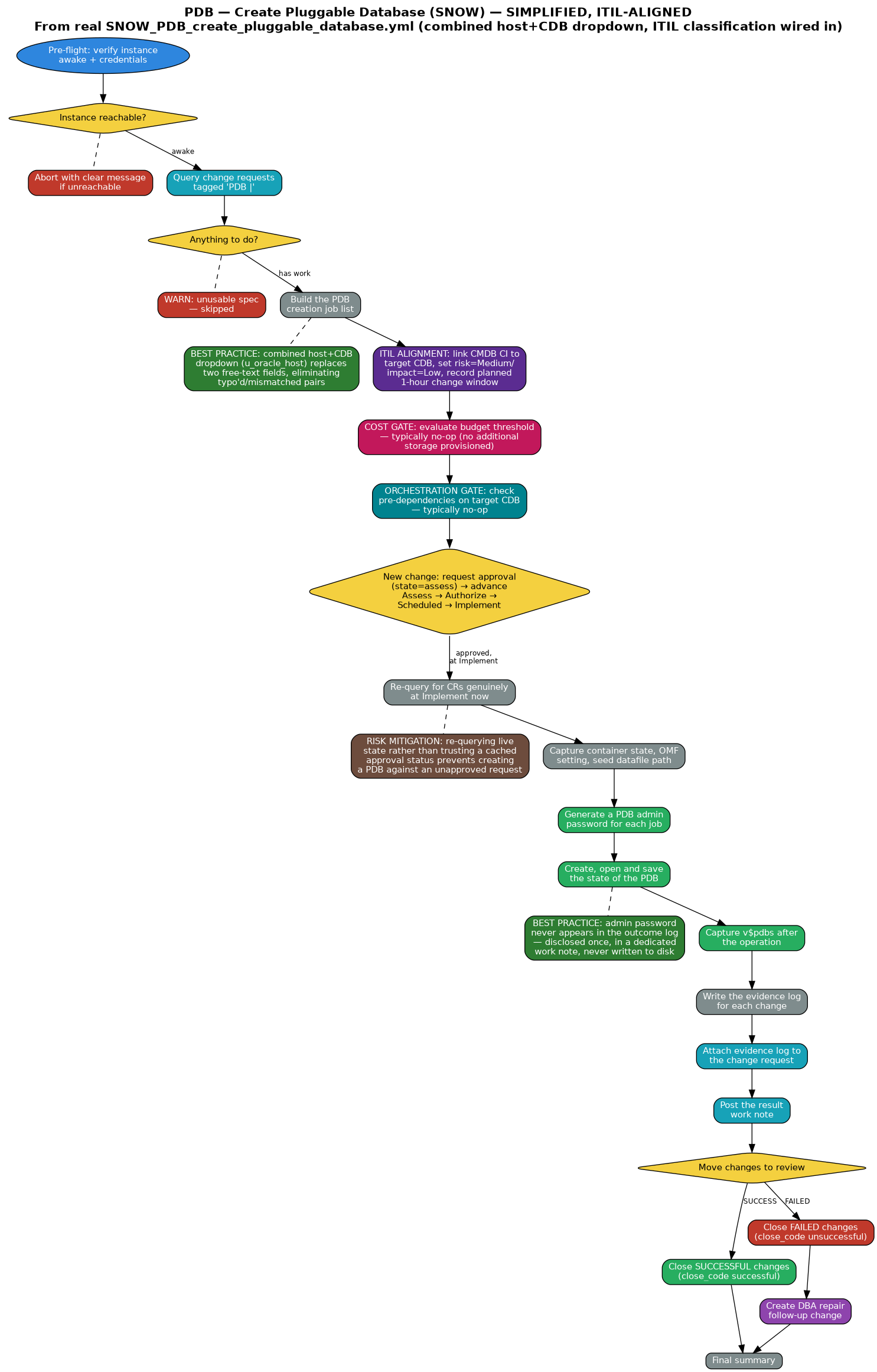
Spec: PDB | host | CDB_NAME | NEW_PDB
MANAGEMENT approval required. Intake now uses a single combined host+CDB dropdown instead of two free-text fields. Includes ITIL classification, risk mitigation, cost gate, orchestration gate, and documented best-practice controls
Start
Process
ServiceNow
Decision
Approval
SQL/Execute
ITIL Alignment
Cost Containment
Orchestration
Risk Mitigation
Best Practice
Close OK
Close Failed
Follow-up
| 1 | 0: pre-flight: verify instance awake + credentials |
| 2 | 0: abort with clear message if unreachable |
| 3 | 0: query change requests tagged 'PDB |' |
| 4 | 0: collect tagged change requests |
| 5 | 0: intake summary |
| 6 | 0: exit cleanly when there is nothing to do |
| → | WARN: unusable spec — skipped |
| 7 | 1: build the PDB creation job list |
| → | Best practice: the intake form's combined host+CDB dropdown (sourced from u_oracle_host) replaces two separate free-text fields, eliminating typo'd or mismatched host/CDB pairs before the request is even submitted |
| → | Nothing valid to process — ends here |
| 8 | 1: jobs queued |
| ITIL | ITIL alignment: classify each job — link the CMDB Configuration Item to the target CDB, set risk=Medium/impact=Low, and record a planned 1-hour change window |
| COST | Cost gate: evaluate whether this change crosses the budget-approval threshold — typically a no-op for PDB creation (no real cost driver, no additional storage provisioned); the gate blocks automatically if that ever changes |
| ORCH | Orchestration gate: check for unsatisfied pre-dependencies on the target CDB — typically a no-op (no dependency chain registered); the gate holds automatically if one ever is |
| 9 | 2: new change: request approval (state=assess) |
| 10 | 2: work note: awaiting approval |
| 11 | 2: advance: Assess → Authorize → Scheduled → Implement |
| → | WARN: if a change could not be advanced |
| 12 | 2: re-query for CRs genuinely at Implement now |
| 13 | 2: filter pdb_jobs to only genuinely-implemented ones |
| → | Risk mitigation: re-querying live state rather than trusting a cached approval status prevents creating a PDB against a request that isn't genuinely approved yet |
| → | Nothing ready this pass (still pending approval) |
| 14 | 2: work note: PDB creation started |
| 15 | 3: capture container state, OMF setting, seed datafile path |
| 16 | 3: fold pre-check results into each job |
| 17 | 3: show what the pre-check found |
| 18 | 4: generate a PDB admin password for each job |
| 19 | 4: create datafile directory when OMF is not in use |
| 20 | 4: create, open and save the state of the PDB |
| 21 | 4: show the creation outcome (no credentials) |
| → | Best practice: the admin password never appears in this outcome log — it's disclosed exactly once, in a dedicated work note, never written to disk logs |
| 22 | 5: capture v$pdbs after the operation |
| 23 | 5: determine the outcome for each change |
| 24 | 5: per-change outcome |
| 25 | 6: ensure the log directory exists, set the run timestamp |
| 26 | 6: write the evidence log for each change |
| 27 | 6: attach the evidence log to the change request |
| → | WARN: if evidence log could not be attached |
| 28 | 7: post the result work note |
| 29 | 8: move changes to review |
| 30 | 8: close SUCCESSFUL changes (close_code successful) |
| 31 | 8: close FAILED changes (close_code unsuccessful) |
| → | WARN: if a change could not be closed |
| 32 | 9: create DBA repair follow-up change |
| 33 | 10: final summary |
PRF - AWR Performance Analysis Automation Workflow (SIMPLIFIED, ITIL-ALIGNED)
Spec: PRF | host | ORACLE_SID | START_DATETIME | END_DATETIME
NO APPROVAL — read-only analysis, never modifies the database. Includes ITIL classification, cost containment, orchestration gate, and documented risk-mitigation controls
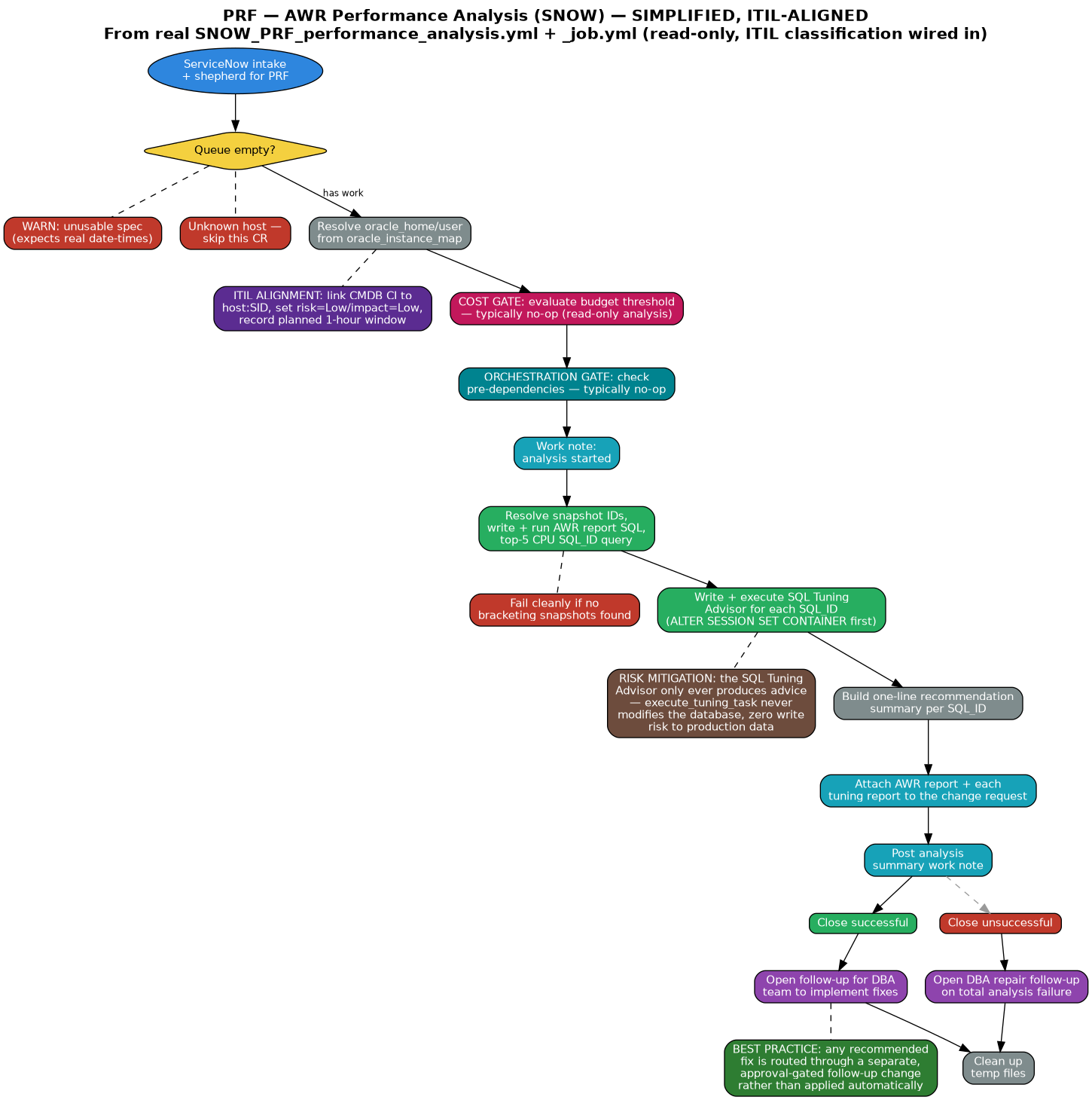
Spec: PRF | host | ORACLE_SID | START_DATETIME | END_DATETIME
NO APPROVAL — read-only analysis, never modifies the database. Includes ITIL classification, cost containment, orchestration gate, and documented risk-mitigation controls
Start
Process
ServiceNow
Decision
SQL/Execute
ITIL Alignment
Cost Containment
Orchestration
Risk Mitigation
Best Practice
Close OK
Close Failed
Follow-up
| 1 | PRE: ServiceNow intake and shepherd for PRF |
| 2 | PRE: nothing to do? end play when queue empty |
| 3 | PRE: build job list (split short_description: host/SID/start_dt/end_dt) |
| → | WARN: unusable spec — expects date-times like '2026-02-21 21:02:00' |
| → | Unknown host — skip this CR |
| 4 | JOB: resolve oracle_home/user from oracle_instance_map |
| 5 | JOB: set per-job facts |
| ITIL | ITIL alignment: classify this analysis — link the CMDB Configuration Item to host:SID, set risk=Low/impact=Low, and record a planned 1-hour change window |
| COST | Cost containment gate: evaluate whether this change crosses the budget-approval threshold — typically a no-op for a read-only analysis (no real cost driver); the gate blocks automatically if that ever changes |
| ORCH | Orchestration gate: check for unsatisfied pre-dependencies on the target CI — typically a no-op (no dependency chain registered); the gate holds automatically if one ever is |
| 6 | JOB: work note: analysis started |
| 7 | JOB: ensure base working directory exists |
| 8 | JOB: ensure per-job working directory writable |
| 9 | JOB: write snapshot-resolution SQL |
| 10 | JOB: write snapshot-resolution wrapper (explicit ORACLE_SID) |
| 11 | JOB: resolve snapshot IDs as oracle |
| 12 | JOB: parse resolved snapshot IDs |
| → | Fail cleanly if no bracketing snapshots found |
| 13 | JOB: show resolved snapshot range |
| 14 | JOB: write AWR report SQL |
| 15 | JOB: write top-5 CPU SQL_ID query |
| 16 | JOB: write execution wrapper (explicit ORACLE_SID) |
| 17 | JOB: run AWR report + top-5 query as oracle |
| 18 | JOB: parse top-5 SQL_IDs from output |
| → | Determine whether top-5 extraction succeeded |
| 19 | JOB: show top SQL_IDs found |
| 20 | JOB: write tuning advisor script per SQL_ID |
| 21 | JOB: execute tuning advisor per SQL_ID (ALTER SESSION SET CONTAINER first) |
| → | Risk mitigation: the SQL Tuning Advisor only ever produces advice — execute_tuning_task never modifies the database, so this entire analysis carries zero write risk to production data |
| 22 | JOB: read each tuning advisor report |
| 23 | JOB: build one-line recommendation summary per SQL_ID |
| 24 | JOB: attach AWR report to the change request |
| 25 | JOB: attach each tuning report to the change request |
| 26 | JOB: post analysis summary work note |
| 27 | JOB: walk Implement → Review |
| 28 | JOB: close successful |
| 29 | JOB: close unsuccessful |
| 30 | JOB: open follow-up for DBA team to implement fixes |
| → | Best practice: any recommended fix (new index, SQL Profile) is routed through a separate, approval-gated follow-up change rather than applied automatically — analysis and implementation stay cleanly separated |
| 31 | JOB: open DBA repair follow-up on total failure |
| 32 | JOB: clean up temp files |
REF - Environment Refresh Automation Workflow (SIMPLIFIED, ITIL-ALIGNED)
Spec: REF | SRC_HOST:SRC_SID:SRC_SCHEMA=>TGT_HOST:TGT_SID:TGT_SCHEMA
3-play structure: PLAY1/PLAY3 run on the controller, PLAY2 runs each job on its OWN target host. Uses a real NETWORK_LINK database-link import (no dump files) and supports genuine cross-host refreshes. Takes a verified pre-drop schema export as a rollback safety net (CONFIRMED WORKING on real infrastructure, cross-host lnx001→lnx002). Includes ITIL classification, cost containment, orchestration gate, and documented risk-mitigation controls
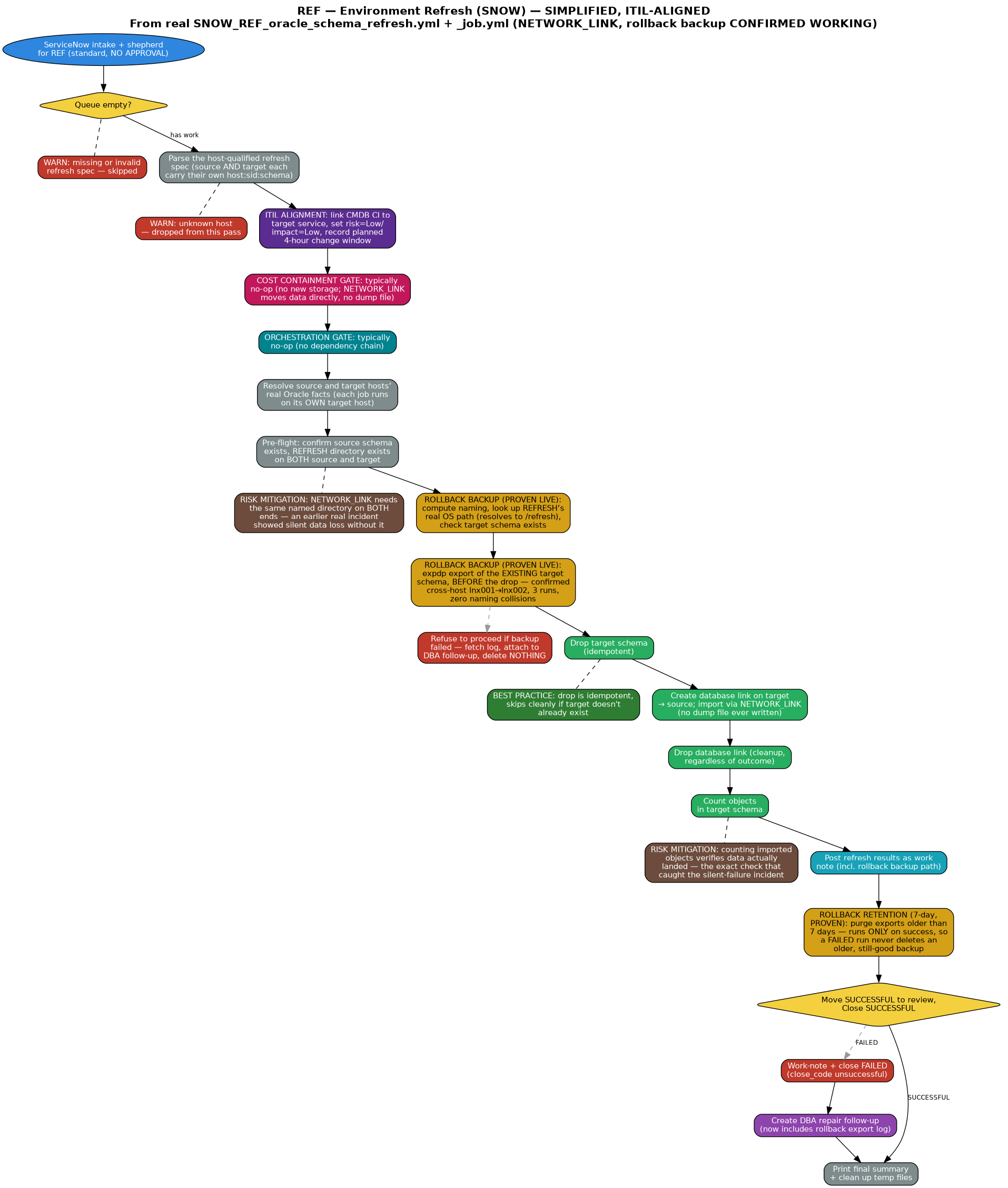
Spec: REF | SRC_HOST:SRC_SID:SRC_SCHEMA=>TGT_HOST:TGT_SID:TGT_SCHEMA
3-play structure: PLAY1/PLAY3 run on the controller, PLAY2 runs each job on its OWN target host. Uses a real NETWORK_LINK database-link import (no dump files) and supports genuine cross-host refreshes. Takes a verified pre-drop schema export as a rollback safety net (CONFIRMED WORKING on real infrastructure, cross-host lnx001→lnx002). Includes ITIL classification, cost containment, orchestration gate, and documented risk-mitigation controls
Start
Process
ServiceNow
Decision
SQL/Execute
Orchestration
ITIL Alignment
Cost Containment
Rollback Backup (proven)
Risk Mitigation
Best Practice
Close OK
Close Failed
Follow-up
| 1 | PLAY1: fetch ServiceNow refresh changes and parse the host-qualified spec |
| 2 | PRE-FLIGHT: remove stale outcomes file from any aborted previous run |
| 3 | 0-1: ServiceNow intake and shepherd for REF (standard, NO APPROVAL) |
| 4 | 1: show 'No Tasks Found' and exit cleanly when queue is empty |
| → | WARN: missing or invalid refresh spec — skipped |
| 5 | 2: parse the host-qualified refresh spec (source AND target each carry their own host:sid:schema — genuinely cross-host, not a single-host assumption) |
| → | WARN: job references an unknown host — dropped from this pass |
| 6 | 2: keep only jobs referencing known hosts |
| 7 | 2: show parsed refresh jobs |
| ITIL | ITIL alignment: classify this refresh — link the CMDB Configuration Item to the target service, set risk=Low/impact=Low, and record a planned 4-hour change window |
| COST | Cost containment gate: evaluate whether this change crosses the budget-approval threshold — typically a no-op for a schema refresh (no new storage; NETWORK_LINK moves data directly, no dump file); the gate blocks automatically if that ever changes |
| ORCH | Orchestration gate: check for unsatisfied pre-dependencies on the target CI — typically a no-op (no dependency chain registered); the gate holds automatically if one ever is |
| 8 | 2: write refresh job list to temp file for PLAY 2 |
| 9 | PLAY2-INIT: read + decode refresh job list |
| 10 | JOB: resolve source and target hosts' real Oracle facts (each job runs on its OWN target host) |
| 11 | JOB: ensure working directory exists on target host |
| 12 | JOB: pre-flight: confirm source schema exists — fail cleanly if not |
| 13 | JOB: pre-flight: confirm REFRESH directory exists on SOURCE — fail cleanly if not |
| 14 | JOB: pre-flight: confirm REFRESH directory exists on TARGET — fail cleanly if not |
| → | Risk mitigation: a NETWORK_LINK import needs the same named directory object on BOTH ends for internal worker coordination — without it, an earlier real incident showed the job reports success while the data silently never persists. This pre-flight check now fails loudly instead, before any work begins |
| 15 | JOB: compute rollback artifact name (naming convention: <CR#>_rollback_<target service>_<target schema>_<timestamp>, shared across every export/backup/restore point in the suite) |
| 16 | JOB: look up the REFRESH directory's real OS path dynamically from dba_directories (confirmed on real infrastructure: resolves to /refresh) rather than assuming one |
| 17 | JOB: check whether the target schema currently exists — a fresh/nonexistent target has nothing worth exporting |
| 18 | Rollback safety net (CONFIRMED WORKING): expdp export of the existing target schema into REFRESH, BEFORE the drop — proven live on CHG0033200, cross-host lnx001→lnx002, three independent runs, zero naming collisions |
| → | Refuse to proceed if the pre-drop backup failed — a drop is never attempted without a verified backup in place. The (possibly partial) export log is fetched to the controller and attached to the DBA follow-up; per explicit instruction, NOTHING is ever deleted on failure, even incomplete artifacts |
| 19 | JOB: drop target schema (idempotent) |
| → | Best practice: the drop is written to be idempotent, skipping cleanly if the target schema doesn't already exist, rather than erroring on a fresh target |
| 20 | JOB: create database link on target, pointing back to source — fail cleanly if link creation fails |
| 21 | JOB: import target schema via NETWORK_LINK directly over the database link (no dump file is ever written) |
| 22 | JOB: show import status |
| 23 | JOB: mark failed if import did not succeed |
| 24 | JOB: drop database link (cleanup — runs regardless of outcome) |
| 25 | JOB: count objects in target schema |
| → | Risk mitigation: counting imported objects verifies the refresh actually landed data via a real query, rather than trusting a clean import exit code alone — this is exactly the check that caught the REFRESH-directory silent-failure incident above |
| 26 | JOB: post refresh results as a ServiceNow work note (includes the rollback backup's exact file path) |
| 27 | JOB: ensure follow-up log dir exists on controller (failed only) |
| 28 | JOB: preserve failure details on controller (failed only) |
| 29 | Rollback retention (7-day): purges rollback exports older than 7 days for this SAME target service+schema — runs ONLY on success (moved here deliberately), so a FAILED refresh never deletes an older, still-good backup even if it's crossed 7 days |
| 30 | JOB: write outcome to controller temp file |
| 31 | PLAY3-INIT: read + decode job outcomes |
| 32 | 7: show outcome per issue |
| 33 | 8: move SUCCESSFUL to review, Close SUCCESSFUL |
| 34 | 8: work-note FAILED changes with failure summary |
| 35 | 8: close FAILED changes (close_code unsuccessful) |
| 36 | 8b: create DBA repair follow-up change for FAILED refreshes (now includes the rollback export log as an attachment, alongside the failure log) |
| 37 | 9: print final summary + clean up temp files |
UPG - Oracle 21c → 26ai Upgrade Automation Workflow (SIMPLIFIED, ITIL-ALIGNED)
Spec: UPG | host | ORACLE_SID
MANAGEMENT+CAB approval required. Intake uses a single combined host+SID dropdown. NEW: automatic rollback on a post-deploy verification failure — explicitly flashes back to the guaranteed restore point AutoUpgrade already retains, confirms the database is genuinely back on its original version, then drops the spent restore point. Also purges orphaned guaranteed restore points older than 7 days on every run (found and cleared one real 48-day-old leftover from an earlier test on lnx001 during today's work). The rollback code path itself is built and reviewed but NOT yet exercised against a real deploy-succeeds-but-verify-fails failure. Includes ITIL classification, cost containment gate, orchestration gate, and documented risk-mitigation controls
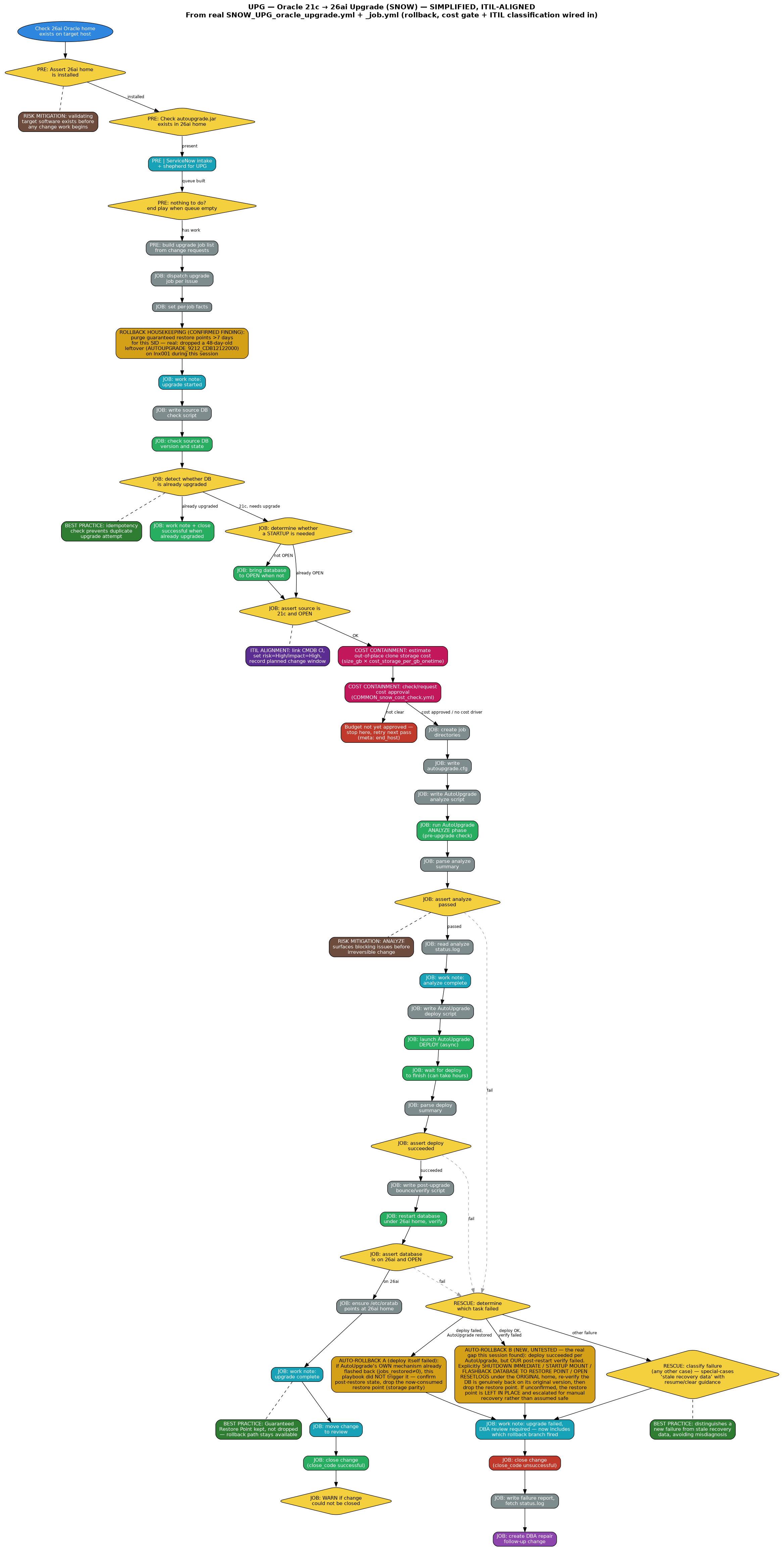
Spec: UPG | host | ORACLE_SID
MANAGEMENT+CAB approval required. Intake uses a single combined host+SID dropdown. NEW: automatic rollback on a post-deploy verification failure — explicitly flashes back to the guaranteed restore point AutoUpgrade already retains, confirms the database is genuinely back on its original version, then drops the spent restore point. Also purges orphaned guaranteed restore points older than 7 days on every run (found and cleared one real 48-day-old leftover from an earlier test on lnx001 during today's work). The rollback code path itself is built and reviewed but NOT yet exercised against a real deploy-succeeds-but-verify-fails failure. Includes ITIL classification, cost containment gate, orchestration gate, and documented risk-mitigation controls
Start
Process
ServiceNow
Decision
Approval
SQL/Execute
ITIL Alignment
Cost Containment
Orchestration
Auto-Rollback (built, untested)
Risk Mitigation
Best Practice
Close OK
Close Failed
Follow-up
| 1 | Check 26ai Oracle home exists on target host |
| 2 | PRE: Assert 26ai home is installed |
| 3 | PRE: Check autoupgrade.jar exists in 26ai home |
| → | Risk mitigation: validating the target software exists before any change work begins prevents a doomed run from ever reaching production data |
| 4 | PRE: ServiceNow intake and shepherd for UPG (MANAGEMENT+CAB) |
| → | Best practice: the intake form's combined host+SID dropdown (sourced from u_oracle_host) replaces a free-typed spec box the user previously had to assemble by hand, including the "UPG |" prefix itself — now hardcoded, never typed |
| 5 | PRE: nothing to do? end play when queue is empty |
| 6 | PRE: build upgrade job list from change requests |
| 7 | JOB: dispatch upgrade job per issue |
| 8 | JOB: set per-job facts |
| 8b | Rollback housekeeping (CONFIRMED FINDING — not just theoretical): find + WARN + drop any guaranteed restore point older than 7 days for this SID. AutoUpgrade names its own GRPs internally, so this can't use the suite's usual naming convention — it matches on guarantee_flashback_database='YES' + age instead. Real-world proof this matters: found and dropped AUTOUPGRADE_9212_CDB12122000 on lnx001, dated July 6th — over 48 days old, silently consuming Fast Recovery Area space the whole time |
| 9 | JOB: work note: upgrade started |
| 10 | JOB: write source DB check script |
| 11 | JOB: check source DB version and state |
| 12 | JOB: detect whether the database is already upgraded |
| → | If already upgraded: work note + close successful — done, no further action |
| → | Best practice: idempotency check prevents a duplicate upgrade attempt against an already-upgraded database |
| 13 | JOB: determine whether a STARTUP is needed |
| 14 | JOB: bring the database to OPEN when it is not |
| 15 | JOB: assert source is 21c and OPEN |
| ITIL | ITIL alignment: classify this change — link the CMDB Configuration Item, set risk=High/impact=High, and record a planned change window (Forward Schedule of Change) |
| COST | Cost containment gate: estimate out-of-place clone storage cost (size_gb × cost_storage_per_gb_onetime) |
| COST | Cost containment gate: check/request cost approval (COMMON_snow_cost_check.yml) — creates a u_cost_approval record on first encounter |
| → | If budget not yet approved: stop here for this issue, retry next pass — no clone or disk work begins until a budget owner approves |
| → | Cost containment: gating the storage-heavy clone behind explicit budget approval prevents surprise infrastructure charges before they're incurred, not after |
| ORCH | Orchestration gate: check for unsatisfied pre-dependencies on the target CI (e.g. a dependent application's own readiness confirmation) — typically a no-op today (no dependency chain registered); the gate holds automatically if one ever is |
| 16 | JOB: create job directories |
| 17 | JOB: write autoupgrade.cfg |
| 18 | JOB: write AutoUpgrade analyze script |
| 19 | JOB: run AutoUpgrade ANALYZE phase (pre-upgrade check) |
| 20 | JOB: parse analyze summary |
| 21 | JOB: assert analyze passed |
| → | Risk mitigation: the ANALYZE phase surfaces upgrade-blocking issues before any irreversible change is attempted |
| 22 | JOB: read analyze status.log |
| 23 | JOB: work note: analyze complete |
| 24 | JOB: write AutoUpgrade deploy script |
| 25 | JOB: launch AutoUpgrade DEPLOY (async) |
| 26 | JOB: wait for deploy to finish (can take hours) |
| 27 | JOB: parse deploy summary |
| 28 | JOB: assert deploy succeeded |
| → | Auto-rollback Branch A (deploy itself failed): if AutoUpgrade reports jobs_restored != 0, its OWN internal mechanism already flashed the database back during the deploy phase — this playbook did not trigger that, Oracle's own tool did. The rescue block only confirms the post-restore version/state and drops the now-consumed restore point (storage parity) |
| 29 | JOB: write post-upgrade bounce/verify script |
| 30 | JOB: restart database under 26ai home and verify |
| 31 | JOB: assert database is on 26ai and OPEN |
| → | Auto-rollback Branch B (deploy succeeded, THIS check failed — the real gap this session found): AutoUpgrade's own report shows deploy completed fine, so it never touches the retained restore point — but our separate post-restart check just failed. Previously this just notified a DBA with generic guidance while the untouched restore point sat there. NOW: looks up the real restore point name, explicitly runs SHUTDOWN IMMEDIATE / STARTUP MOUNT / FLASHBACK DATABASE TO RESTORE POINT / OPEN RESETLOGS under the ORIGINAL (pre-upgrade) Oracle home, then re-verifies the database is genuinely back on its original version before dropping the restore point. If the flashback itself can't be confirmed successful, the restore point is deliberately LEFT IN PLACE and escalated for manual recovery rather than assumed safe |
| 32 | JOB: ensure /etc/oratab points at 26ai home |
| 33 | JOB: work note: upgrade complete (Guaranteed Restore Point retained deliberately) |
| → | Best practice: the Guaranteed Restore Point is deliberately kept after success, not dropped immediately — a real rollback path stays available through the post-upgrade observation window |
| 34 | JOB: move change to review |
| 35 | JOB: close change (close_code successful) |
| 36 | JOB: WARN if the change could not be closed |
| → | Any of the assertions above failing: JOB: determine which task failed — routes into Branch A or Branch B above if applicable, then falls through to generic failure classification (special-cases stale recovery data, with resume/clear guidance) for anything else |
| → | Best practice: failure classification distinguishes a genuinely new failure from stale recovery data left behind by an earlier interrupted run, avoiding a misleading diagnosis |
| 37 | JOB: work note: upgrade failed, DBA review required — now includes the rollback outcome (which branch fired, whether flashback was confirmed) alongside the failure reason |
| 38 | JOB: close change (close_code unsuccessful) |
| 39 | JOB: write failure report for follow-up |
| 40 | JOB: fetch AutoUpgrade status.log from host |
| 41 | JOB: create DBA repair follow-up task |
| 42 | JOB: clean up temp scripts |
Please download this code from https://github.com/r-able/Oracle-SelfService . The code is free.