
Demo: Automation and AI for Oracle Host, Database, Agent and Listener Unreachable Incidents
Let's start with a scenario. If you've ever carried the Oracle DBA pager, you won't have to imagine it.
It's 3:12 AM. Your phone lights up: Agent Unreachable: lnx002. Then, before you've found your glasses, three more: Host unreachable. Database Instance unreachable. Listener unreachable.
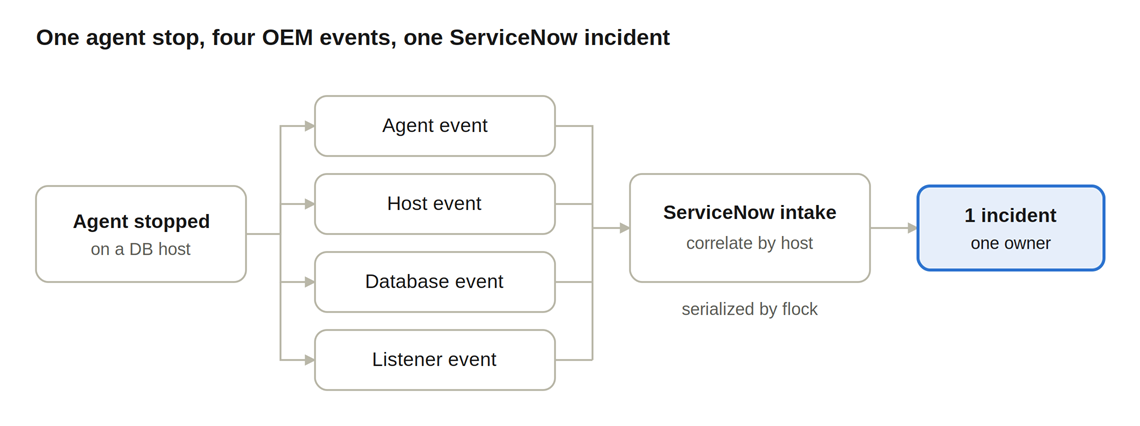
Four alerts. Is the server down? Did the database crash? Is it the network? You VPN in, ping the box (it answers), SSH in (it lets you), run emctl status agent, and discover the truth: the OEM agent stopped. The database was fine the whole time. The listener was fine the whole time. OEM simply lost its eyes, and when OEM can't see, everything it watches turns "unreachable" at once.
You restart the agent, wait for OEM to clear the four events, and write a ticket note, or more honestly, you write "restarted agent" and go back to bed.
Now do that a few hundred times a month across a fleet.
When "unreachable" really means "we don't know yet"
"Unreachable" is not a diagnosis. It's OEM telling you it has lost contact, and the real cause could be any of half a dozen things with completely different fixes:
- The OEM agent stopped. Annoying, harmless, and one command to fix.
- The listener stopped. The database is up, but nobody can connect to it. One command to fix, and the business notices fast if you don't.
- The database instance went down. Maybe someone shut it down on purpose. Maybe it crashed. Starting it back up without knowing which is how a bad night becomes a bad week.
- The host is gone. No ping, no SSH. That's a job for the hardware team, not a script.
- It's planned. There's an approved change or an OEM blackout, and someone is patching that box right now. Paging anyone is pure noise; "fixing" it is actively harmful.
- It was a blip. By the time a human looks, it's already cleared.
Every one of these starts with the same fixed sequence of checks. A human does them at 3 AM, half-awake, slightly differently each time. That is precisely the kind of work automation should be doing, as long as it knows when not to act.
The fix: diagnose first, ticket second
In our tablespace demo, OEM raised an incident in ServiceNow and Ansible picked it up and fixed it. For unreachable outages we turned that around. The automation works the outage before anyone opens a ticket.
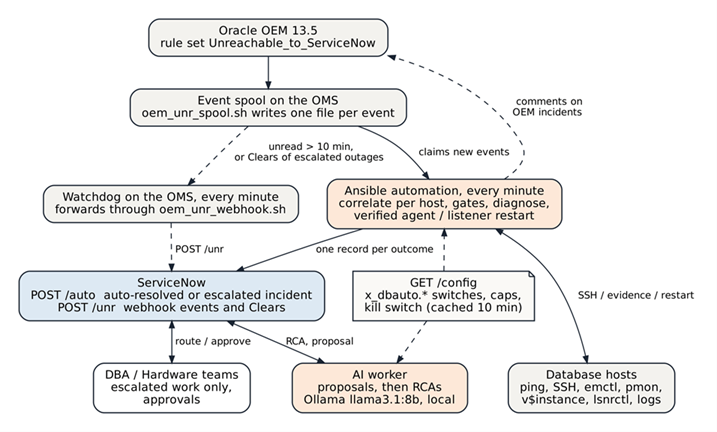
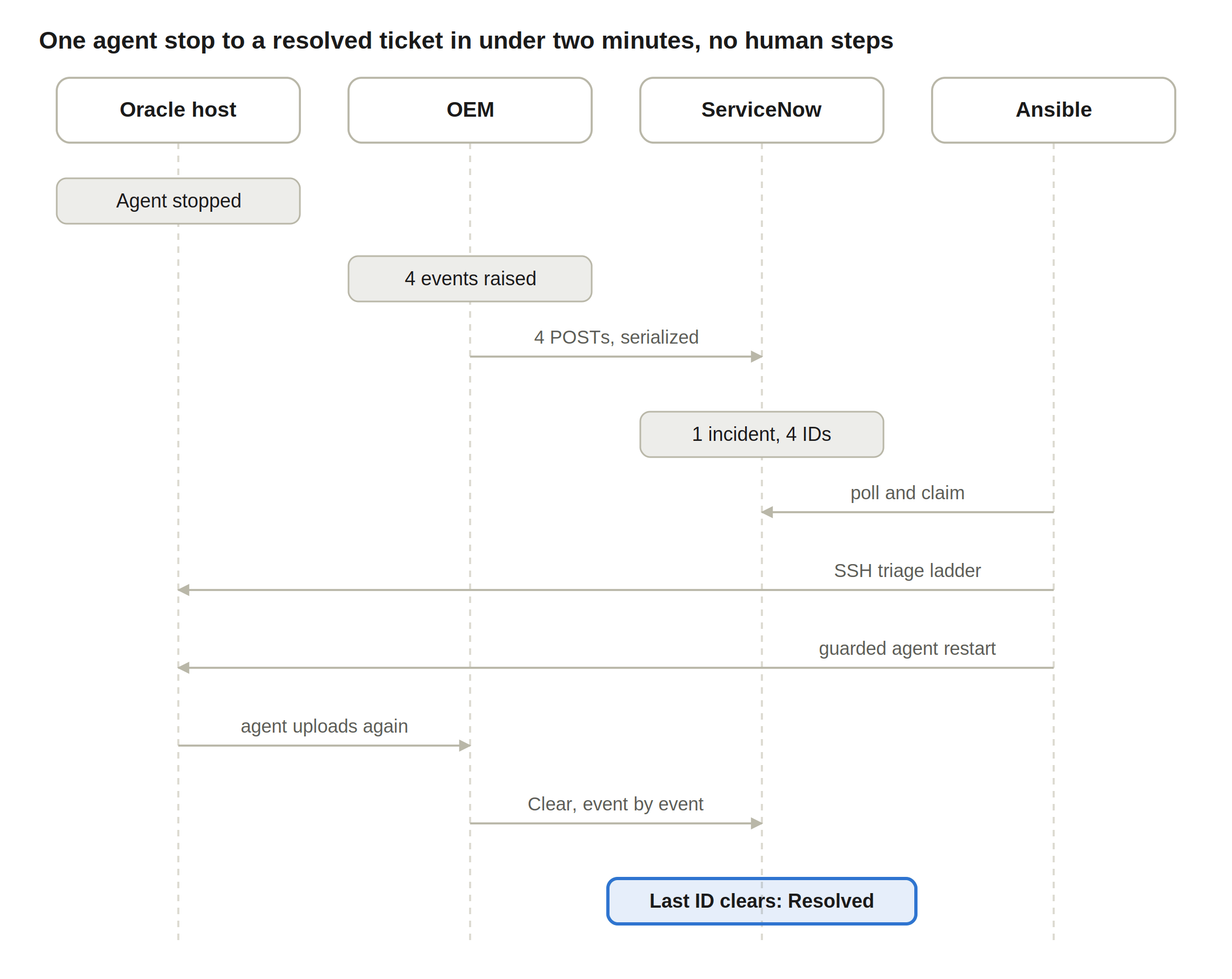
OEM drops each event into a spool on the OEM server. Every minute, Ansible reads the spool, groups the events by host (four alerts, one outage), checks the kill switch, approved changes and OEM blackouts, then logs onto the host over one SSH session and finds out what's actually down. If it's an agent or a listener, and restarts are allowed, and the host hasn't hit its daily restart cap, it restarts it and verifies the result. Only then does it talk to ServiceNow.
The result: the outages the automation fixed never sit in anyone's queue. ServiceNow still gets a complete record, created already Resolved, with the diagnosis, the evidence and OEM's real outage times, but it's created only after OEM itself confirms the outage is over. The outages it can't or mustn't fix arrive at the DBA team already diagnosed, routed to the right group at the right urgency, with the relevant log lines attached. Nobody starts from zero.
And where does AI fit in?
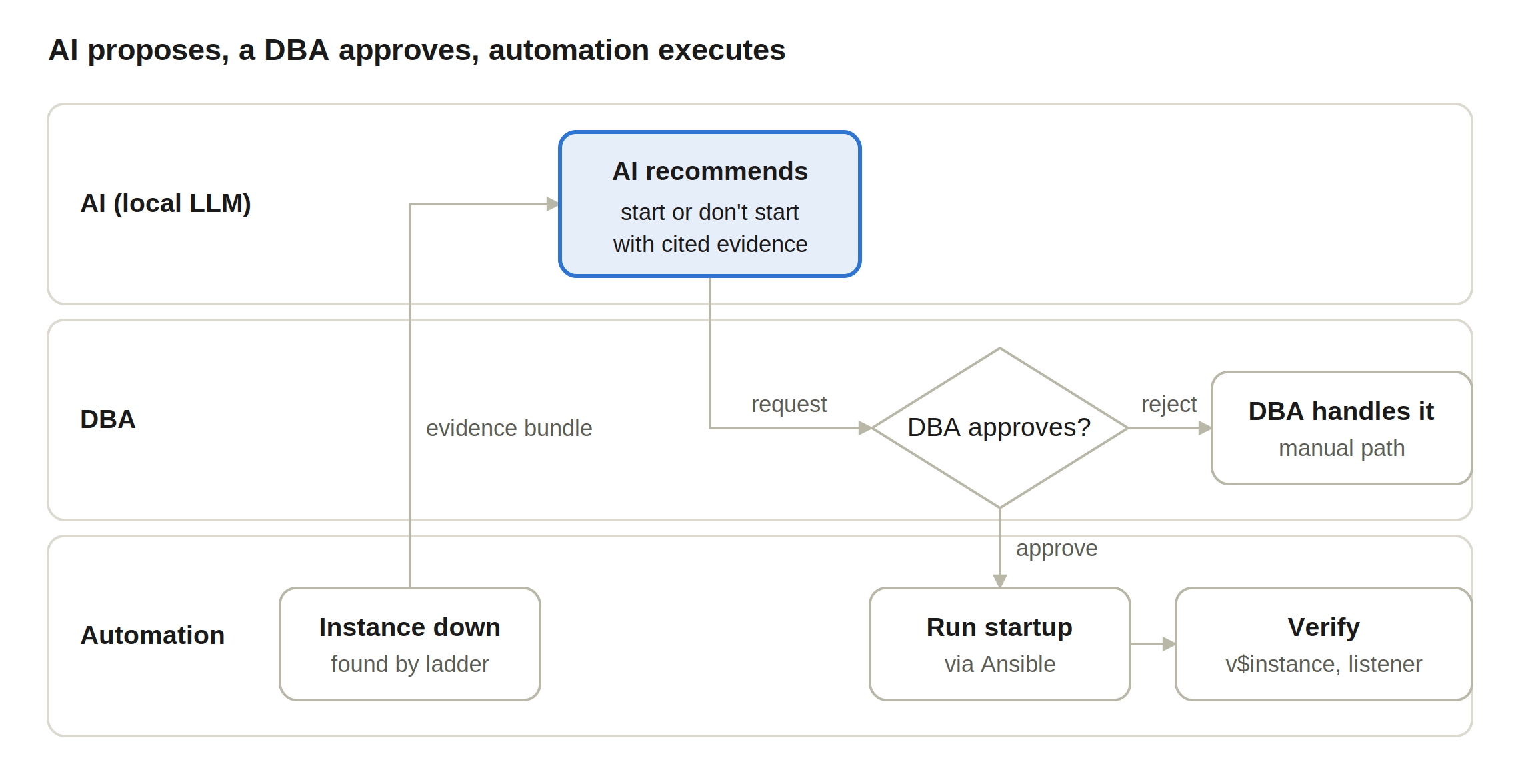
Carefully. Here's the rule we built everything around: automation decides and acts on facts; AI explains and proposes; people approve anything risky.
The AI is a Llama 3.1 8B model running locally on the Ansible host with Ollama. No per-call cost, and no incident data ever leaves the network. It does exactly two jobs:
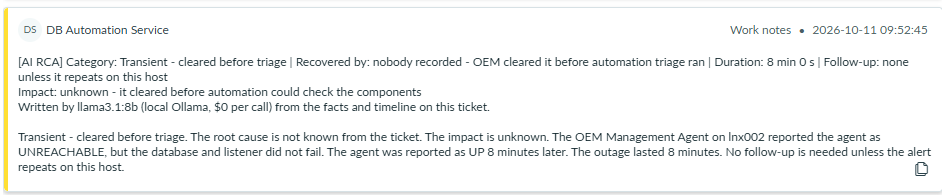
- It writes the root-cause note on every resolved incident: what failed, when, what was done, and what to look at next. Every log line it quotes is checked against the real log before the note is saved. If it makes something up, the quote is caught.
- It may propose a database startup when an instance is down, chosen from a fixed menu (start it, or do nothing). Hard-coded vetoes run first: maintenance windows, ORA- errors that mean corruption or media problems, missing evidence. And nothing runs until a DBA clicks Approved in ServiceNow. In our first test, the AI looked at the evidence, wasn't sure the shutdown had been clean, and declined to propose anything. That's not a failure. That's exactly the behaviour you want.
Show, don't tell: the numbers from the lab
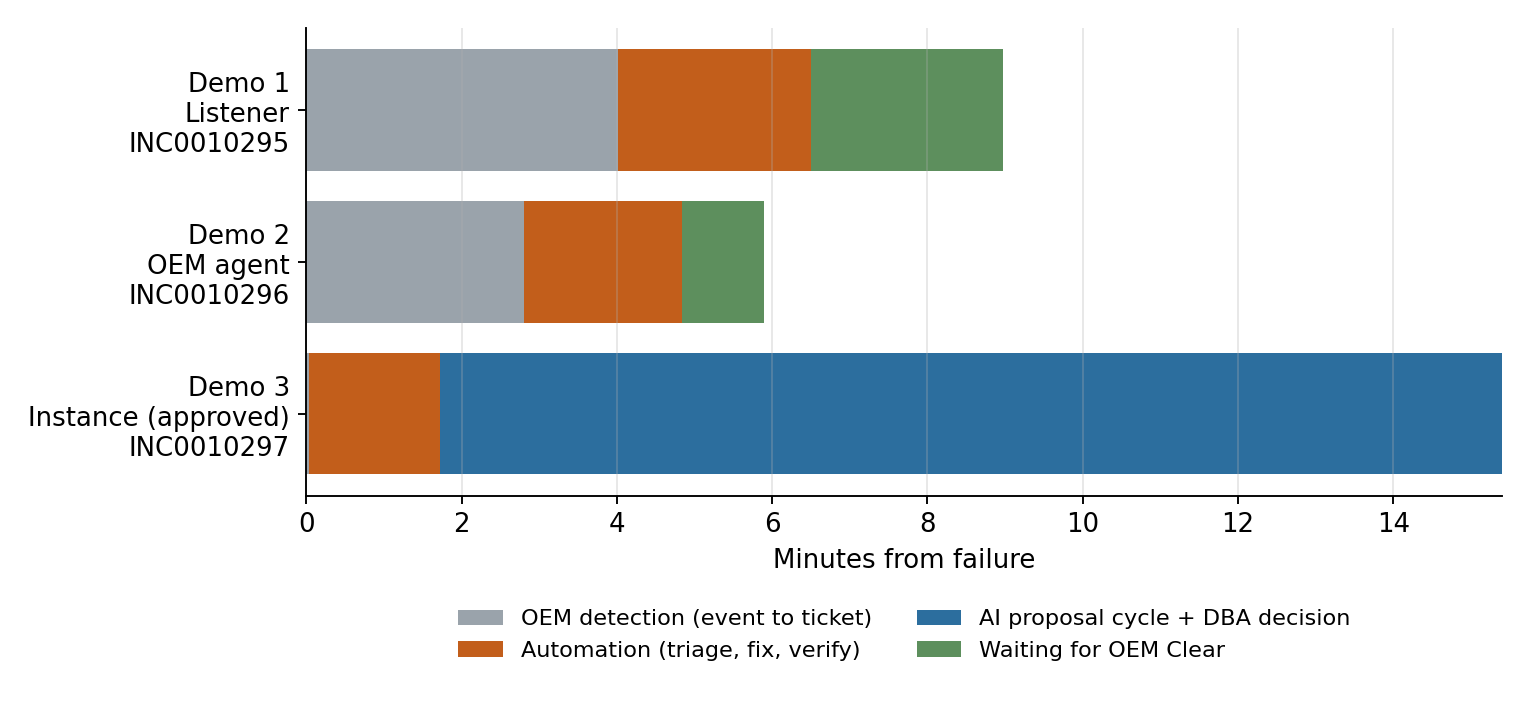
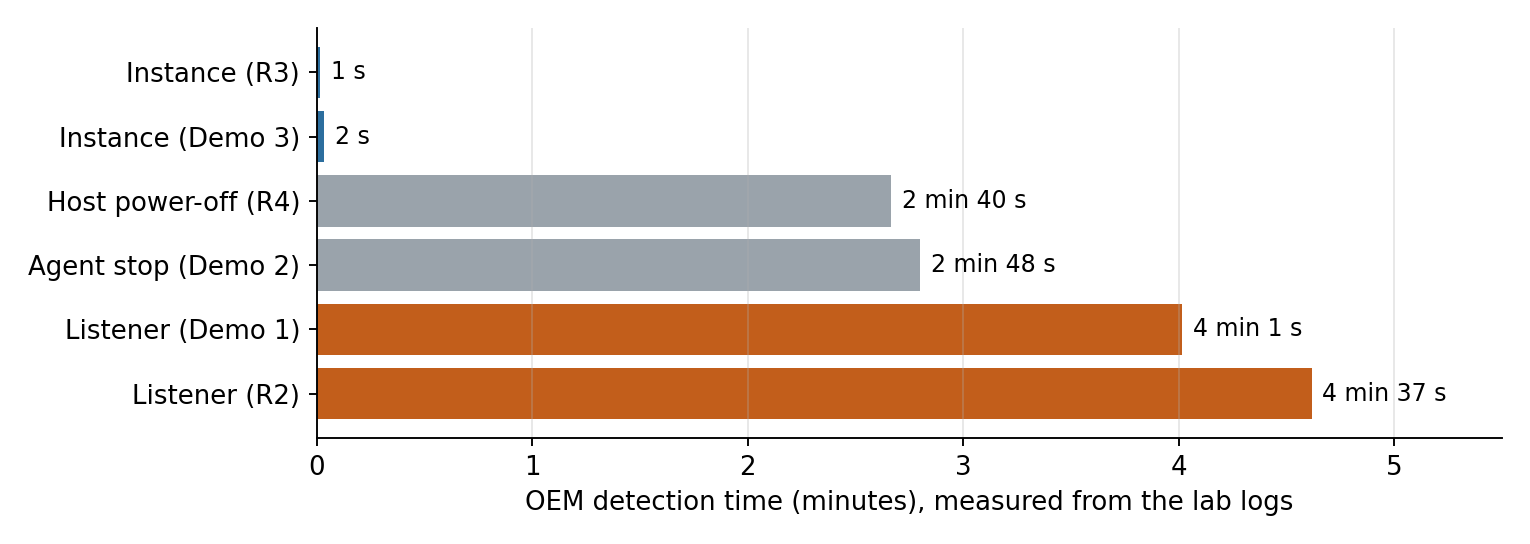
Everything on this page was run end to end on a freshly built ServiceNow instance against a real Oracle 21c database, with the outages caused on purpose. The times below are measured from the logs, not estimated:
The rest of this page is the full walkthrough: every flowchart, every screenshot, every safety control, and the real output of each demo, for the people on your team who are going to ask "yes, but how exactly?"
- 1. The problem
- 2. What happens to an outage
- 3. Architecture
- 4. Intake: spool, watchdog and webhook
- 5. How it decides
- 6. Where AI is used, and where it is not
- 7. The ServiceNow side
- 8. Demos, with screenshots
- 9. Timing
- 10. Clean-instance rebuild: what it found and fixed
- 11. Safety controls
- 12. Installation
- 13. Operating it
- 14. Names (version 3.0 and later)
- 15. Known behaviours and open items
- 16. Rollout
- 17. Files and versions
- Appendix: real outputs
1. The problem
One failure produces several alerts. When an OEM agent stops, OEM loses sight of everything that agent watches, so a single stopped process raises four events: the agent itself, the host, the database instance and the listener, each marked AGENT UNREACHABLE. Before this work, each became a ServiceNow incident or a pile of correlated noise for the DBA team, and an engineer logged on, found what was actually down, restarted it, and wrote a note.
Most of these outages are routine: a stopped agent, a stopped listener, a short network blip. Diagnosing them is a fixed sequence of checks, and fixing the common ones is a single command. That is exactly what automation does well, provided it knows when not to act: during maintenance, when the same fix has already been tried, or when the database itself is down.
2. What happens to an outage
| Outcome | What appears in ServiceNow |
|---|---|
| Fixed Agent or listener restarted and verified | No working incident. When OEM clears, one incident is created already Resolved: caller DB Automation Service, group Automation, resolution code Resolved by automation, with the diagnosis, log evidence and real outage times in the work notes. |
| Nothing to fix All checks healthy | Nothing, unless OEM still has not cleared after 15 minutes; then one incident for the DBA team (OEM_NOT_CLEARING). |
| Planned work Approved change or OEM blackout | Nothing. The OEM incident gets a comment naming the change or blackout. If the host is still down when the window ends, the automation handles it then. |
| Escalated Host down, database down, restart limit reached, restarts switched off, fix failed | One incident created In Progress, already triaged: routed to DBS-GLB-L2 OPERATIONS or Hardware, urgency set, diagnosis and log evidence attached. Later OEM events join it, and OEM’s Clears resolve it. |
| Approval Database instance down | Escalated at urgency 1. The AI may propose STARTUP_OPEN; nothing runs until a member of the approver group sets Remediation Approval = Approved. |
| Switched off Kill switch | One New incident per outage with the OEM events and no diagnosis, for people to work as before. |
| Automation not running | The watchdog on the OEM server forwards events that have waited more than 10 minutes straight to ServiceNow, which opens, correlates and resolves incidents itself. Nothing is lost. |
3. Architecture
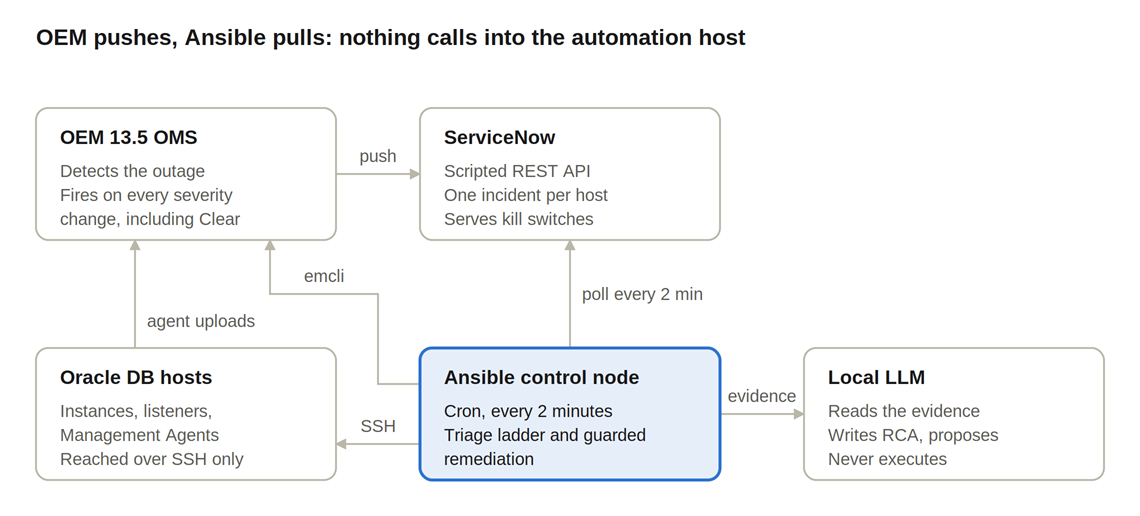
Three machines and one ServiceNow API. OEM never calls ServiceNow directly in normal operation: it writes each event to a spool on the OEM server. The Ansible host reads the spool every minute, decides, acts, and writes to ServiceNow only once it has an outcome.
| Component | Where | What it does |
|---|---|---|
| OEM 13.5 incident rule Unreachable_to_ServiceNow | OEM server lnx003 | Calls the notification method for host, agent, database and listener availability events and their Clears. |
oem_unr_spool.sh | OEM server, as oracle | Writes each event as one JSON file (atomic rename) into incoming/. Never loses an event: if the spool cannot be written, it falls back to the webhook. Always exits 0. |
oem_unr_watchdog.sh | OEM server, cron every minute | Forwards an event to ServiceNow POST /unr if it waited more than 10 minutes and the automation’s heartbeat is stale, or if the automation asked it to (to_snow/). |
SNOW_UNR_auto.yml and _auto_host.yml | Ansible host, cron every minute | Reads the spool, correlates per host, applies the gates, diagnoses over SSH, restarts the agent or listener when allowed, records one outcome with POST /auto. |
SNOW_UNR_dispatcher.yml | Ansible host, every 2 minutes, gated | Handles incidents that arrive through the webhook path, change holds, and runs DBA-approved startups (SNOW_UNR_execute_one.yml). |
SNOW_UNR_rca.yml | Ansible host, every 2 minutes, gated | The AI worker: startup proposals first, then root-cause notes on resolved incidents. |
Ollama, llama3.1:8b | Ansible host, localhost:11434 | Writes the narrative and chooses from the proposal menu. Never executes anything. |
| DB Automation Events API | ServiceNow | POST /unr (events in), GET /config (switches out), POST /auto (outcomes in). All writes happen server-side, so the accounts need no create rights on the incident table. |
4. Intake: spool, watchdog and webhook
The spool decouples OEM from ServiceNow. Each file keeps every variable OEM passed (raw) plus normalized fields (host_name, target_name, target_type, severity_code, event_state, oem_incident_id, event_time, message, spooled_at_utc). File names sort chronologically, so a FIRE is always processed before its CLEAR.
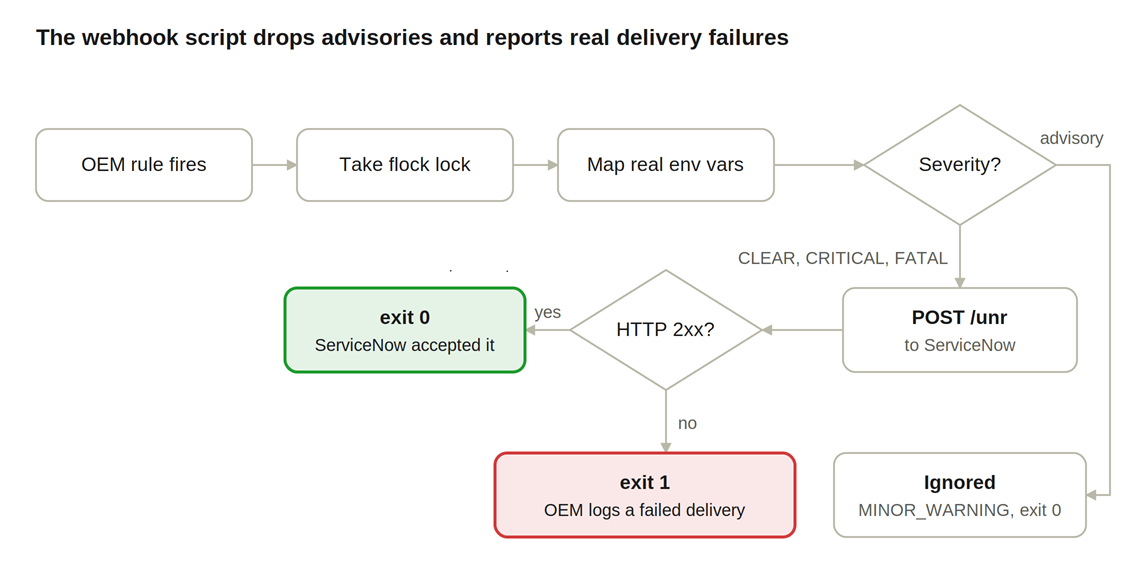
failed/ and logs it loudly.Correlation in ServiceNow
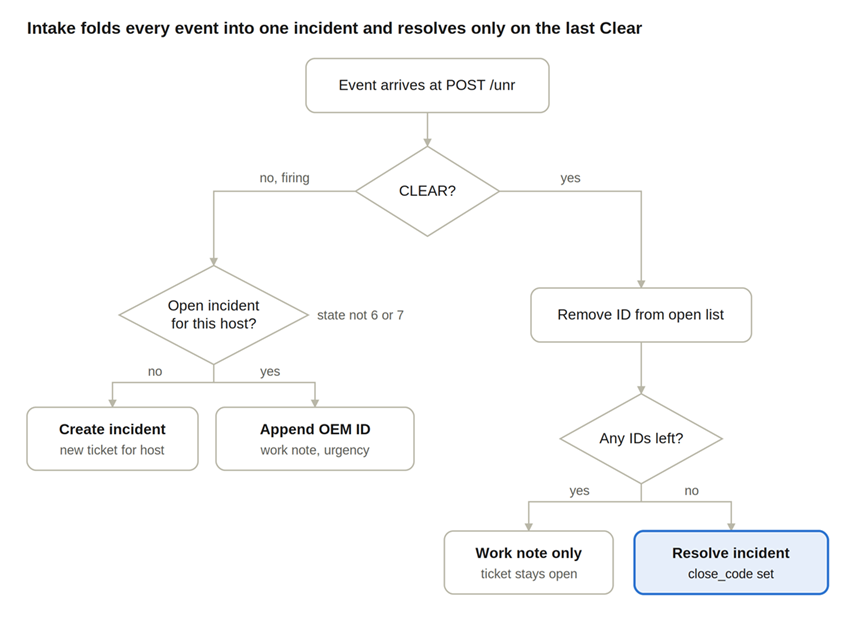
POST /unr folds every event for a host into one incident and resolves it only on the last Clear. Each incident keeps the list of OEM incident numbers still open in u_alert_open_ids; a Clear removes its number, and when the list is empty the incident is resolved with Solved (Permanently). A correlated CRITICAL or FATAL event raises the incident’s urgency.
Late events keep OEM’s time (new in 3.0.3)
The clean-instance test found that events held in the spool while ServiceNow was unavailable were stamped with their delivery time: a replayed outage from the previous day showed as a 58-second outage the next morning. Since 3.0.3, /unr parses OEM’s own event_time. An event more than 5 minutes old on arrival keeps OEM’s time on the incident and says so in the note.
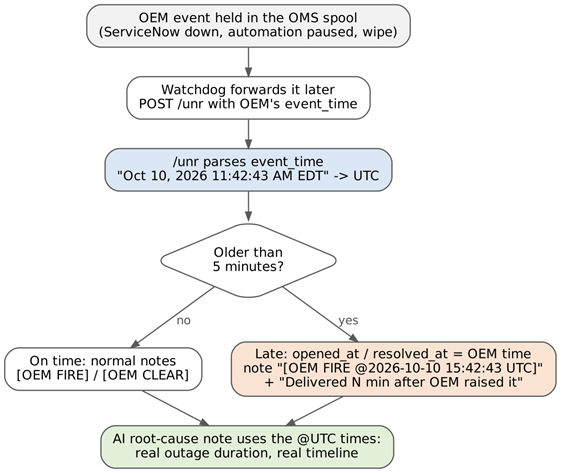
POST /unr (3.0.3). Recognised zones: UTC, GMT, EST/EDT, CST/CDT, MST/MDT, PST/PDT, BST, CET/CEST, EET/EEST, IST, SGT, JST, AEST/AEDT; an unrecognised format is treated as on time.5. How it decides
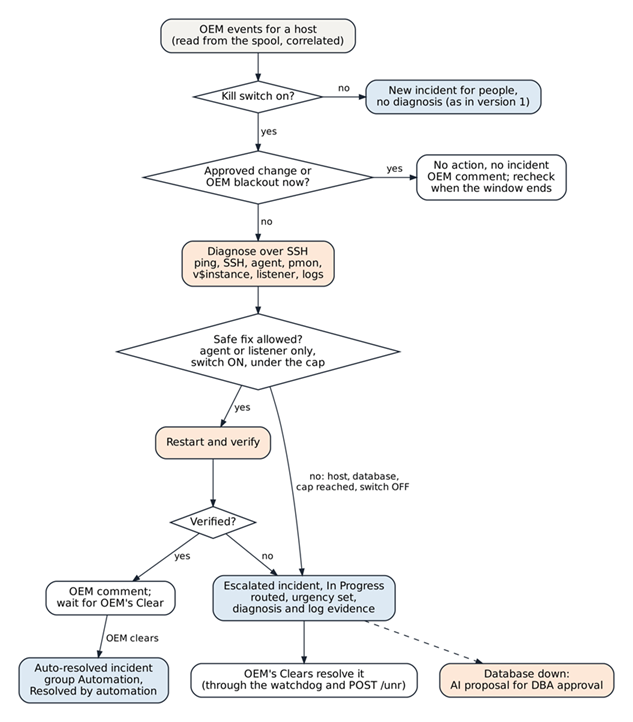
For each host outage the automation makes one decision, in a fixed order. The first rule that applies wins.
- Kill switch. If
x_dbauto.automation_enabledis false, hand the outage to people unchanged. - Approved change. If an approved change (Scheduled or Implement) covers the host now, do nothing and open no incident.
- OEM blackout. If the host or any target on it is in, just out of (60 min) or about to enter (30 min) a blackout, or the blackout status cannot be read, do nothing and check again in 15 minutes.
- Diagnose over one SSH session: ping, SSH, OEM agent (
emctl status agent),pmon,v$instance, listener, plus the relevant log lines (alert log,listener.log,emctl.log). The first failing check decides the diagnosis. - Fix only what is safe: an agent or listener restart, only if its switch is on and the host is under its daily cap, and only counted as fixed once verified (agent Running and Ready; listener up with the instance registered READY).
- Record one outcome in ServiceNow and comment on the OEM incidents with the result or the incident number.
The triage ladder
Each rung runs only if the rung above passed, so the first failure names the component. Only two outcomes restart anything.
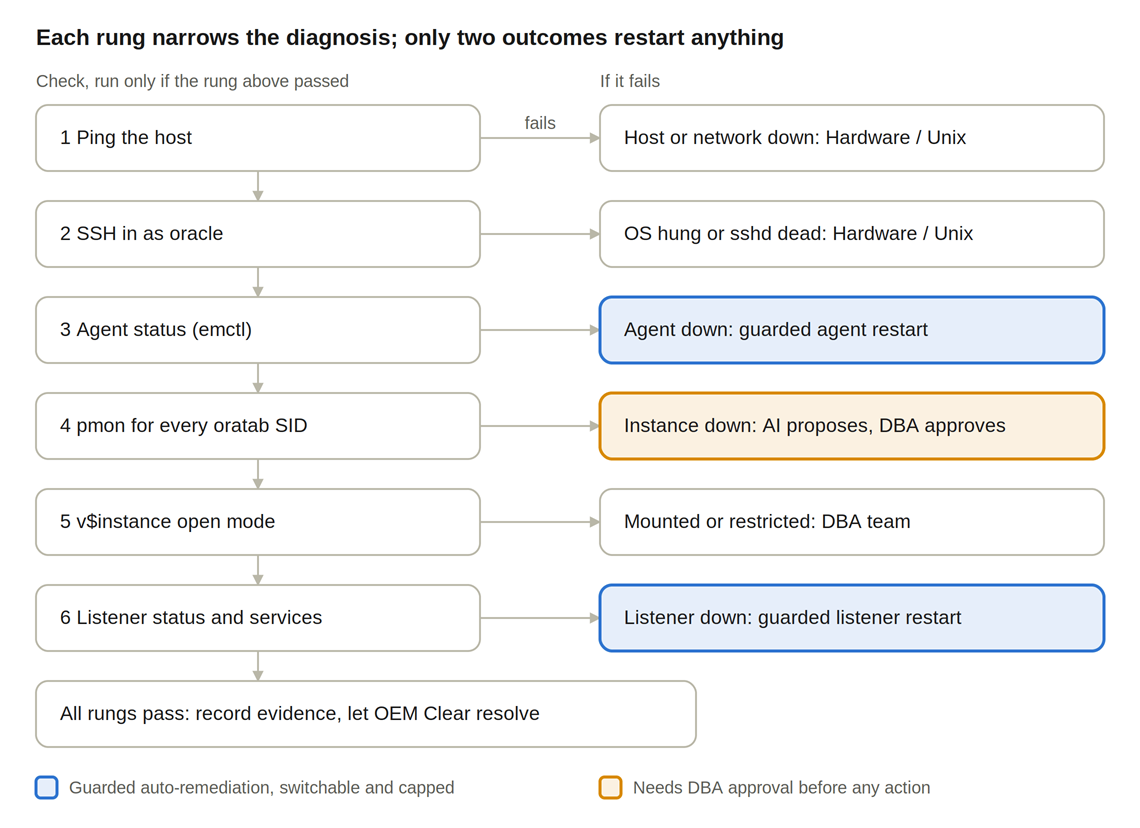
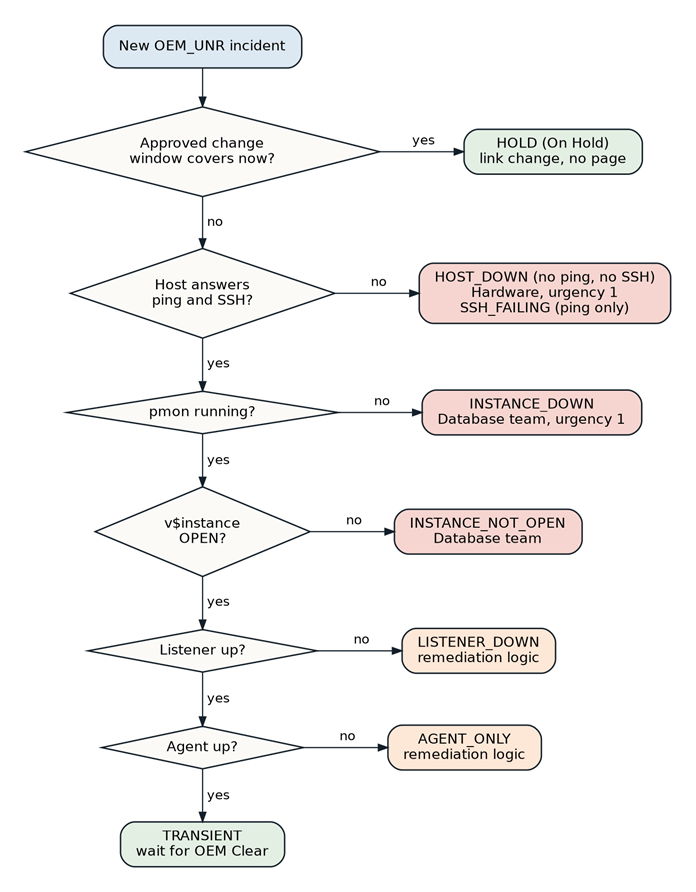
| Diagnosis | Detected by | Action | Route and urgency |
|---|---|---|---|
HOST_DOWN | No ping and no SSH | None | Hardware, urgency 1 |
SSH_FAILED | Ping answers, SSH fails | None | Hardware |
INSTANCE_DOWN | No pmon for the SID | AI proposal, DBA approval | DBS-GLB-L2 OPERATIONS, urgency 1 |
INSTANCE_NOT_OPEN | v$instance mounted or restricted | None | DBS-GLB-L2 OPERATIONS |
LISTENER_DOWN | lsnrctl status fails | Guarded listener restart | Auto-resolved, or DBA if not allowed |
AGENT_ONLY | Only emctl reports down | Guarded agent restart | Auto-resolved, or DBA if not allowed (AGENT_AUTOFIX_OFF, AGENT_RESTART_LIMIT) |
TRANSIENT | Everything healthy | None | Wait for OEM’s Clear |
Guarded restarts
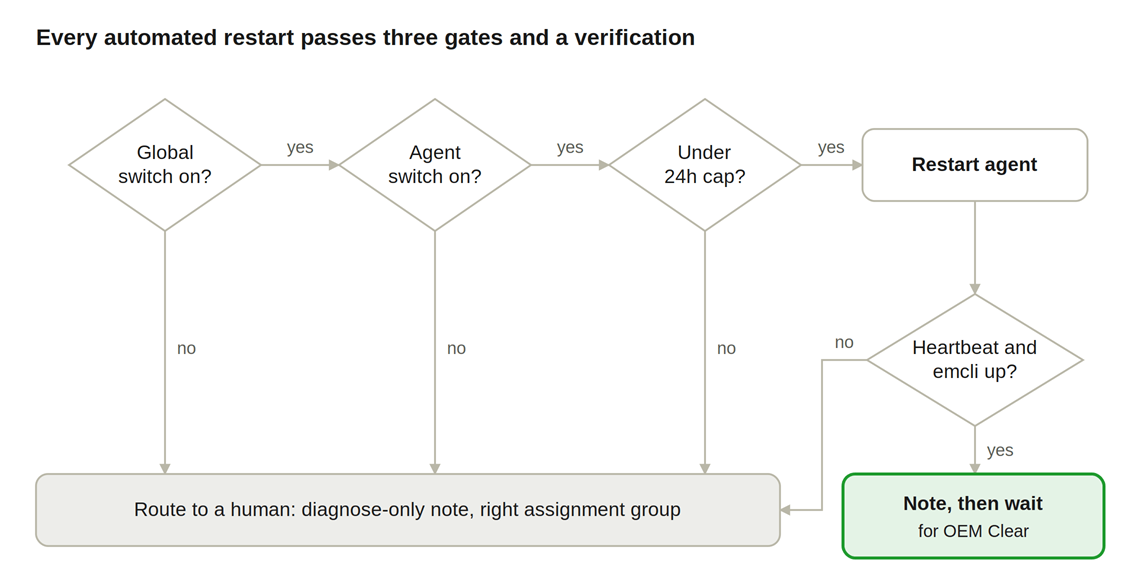
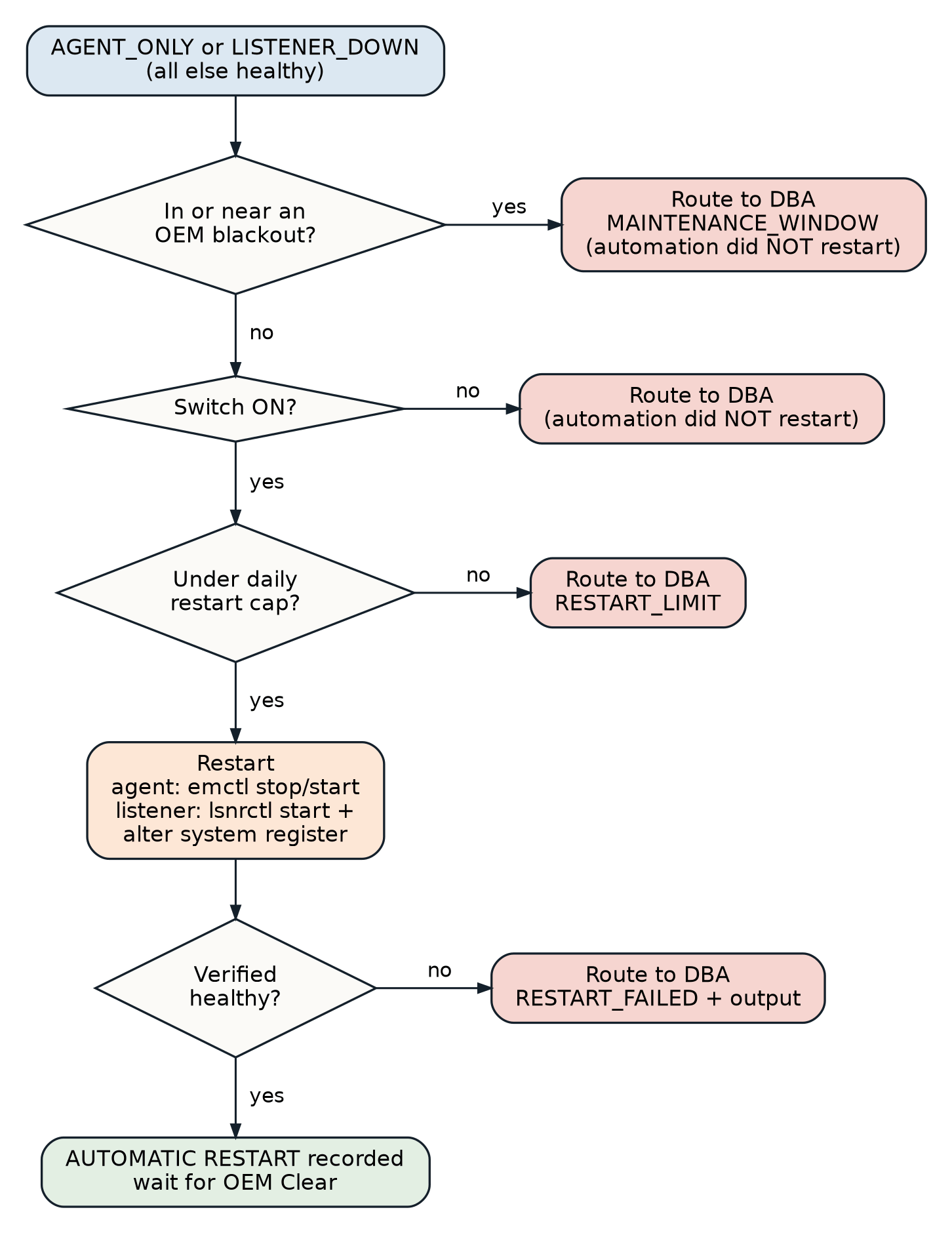
Agent restart: emctl stop agent then emctl start agent, verified by emctl status agent showing Agent is Running and Ready and a successful heartbeat. Listener restart: lsnrctl start plus alter system register, verified by the instance registered as READY. A failed verification is never reported as fixed: the outage is escalated with the output.
Approved changes and OEM blackouts
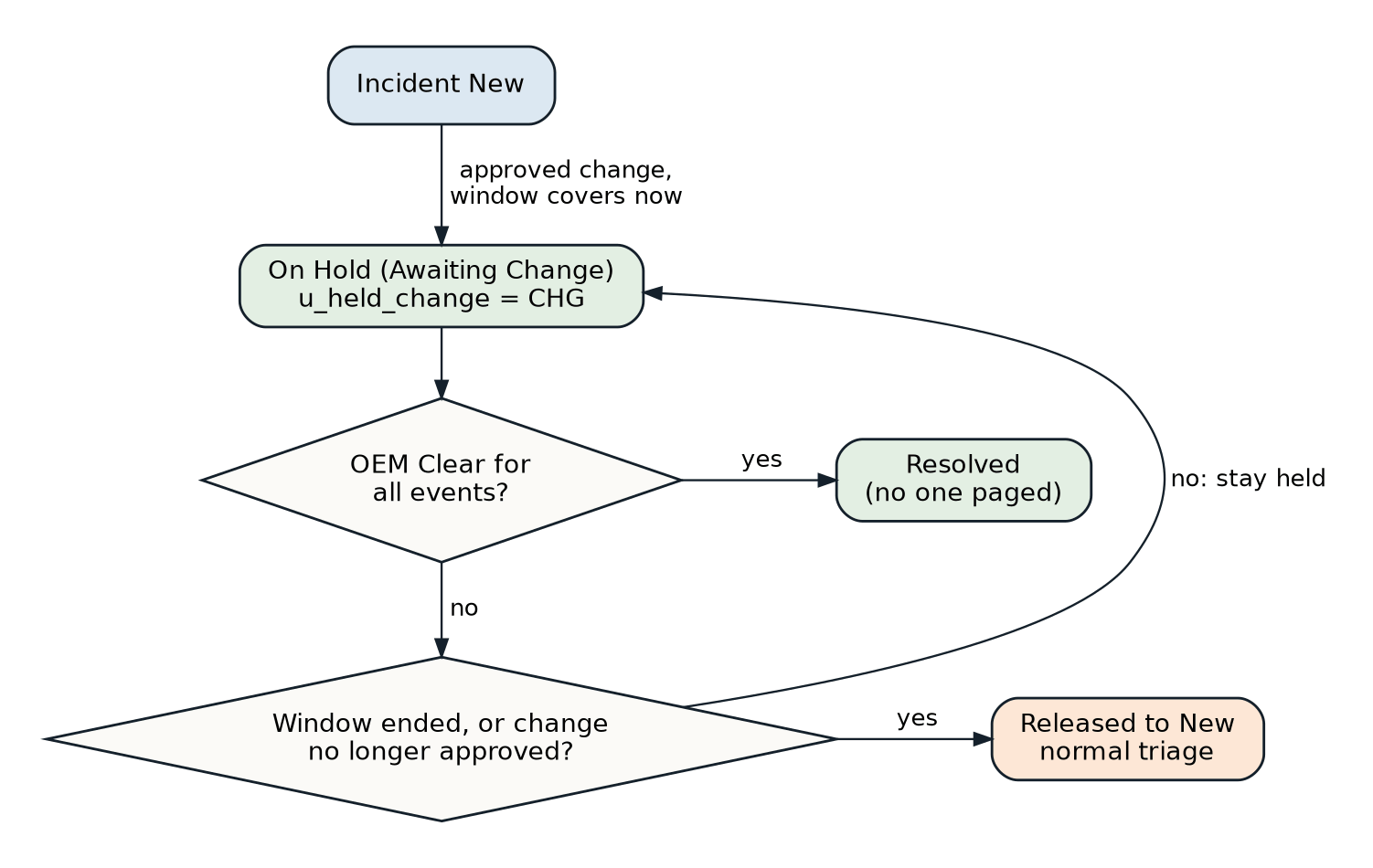
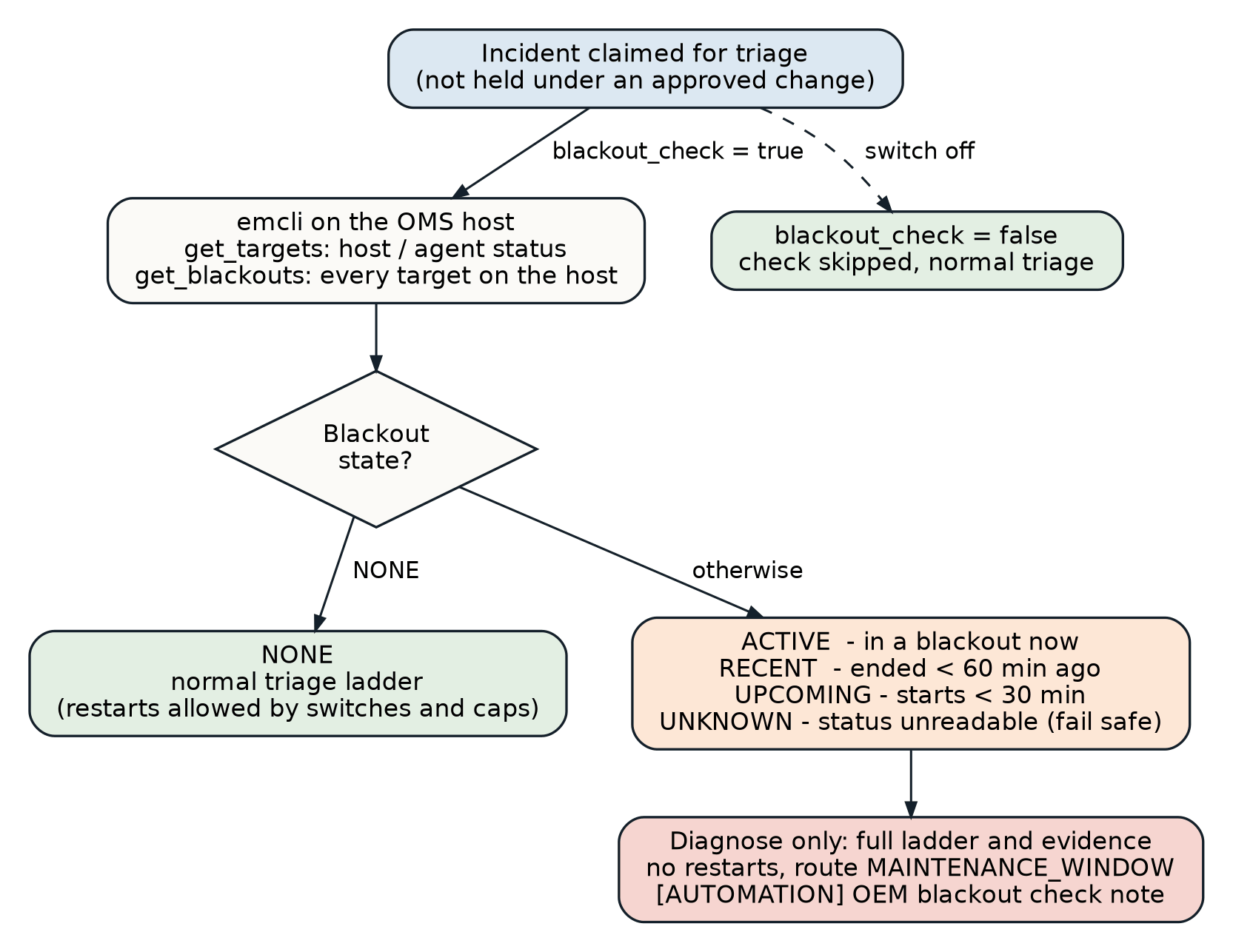
emcli get_targets and emcli get_blackouts. Unknown blocks restarts by default (fail safe).6. Where AI is used, and where it is not
Root-cause notes on every resolved incident
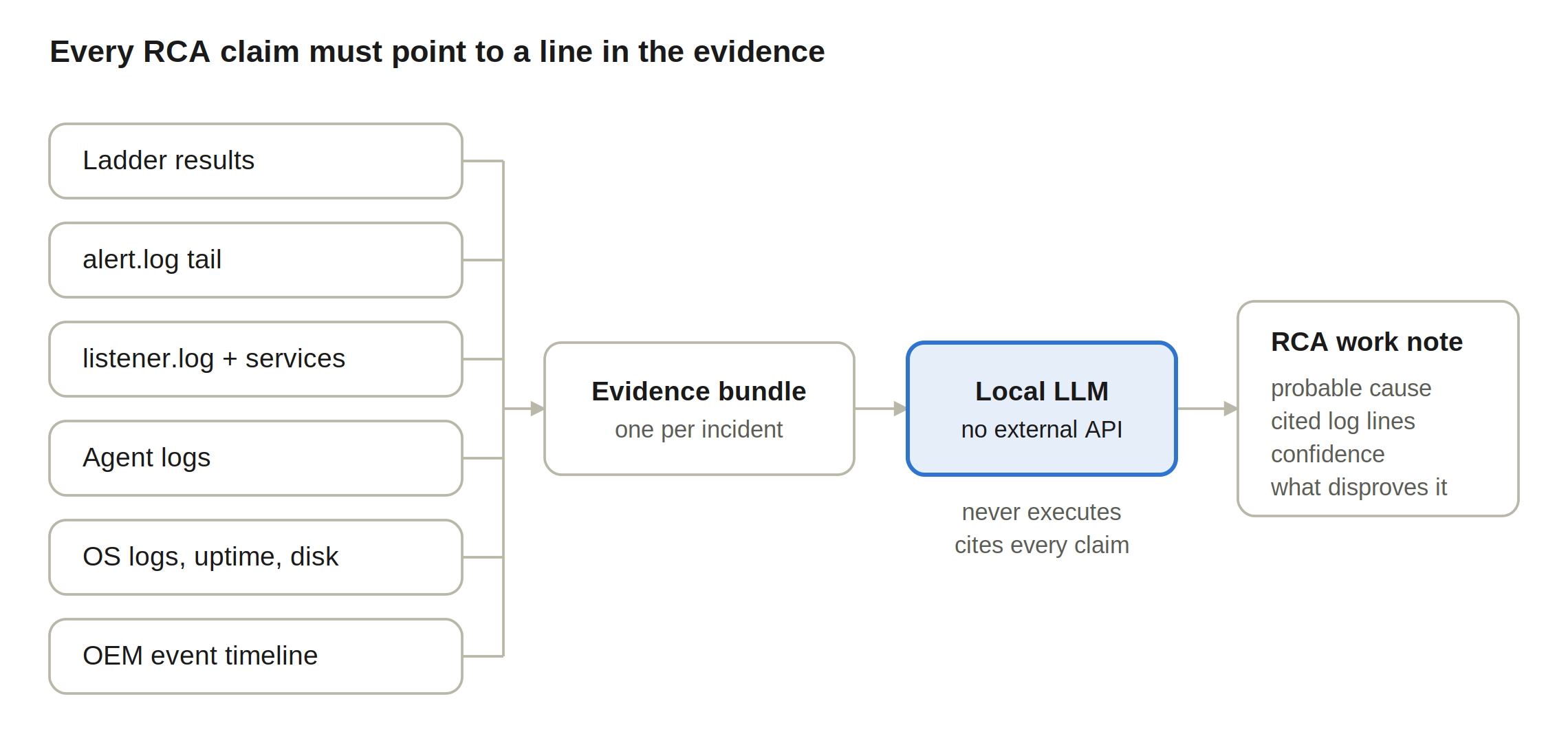
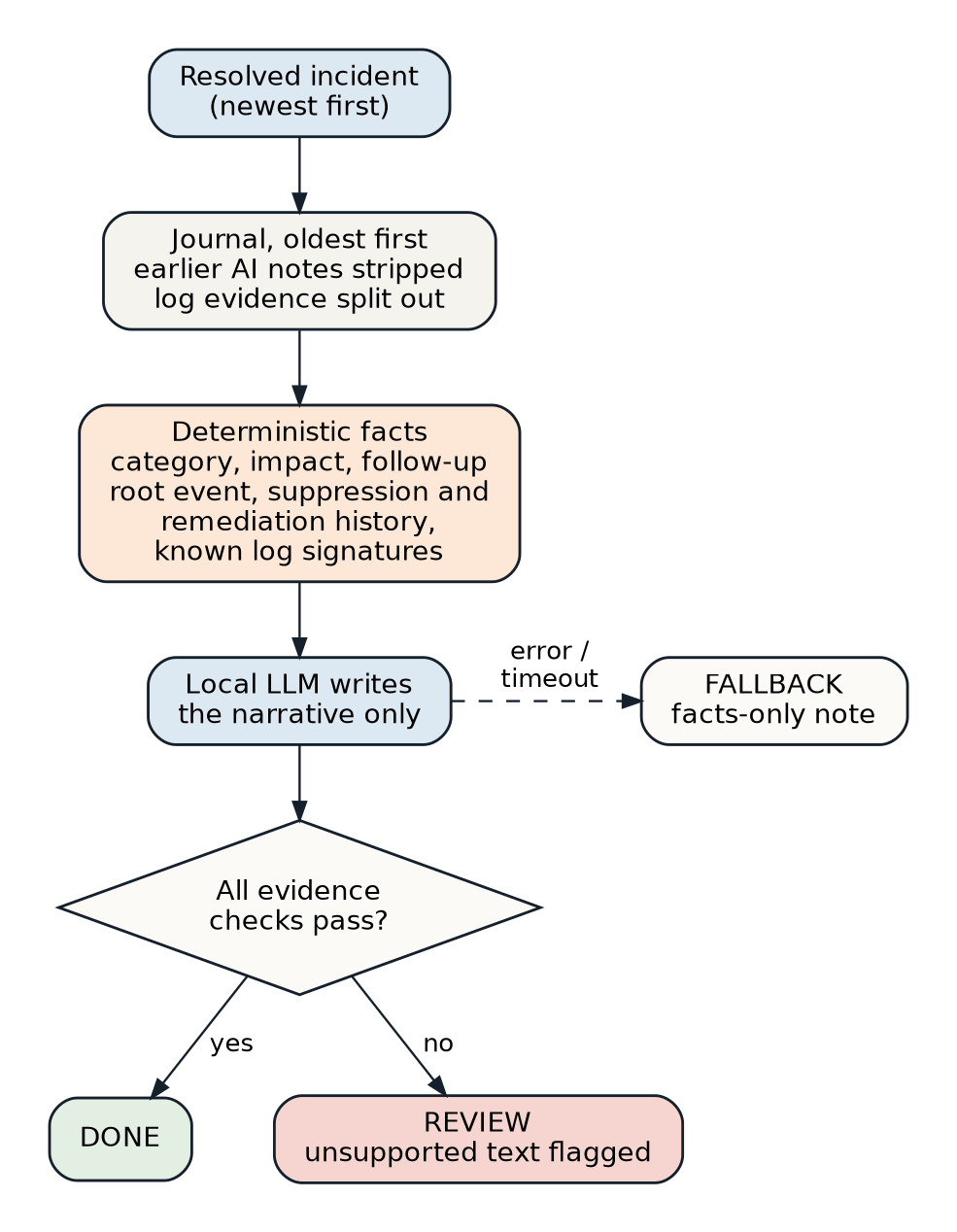
- Decided by the automation, not the model: category, impact, who recovered it, follow-up, root event, remediation history, suppression history, blackout state, duration.
- Known log signatures are matched in code and handed over as facts with the exact line to quote (for example
(COMMAND=stop)inlistener.log,Processing stop agentinemctl.log,Shutting down ORACLE instance (abort)in the alert log). An 8B model misreads raw log syntax; this removes that failure. - Grounding check: a note that claims a database, listener or host failure the triage evidence does not support is marked REVIEW.
- Timeline: notes written after the fact carry their real time as
[AUTOMATION @… UTC]or (3.0.3)[OEM FIRE @… UTC]; the RCA uses those times. Records created through/autonow get their root event from the firstOEM nnnn:line (3.0.3). - Every note is auditable: an
[AI EXEC LOG]note carries the model, token counts, timings and the full prompt.
Proposals and DBA approval
- Fixed menu: the model can choose only
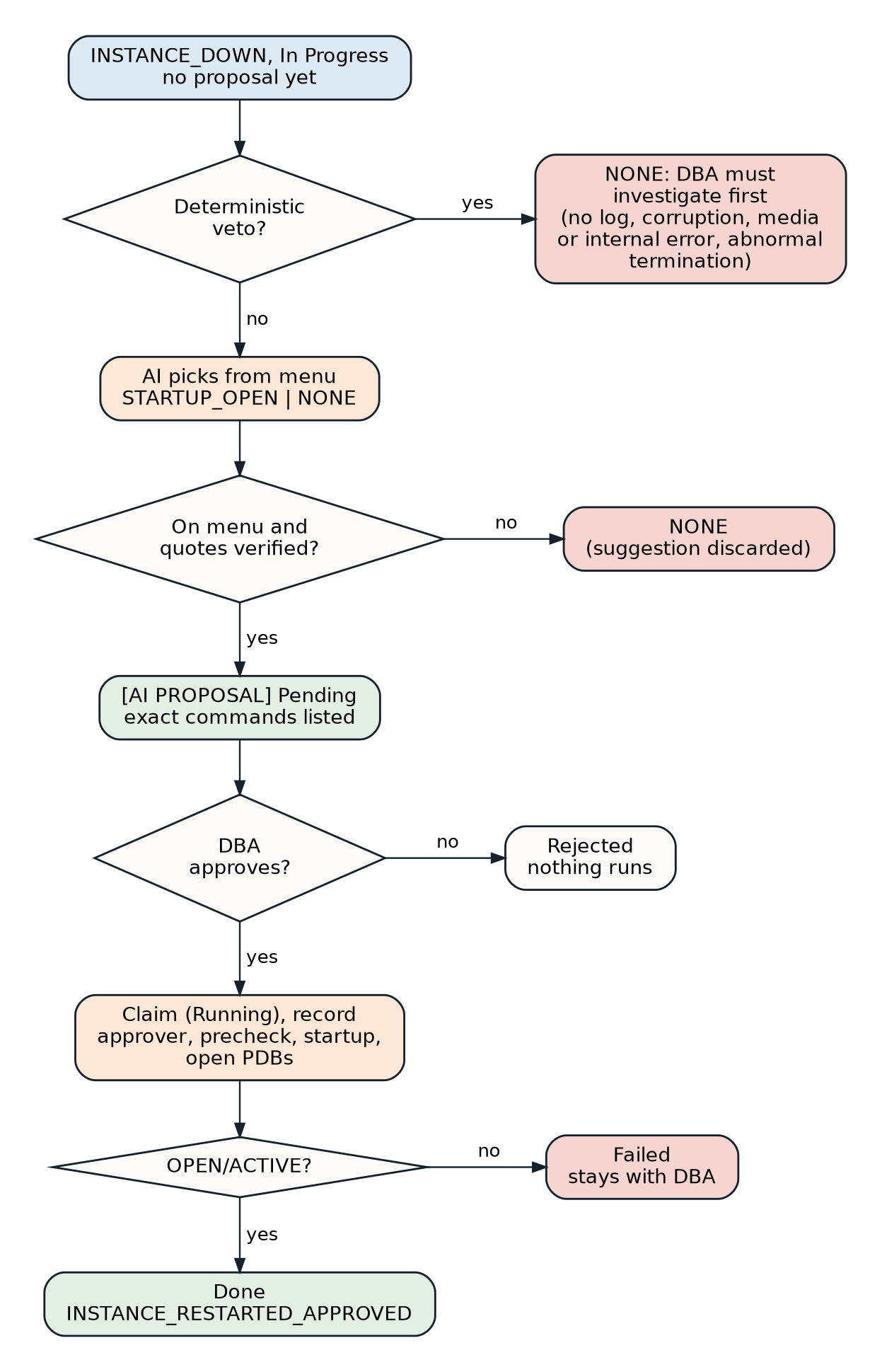
STARTUP_OPENorNONE. The commands for each item are fixed in code (startup,alter pluggable database all open, then verifyv$instanceOPEN/ACTIVE). - Deterministic vetoes run before the model is asked: maintenance window, no alert-log evidence, any of ORA-00600, ORA-07445, ORA-01157, ORA-01578, ORA-00257, ORA-19815 and other media, corruption or recovery-area signatures, or termination by a background process.
- Quote verification: every quoted line in the model’s reasoning must exist in the collected log, or the proposal is downgraded to NONE.
- Approval: only a member of the approver group (
dbauto_approver, plusitilto open incidents) can set Remediation Approval = Approved. An ordinary itil user sees the field read-only. - Re-checks at execution: the maintenance window is checked again right before an approved startup runs (an approval can sit for hours), and the instance must still be down.
- Wording (3.0.3): a
SHUTDOWN ABORTis never described as clean; the proposal says instance recovery runs at startup.
7. The ServiceNow side
One Fix Script (DB_Automation_setup_fix_script_V3.0.3.js) builds everything, looks every object up first and only creates or corrects what is missing, and prints the values the DBA team needs. Re-running it on a built instance reports 0 created, 0 corrected, 0 warnings.
| Object | What is created |
|---|---|
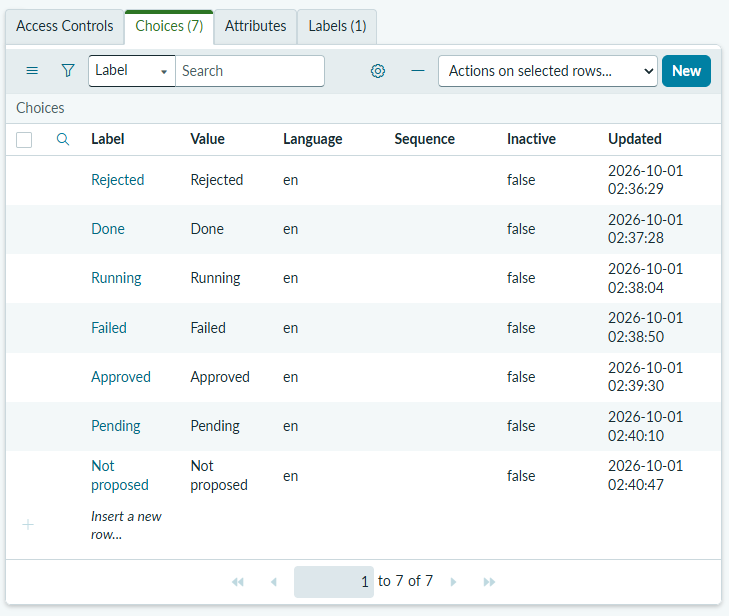
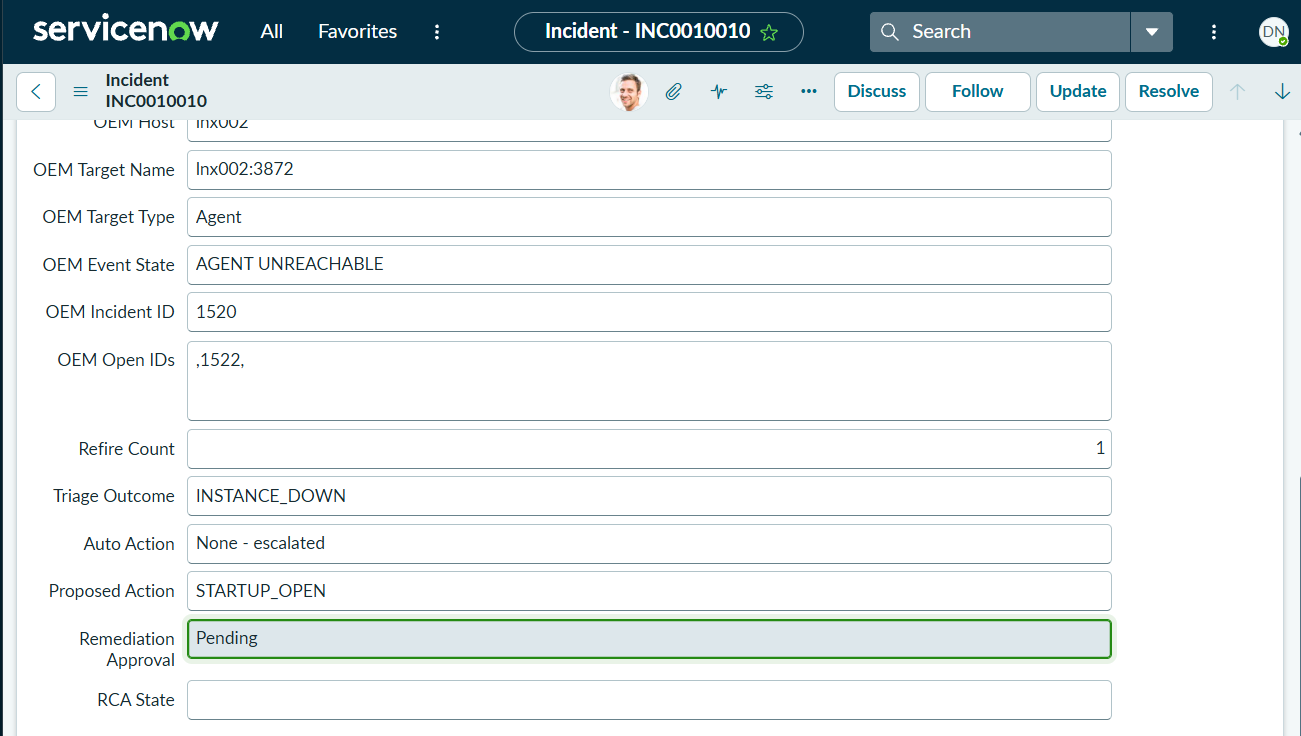
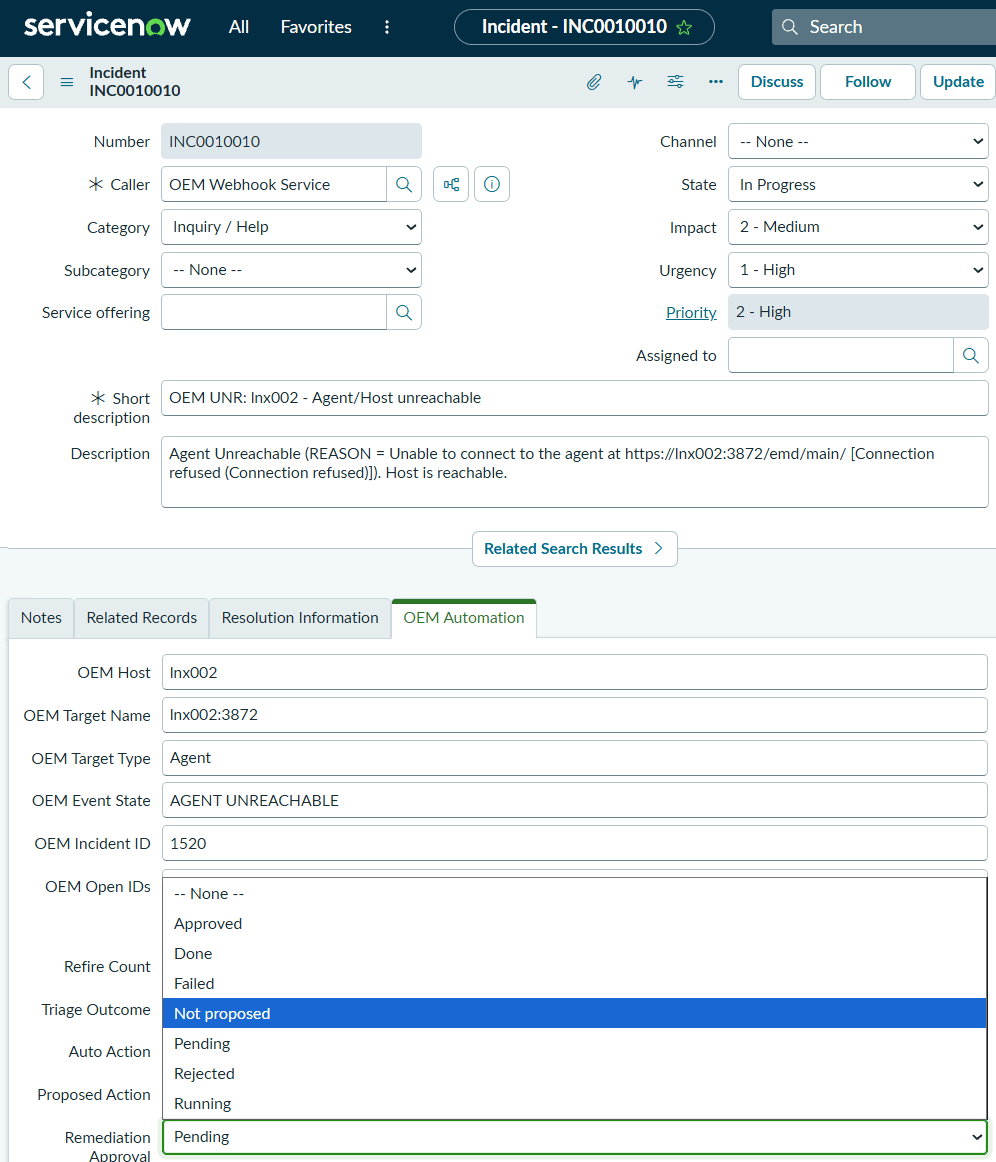
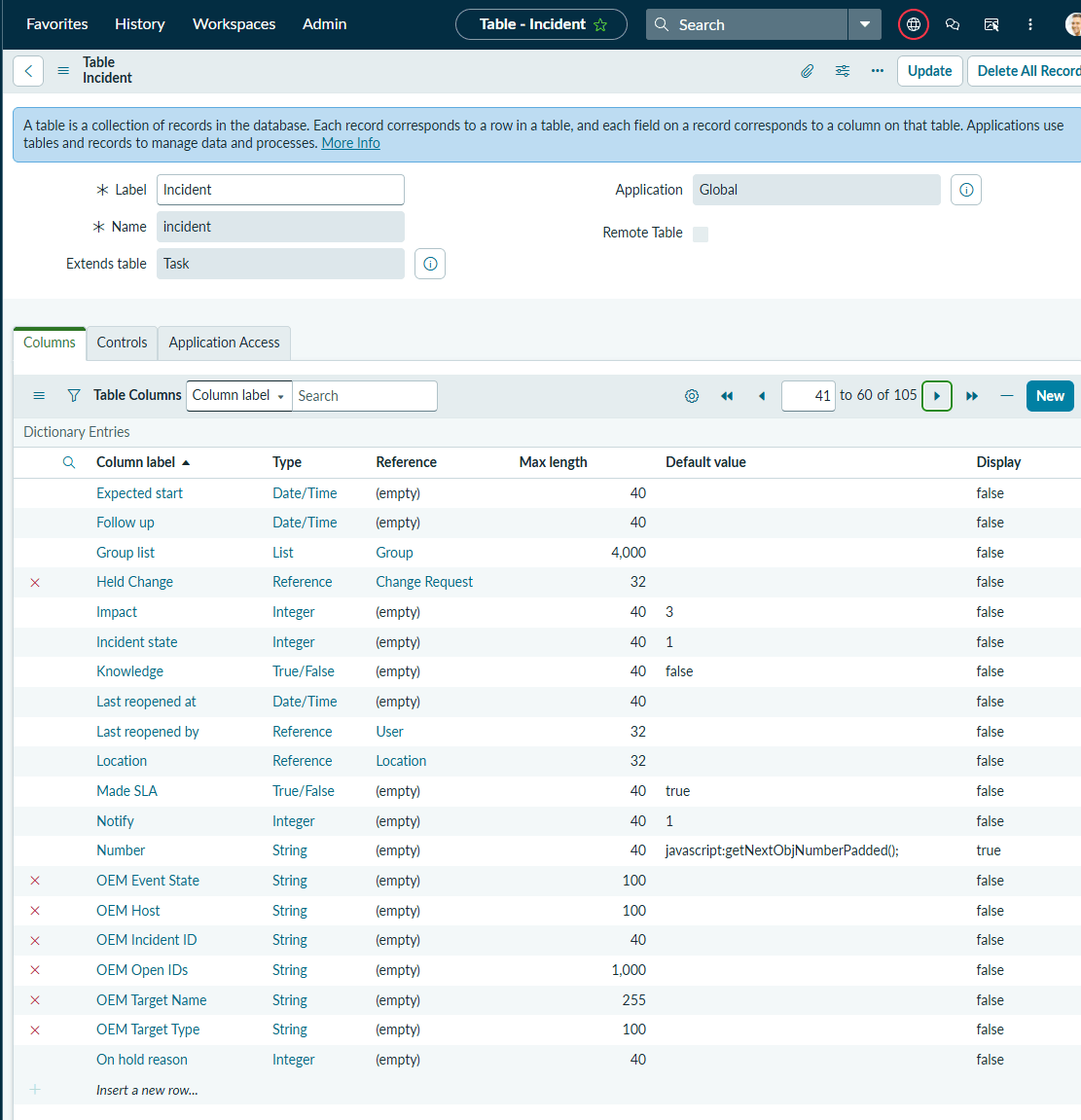
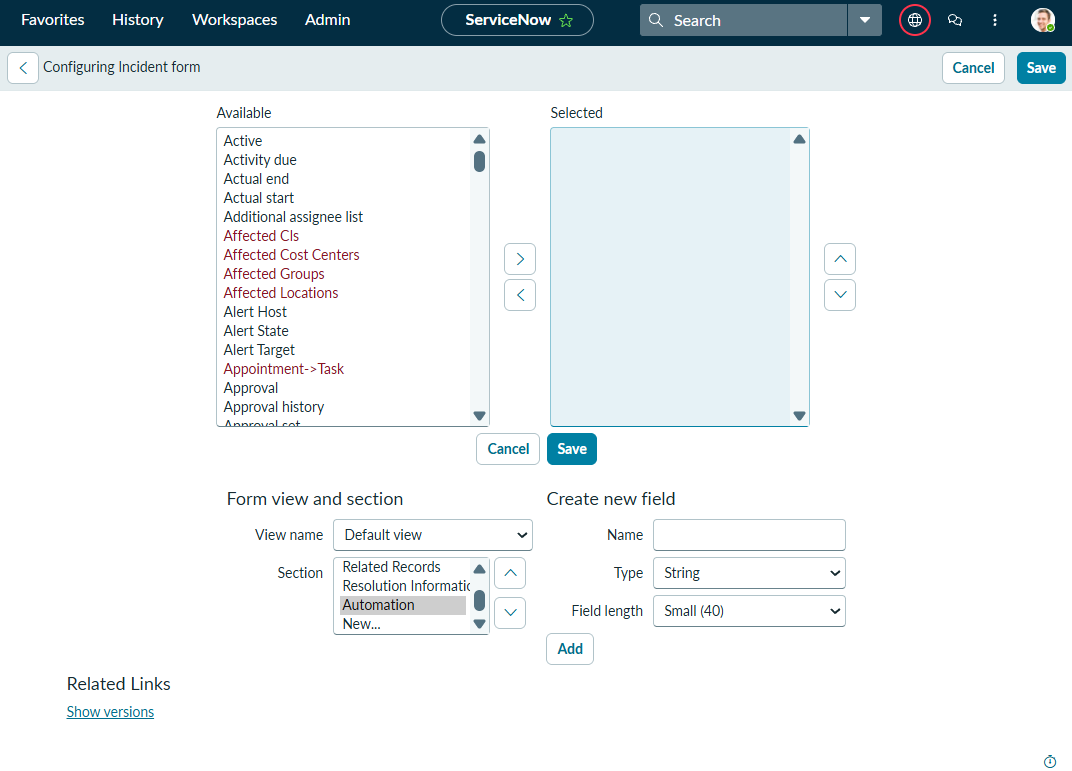
| Incident fields (13) | u_alert_host, u_alert_target, u_alert_target_type, u_alert_state, u_alert_id, u_alert_open_ids, u_refire_count, u_triage_outcome, u_auto_action, u_held_change (reference to change), u_rca_state, u_proposed_action, u_remediation_approval (choice: Pending, Approved, Rejected, Running, Done, Failed, Not proposed) |
| Properties (12) | x_dbauto.automation_enabled, auto_restart_agent, auto_restart_listener, max_agent_restarts_24h, max_listener_restarts_24h, auto_propose, storm_threshold, blackout_check, blackout_grace_after_min, blackout_lookahead_min, blackout_unknown_blocks_restarts, automation_group |
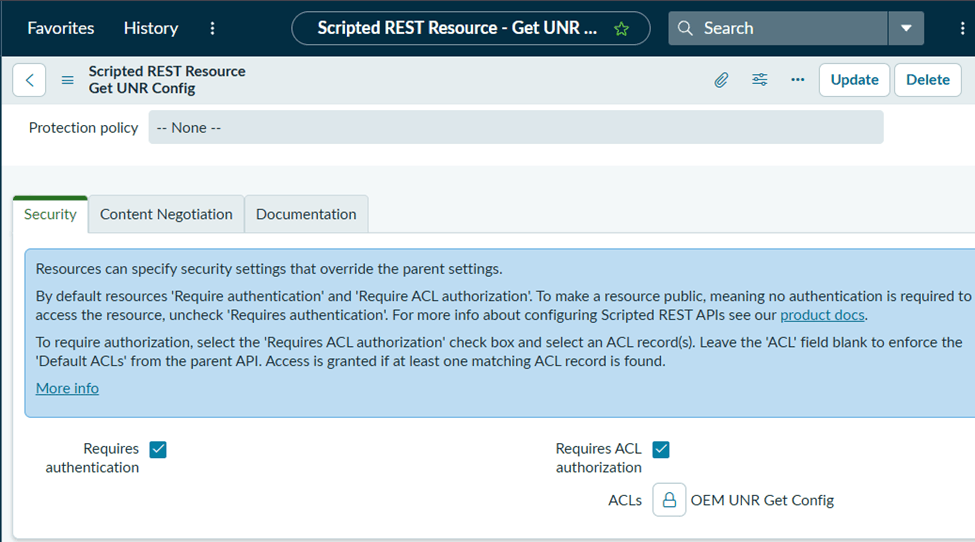
| Scripted REST API | DB Automation Events, path /api/<namespace>/db_automation_events, resources POST /unr, GET /config, POST /auto |
| Roles (3) | dbauto_oem_webhook, dbauto_automation, dbauto_approver |
| Access rules (29) | All Allow If, none for delete, none changing a built-in rule (the script only touches rules that carry its own roles) |
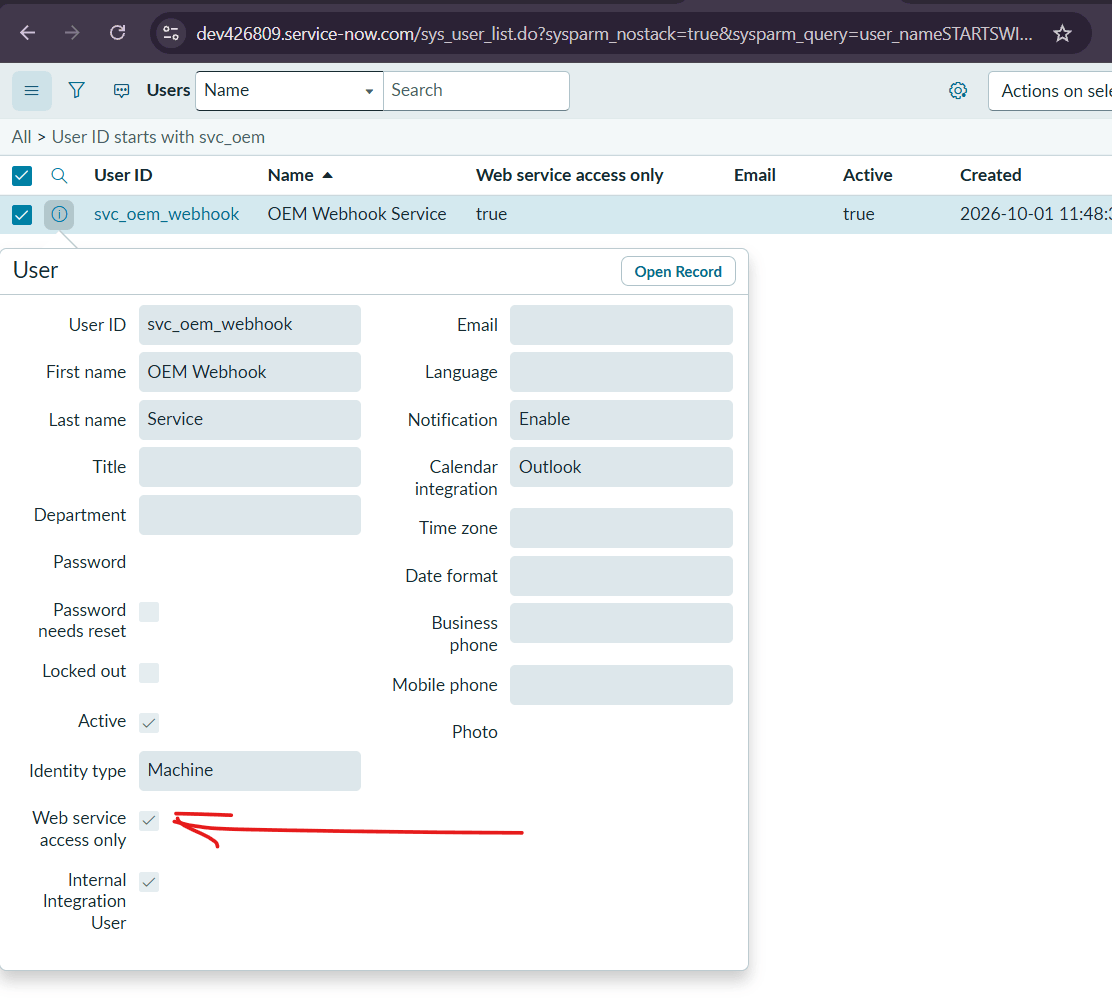
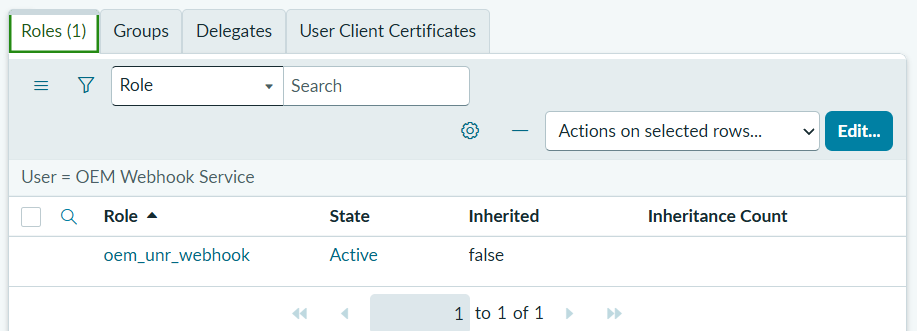
| Accounts (2) | svc_oem_webhook (OEM Webhook Service), svc_db_automation (DB Automation Service): web service access only, machine identity, one role each |
| Other | Resolution code Resolved by automation, group Automation (no members), dbauto_approver on the DBA group |
Least privilege
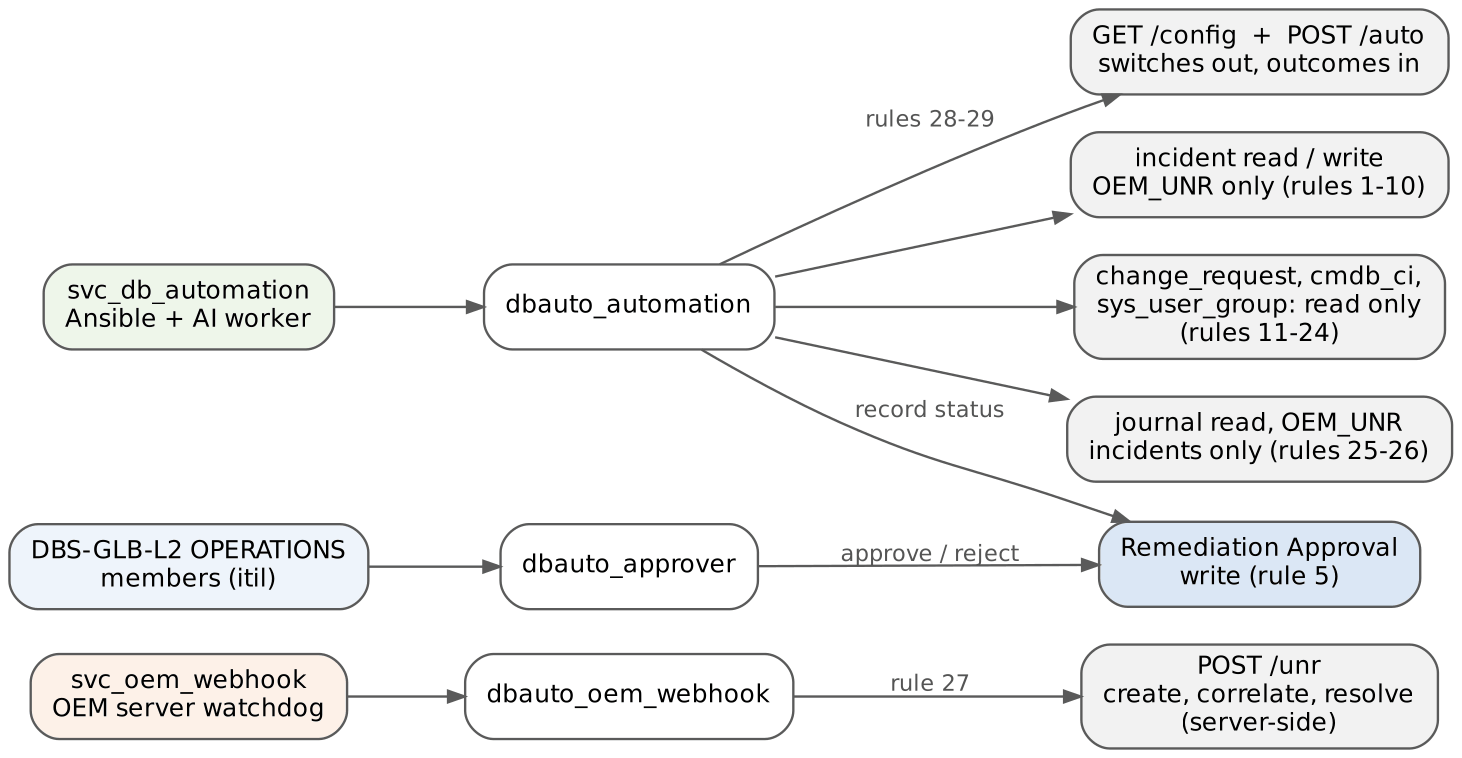
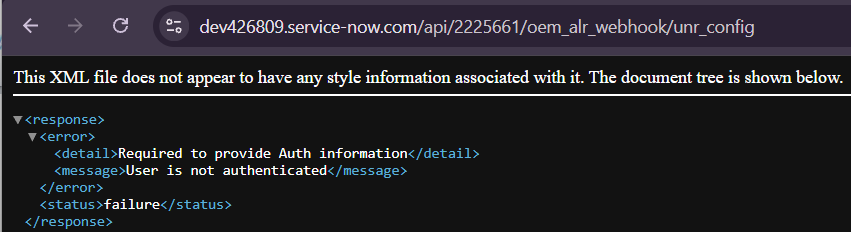
OEM_UNR, read change and group data, and call two endpoints. It cannot create or delete incidents: /auto creates them server-side.Build screenshots
Several build screenshots come from the validation instance before the version 3.0 rename and show the earlier names (x_unr.*, oem_unr_* roles, OEM ALR Webhook, Database Atlanta). The objects and settings are the same; see Names.
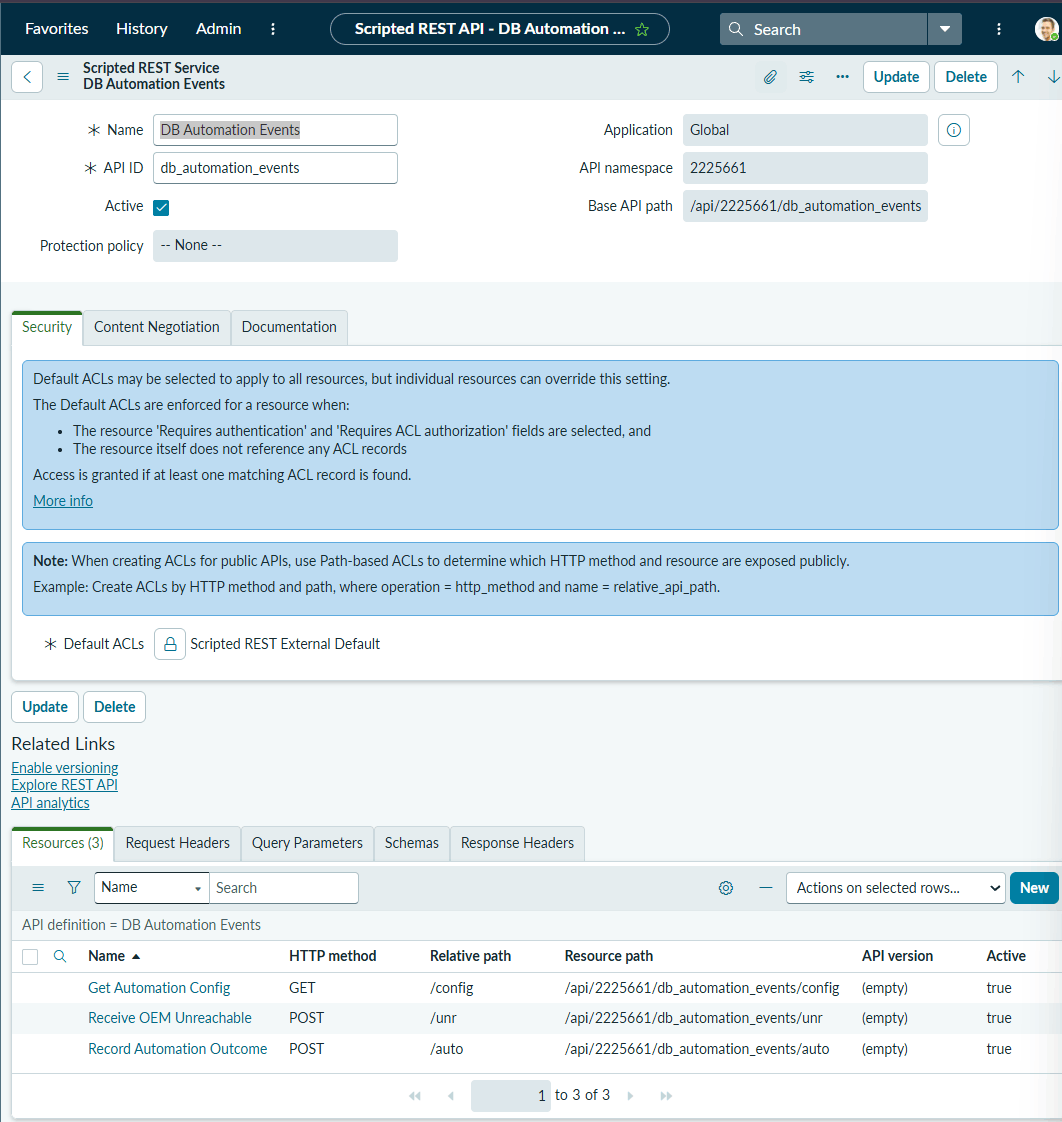
/config, /unr, /auto).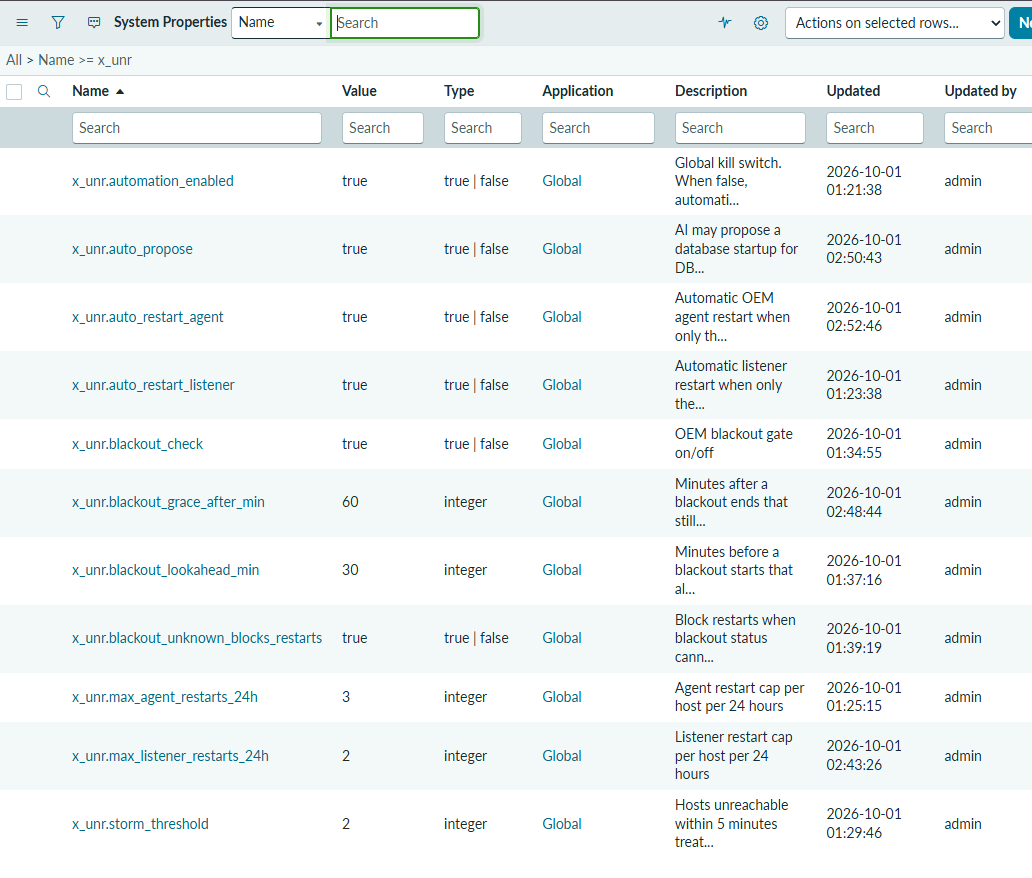
x_unr.*; now x_dbauto.*).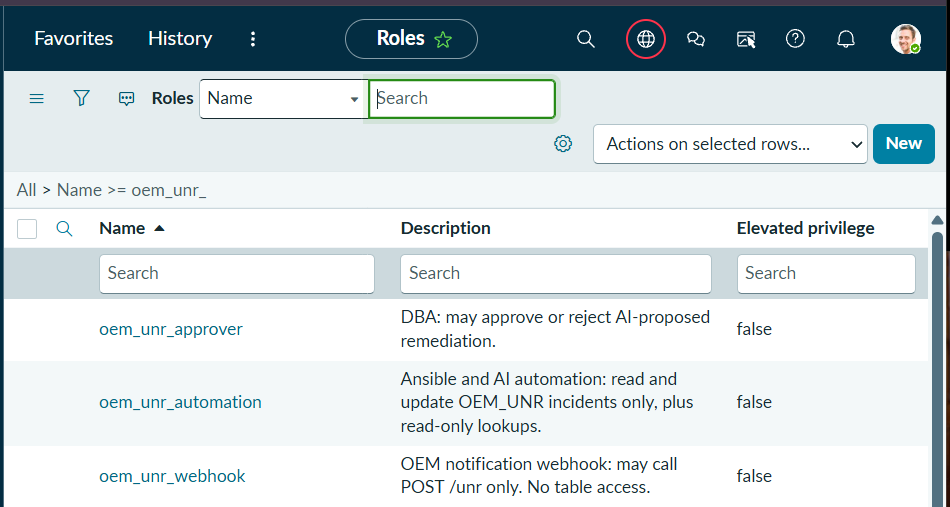
dbauto_*).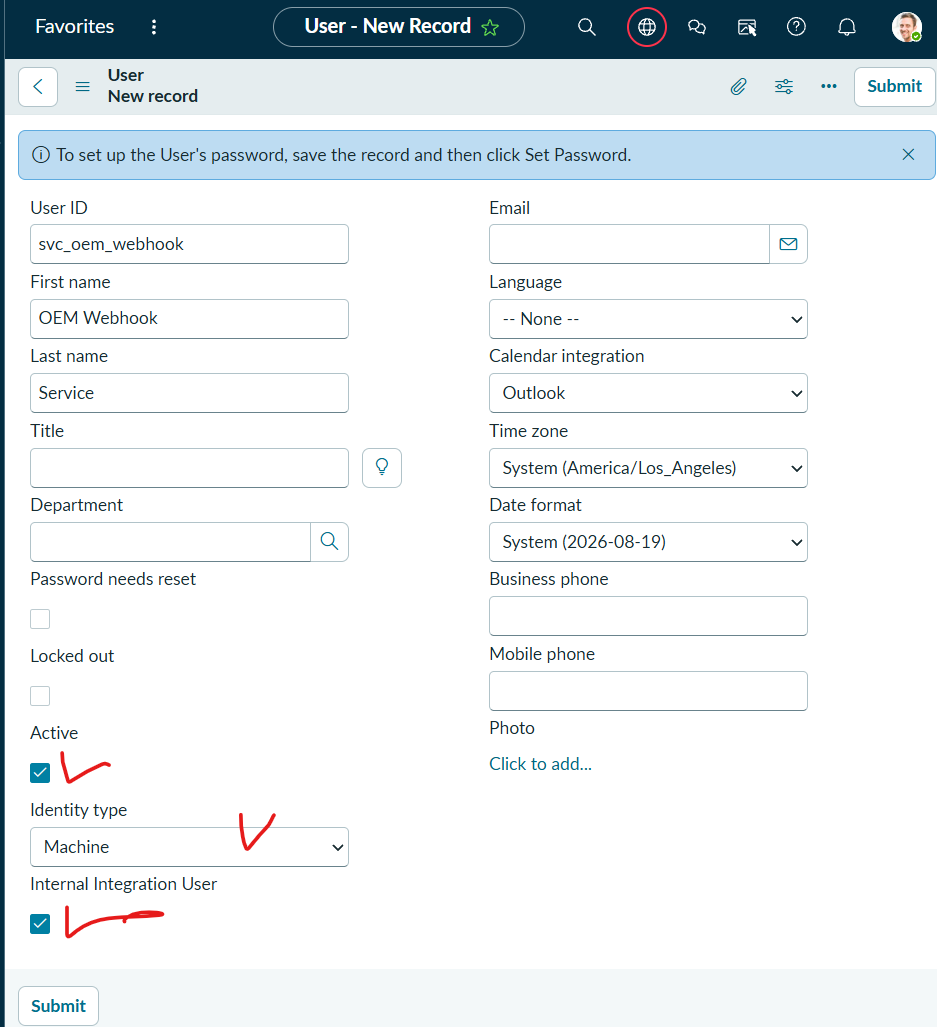
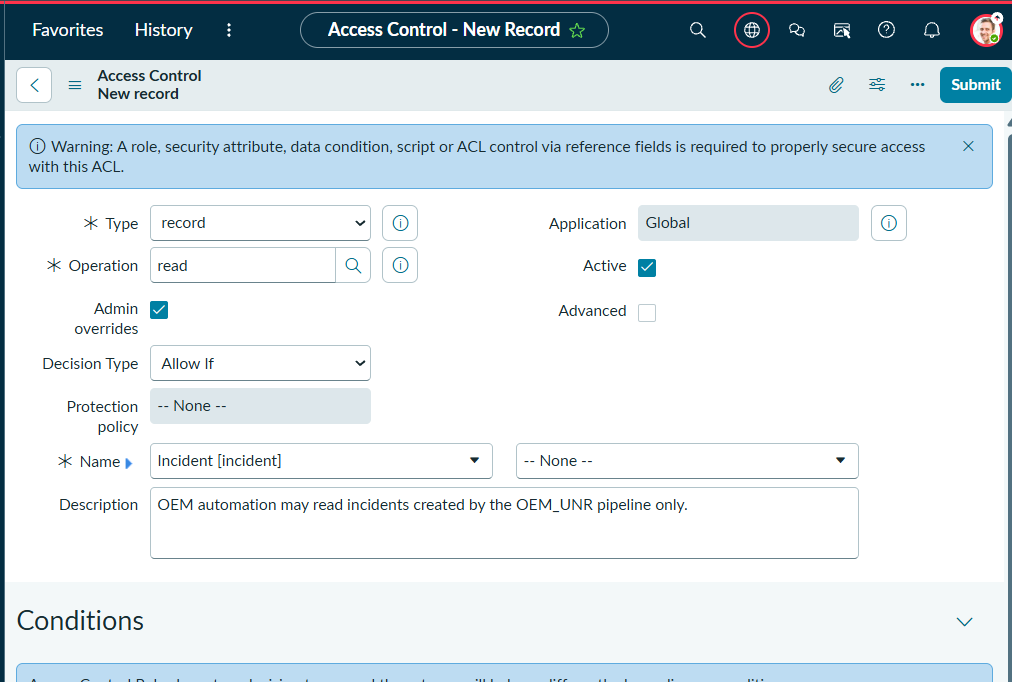
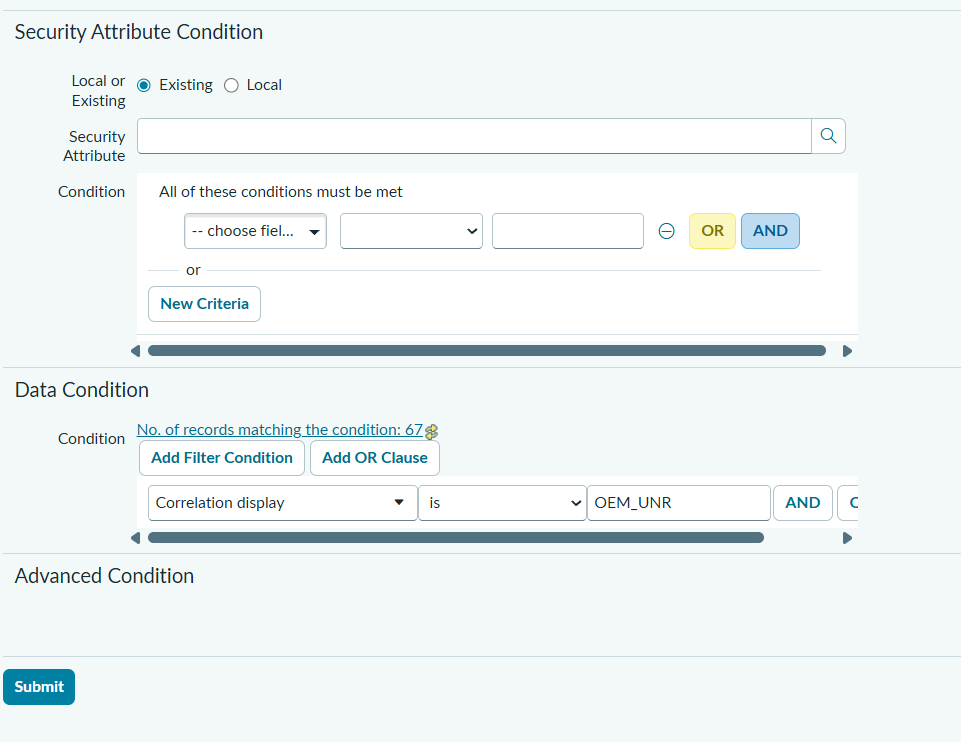
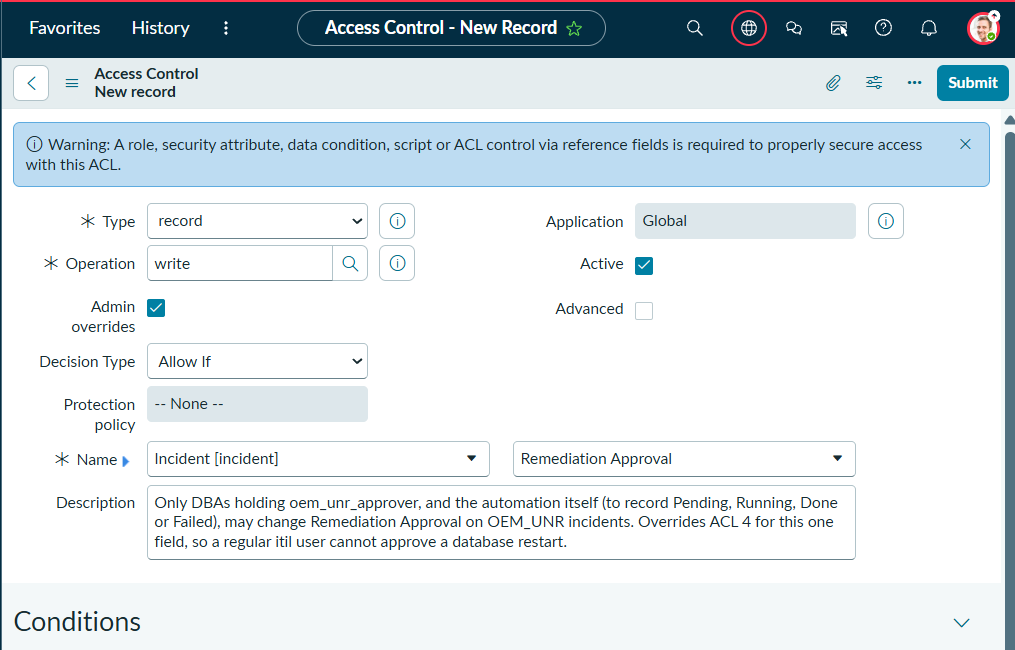
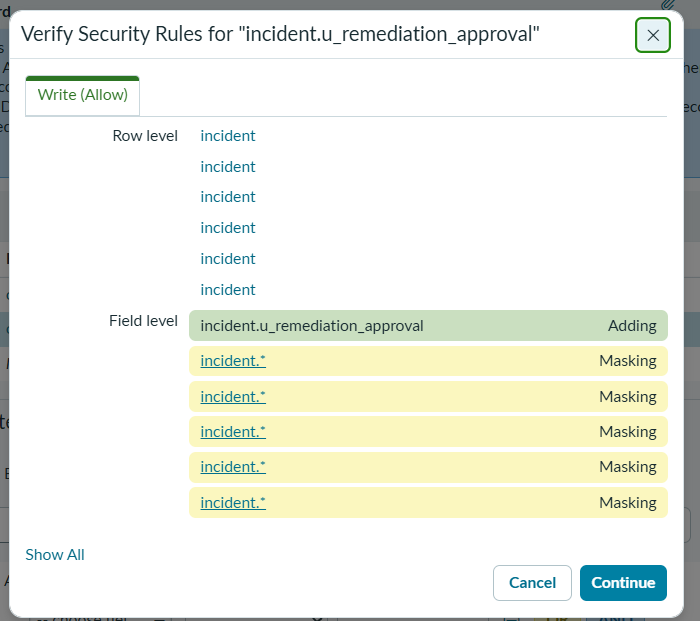
incident.* write rules for this one field.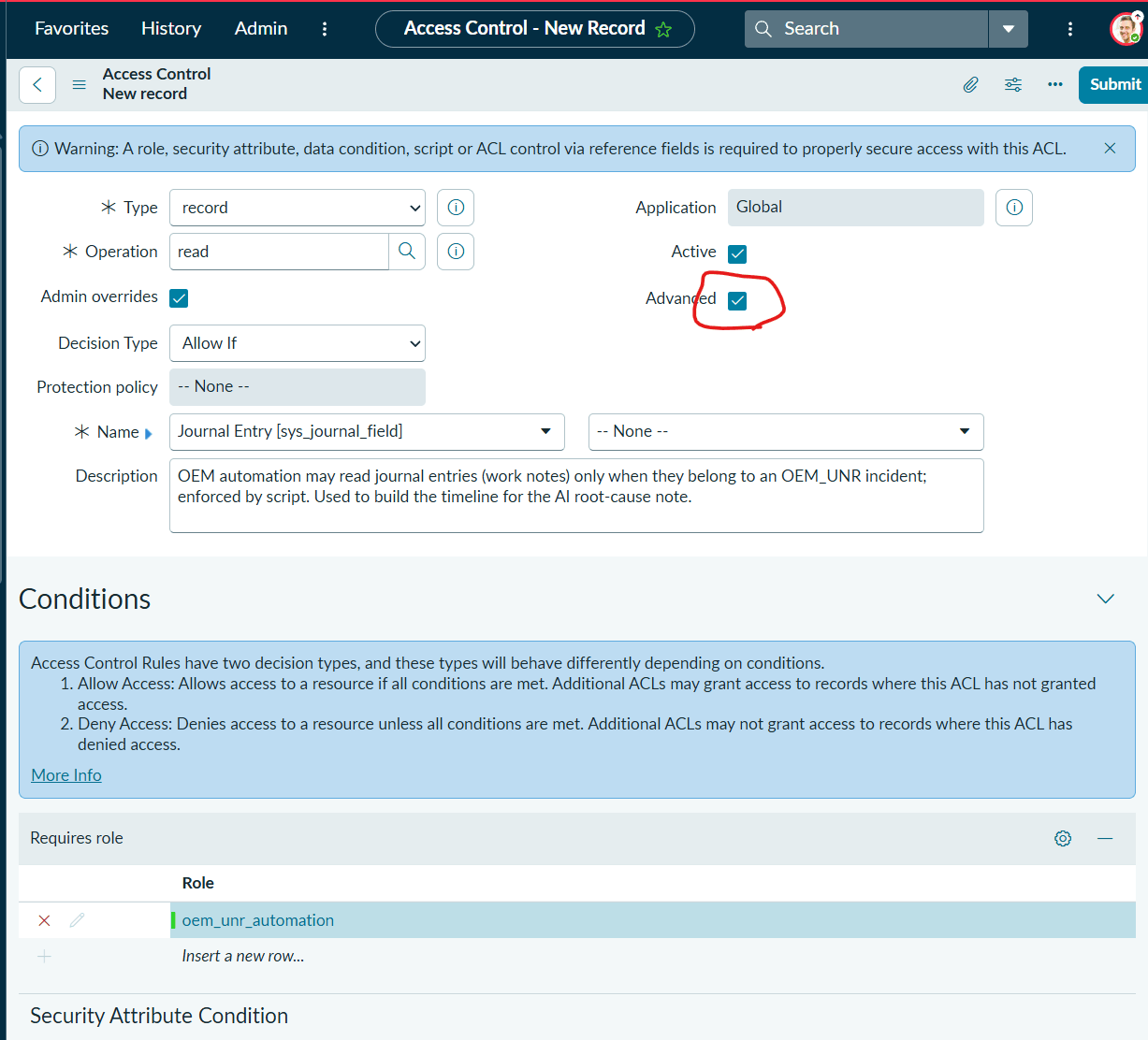
sys_journal_field read with a script…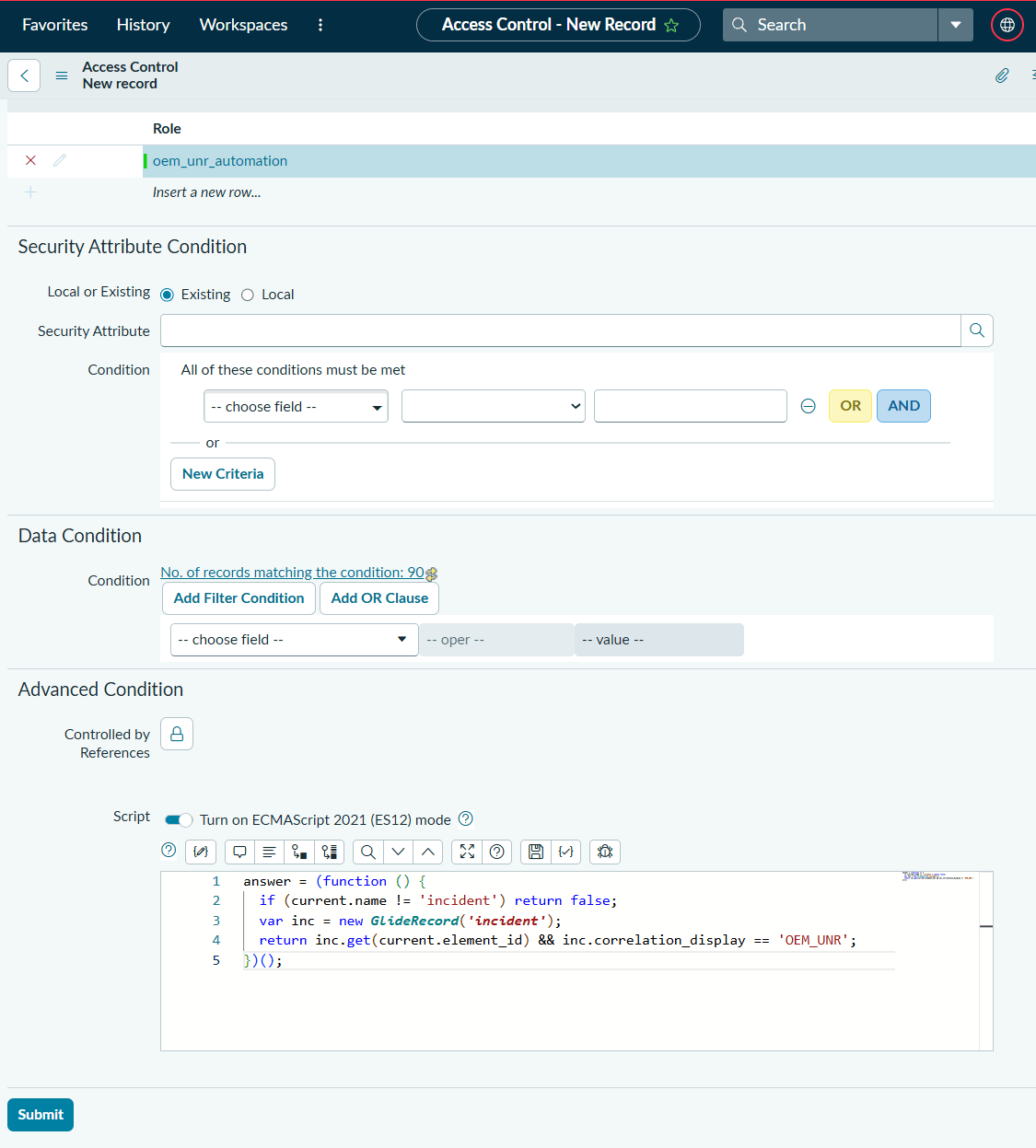
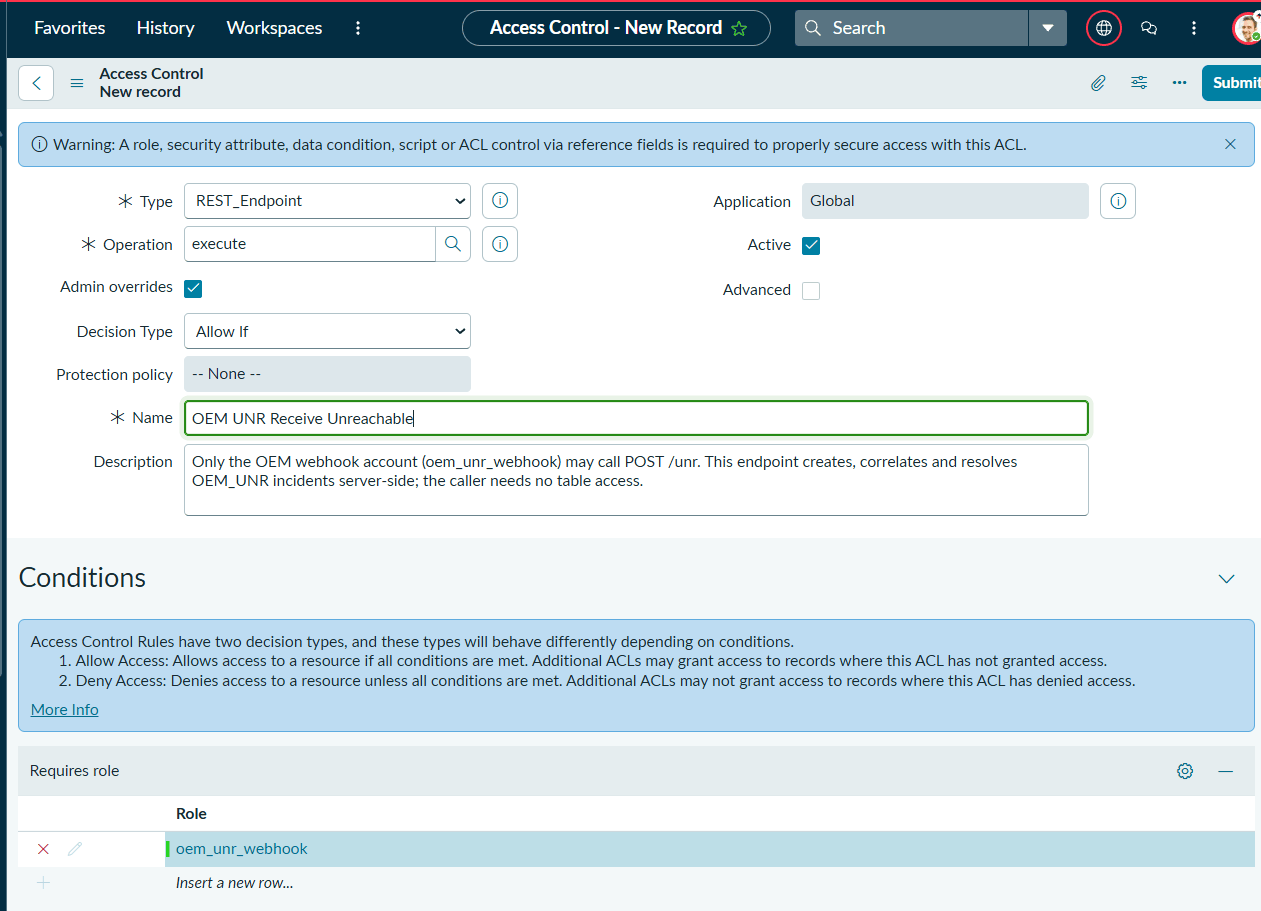
8. Demos, with screenshots
Two rounds of live tests against OEM 13.5 and Oracle 21c on lnx002: on the validation instance on 7 October 2026 (INC0010014–INC0010017) and on a freshly wiped instance built by the 3.0.3 Fix Script on 11 October 2026 (INC0010001–INC0010006). Times in ServiceNow screenshots are in the viewing user’s time zone; times inside notes are UTC.
Demo A. A stopped agent, fixed and recorded
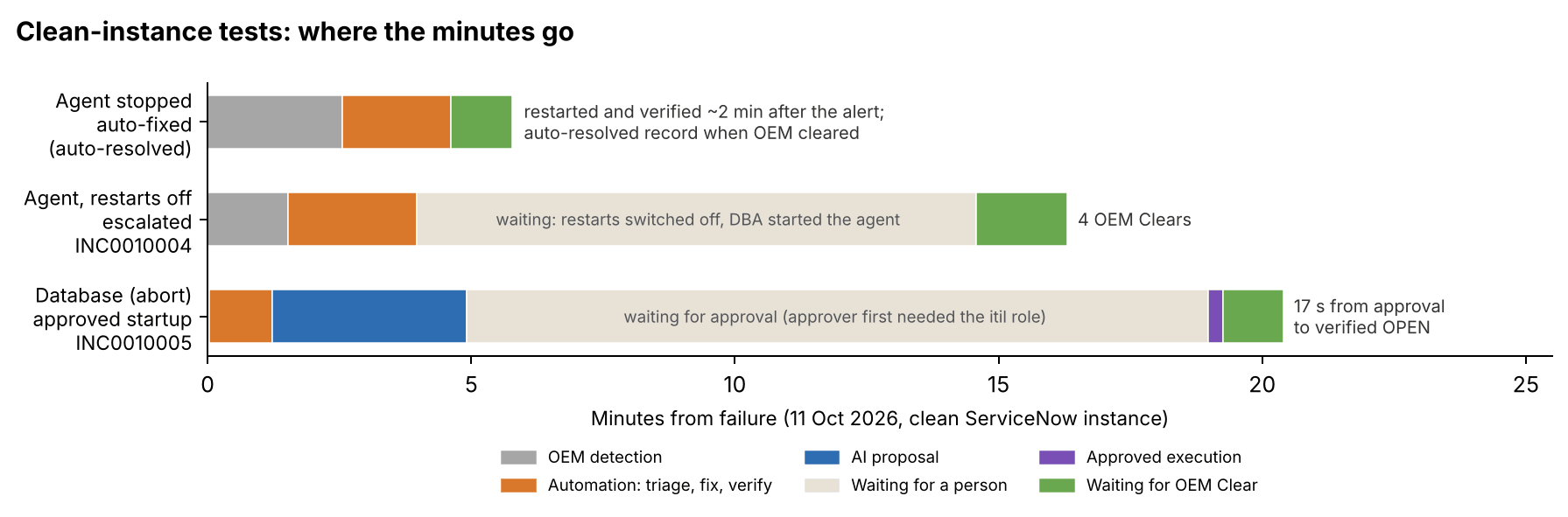
emctl stop agent on lnx002. OEM raised four events (agent CRITICAL; host, database, listener WARNING). The automation diagnosed AGENT_ONLY (ping, SSH, pmon, v$instance OPEN, listener up; agent down), confirmed no blackout and the cap (restart 1 of 2 in 24 h), restarted the agent and verified Running and Ready about 2 minutes after OEM’s alert. When OEM cleared all four events, one incident was written already resolved.
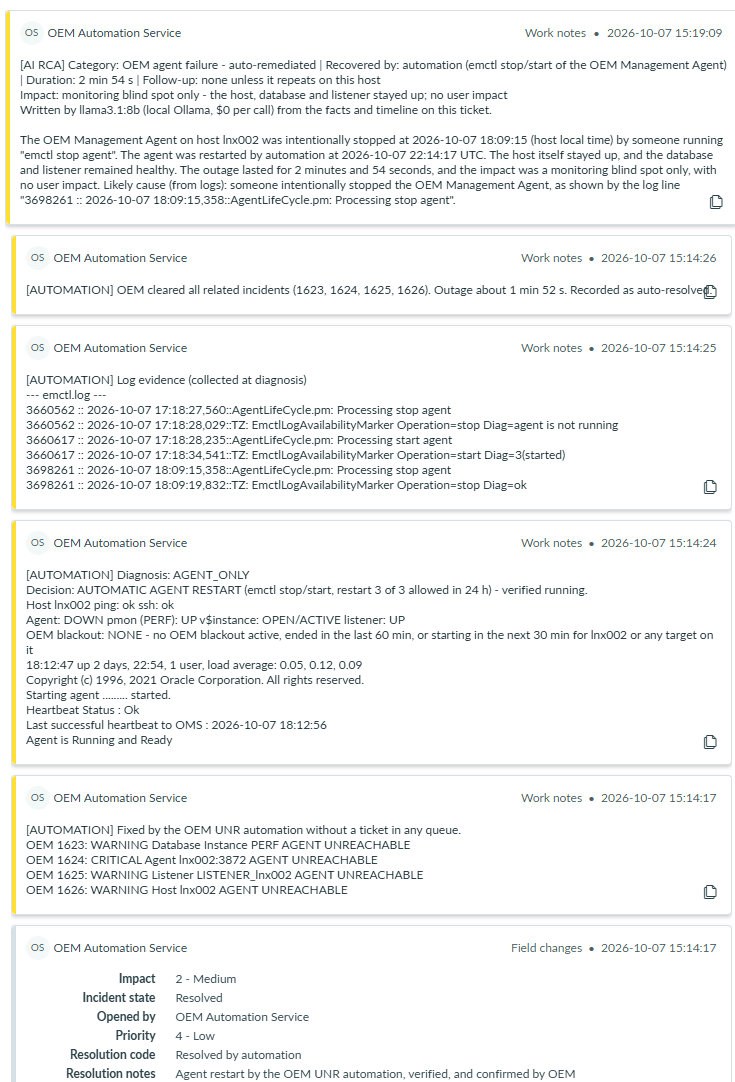
emctl stop agent found in the log.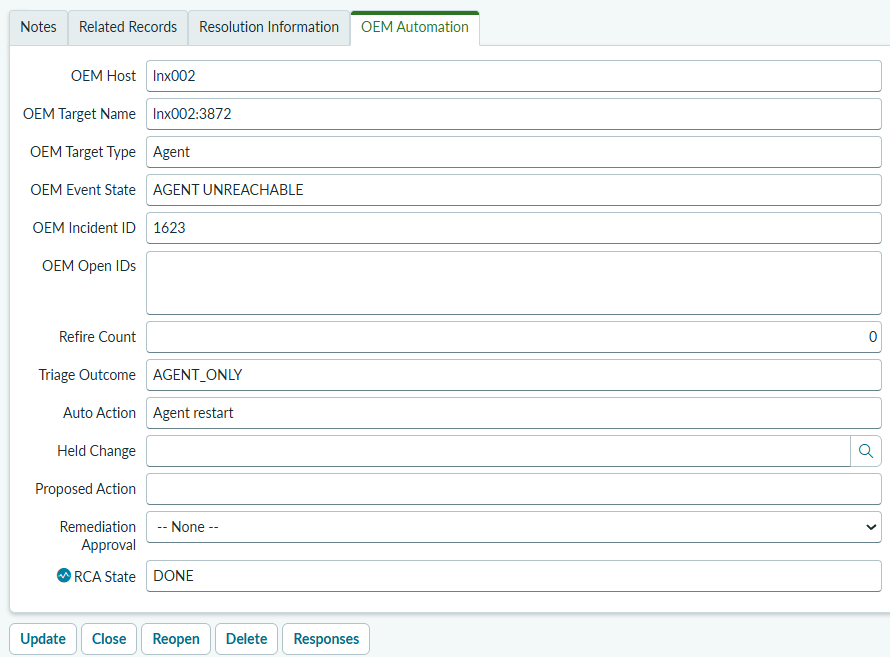
AGENT_ONLY, action Agent restart, RCA DONE.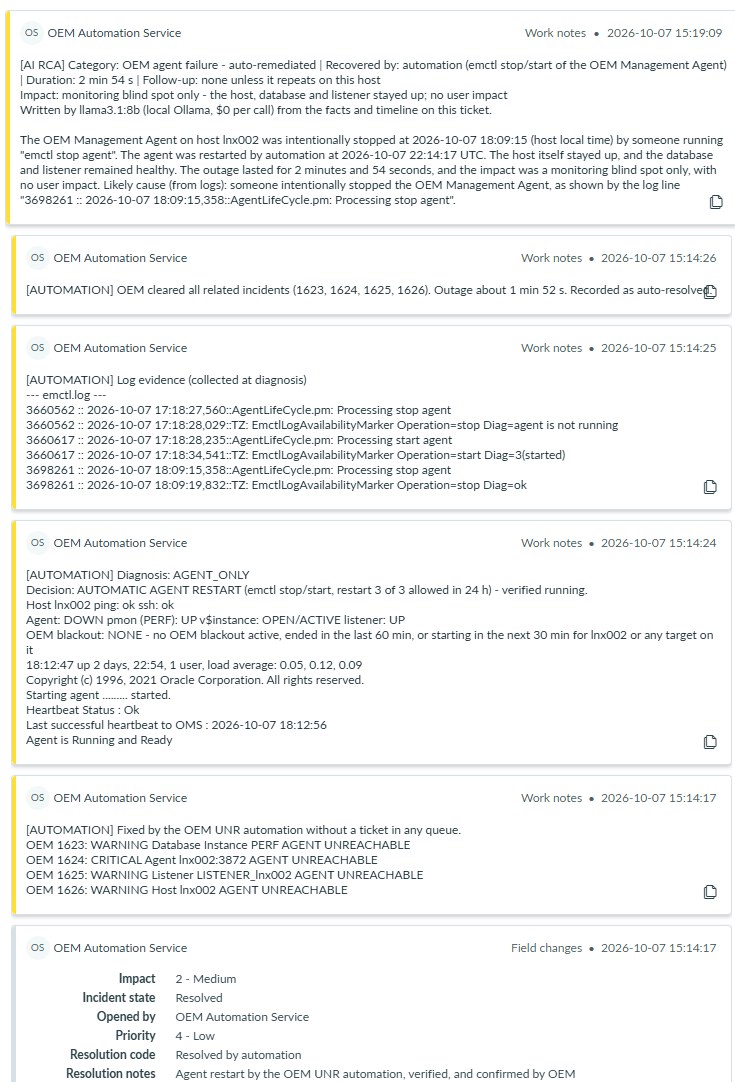
The same test on the clean instance (11 October) produced the same result: diagnosis AGENT_ONLY, Decision: AUTOMATIC AGENT RESTART (emctl stop/start, restart 1 of 2 allowed in 24 h) - verified running, outage 3 min 13 s as measured by OEM, record written as Resolved with priority 4.
Demo B. Restarts not allowed: escalated, then resolved by OEM’s Clears
With automatic agent restart switched off (or the day’s cap used), the automation diagnosed the outage and routed it instead of acting. The incident reached the DBA group In Progress, with the diagnosis and the emctl.log lines attached. When the agent was started by hand, OEM’s four Clears arrived and resolved the incident one OEM incident at a time.
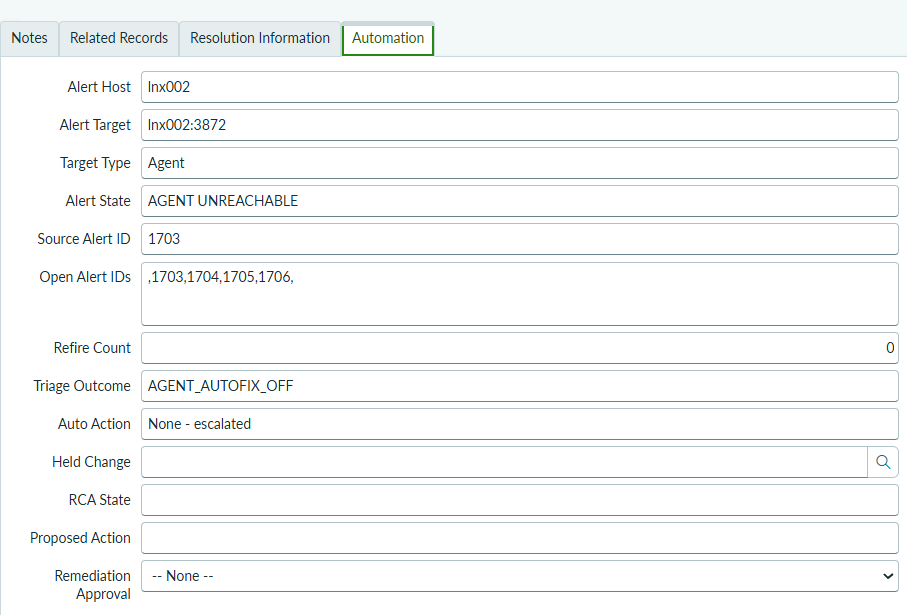
AGENT_AUTOFIX_OFF, action None - escalated, open alert IDs ,1703,1704,1705,1706,.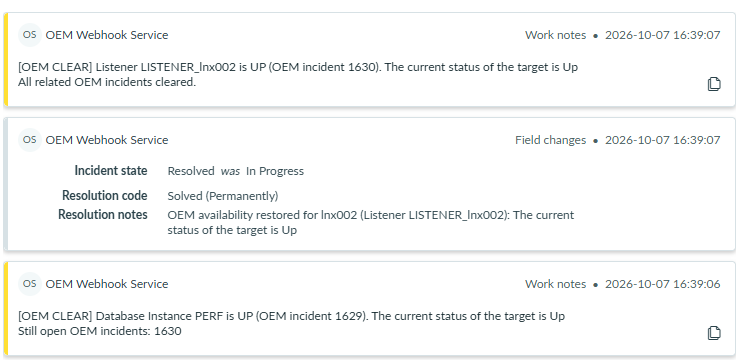
[AUTOMATION] Triage diagnosis: AGENT_ONLY
Decision: AGENT_AUTOFIX_OFF - ROUTED to DBS-GLB-L2 OPERATIONS (urgency 3)
Only the agent is down, but automatic agent restart is switched off (x_dbauto auto_restart_agent) - routed to DBA.
Host lnx002 ping: ok ssh: ok
Agent: DOWN pmon (PERF): UP v$instance: OPEN/ACTIVE listener: UP
OEM blackout: NONE - no OEM blackout active, ended in the last 60 min, or starting in the next 30 min for lnx002 or any target on it
The AI note on INC0010004 matched the known log signature and quoted it: “Likely cause (from logs): someone intentionally stopped the agent with the command ‘emctl stop agent’ (‘1323705 :: 2026-10-11 05:51:49,028::AgentLifeCycle.pm: Processing stop agent’)”, with impact “monitoring blind spot only” and duration 14 min 46 s.
Demo C. A stopped listener, fixed with real event times
lsnrctl stop LISTENER_lnx002. Restarted and verified 39 seconds after OEM’s alert. Because the record is written after OEM clears, each note carries the time it really happened.
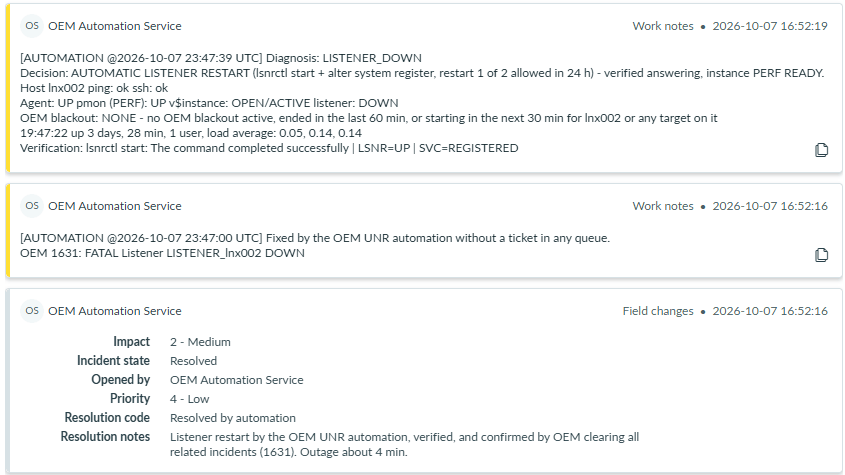
[AUTOMATION @… UTC] with the real event times.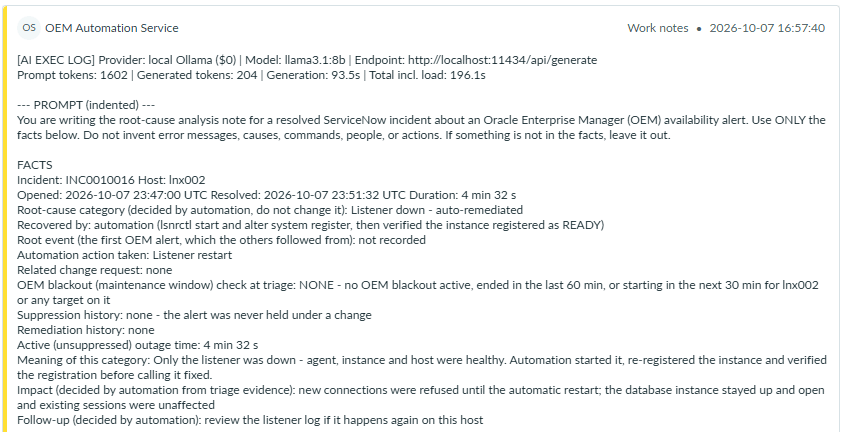
listener.log.Demo D. A database shut down: the cautious decline, then an approved startup
A database is never started automatically. In the first run the AI declined to propose a startup because the alert-log lines it was given started after the line that names who issued the shutdown. That is the intended failure mode: when unsure, a person decides.

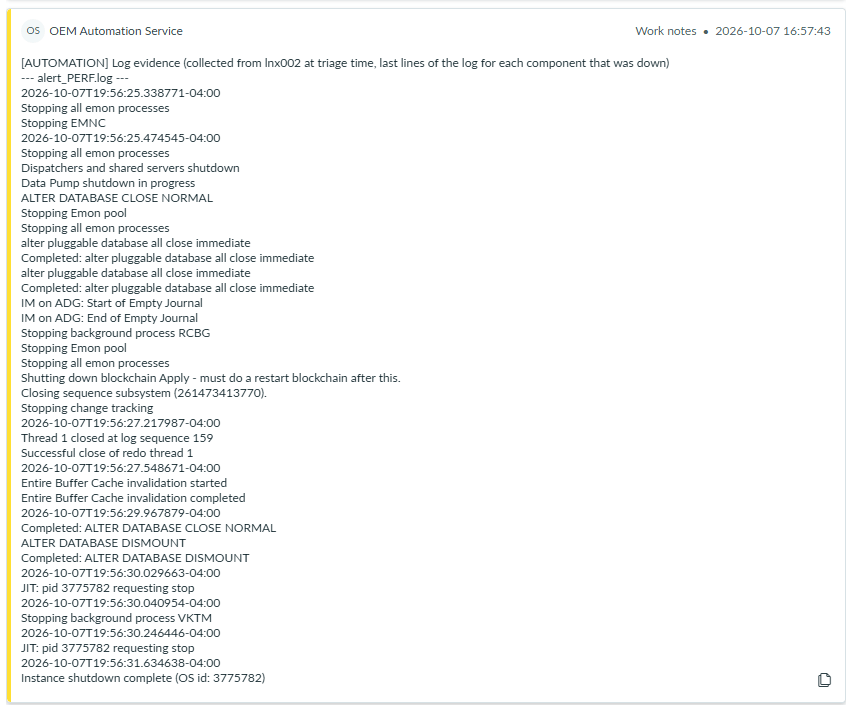
On the clean instance, shutdown abort from SQL*Plus. Triage routed it at urgency 1 (INSTANCE_DOWN), the log evidence now included Shutdown is initiated by sqlplus@lnx002, and the AI proposed STARTUP_OPEN. A member of DBS-GLB-L2 OPERATIONS approved it; the automation re-checked the window, confirmed the instance was still down, started it and verified it OPEN in 17 seconds.
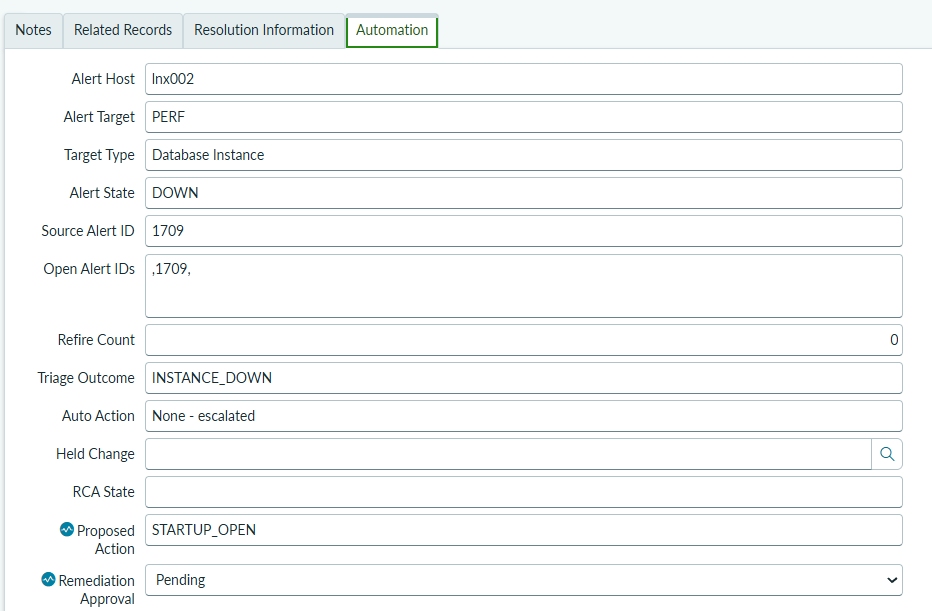
STARTUP_OPEN, Remediation Approval Pending.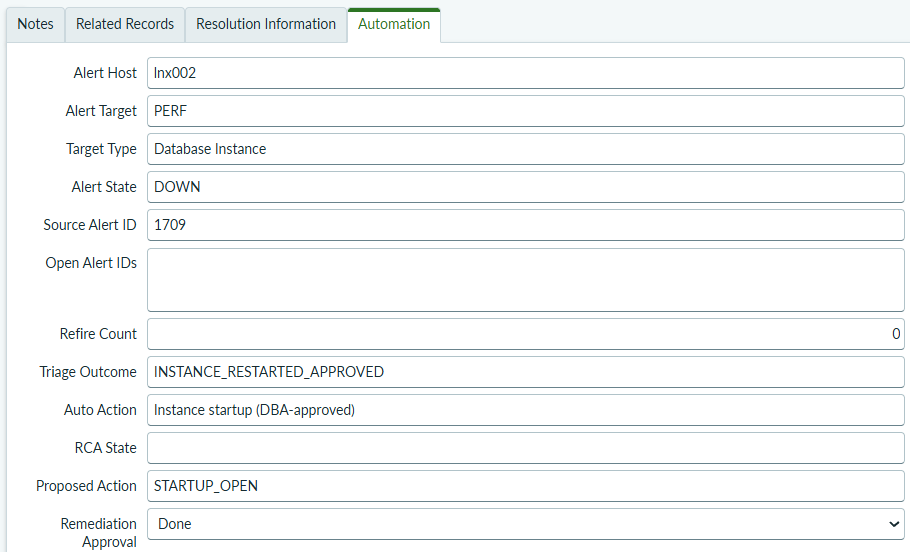
INSTANCE_RESTARTED_APPROVED, Instance startup (DBA-approved), approval Done, open alert IDs empty.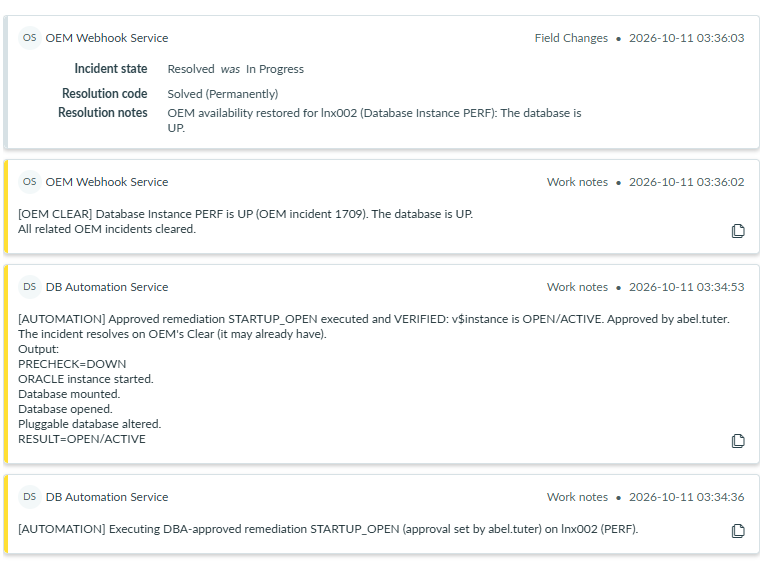
PRECHECK=DOWN, instance started, mounted, opened, pluggable databases opened, RESULT=OPEN/ACTIVE; then OEM’s Clear resolved the incident.[AI PROPOSAL] Proposed remediation: STARTUP_OPEN - awaiting DBA approval. NOTHING RUNS WITHOUT APPROVAL.
Exact commands automation will run on lnx002 (PERF) as sysdba if approved:
startup
alter pluggable database all open
Then it verifies v$instance shows OPEN/ACTIVE.
Safety checks passed: alert-log evidence present; no corruption/media/internal-error signatures;
every quote above verified against the log lines.
To approve: set Remediation Approval = Approved. To decline: set it to Rejected.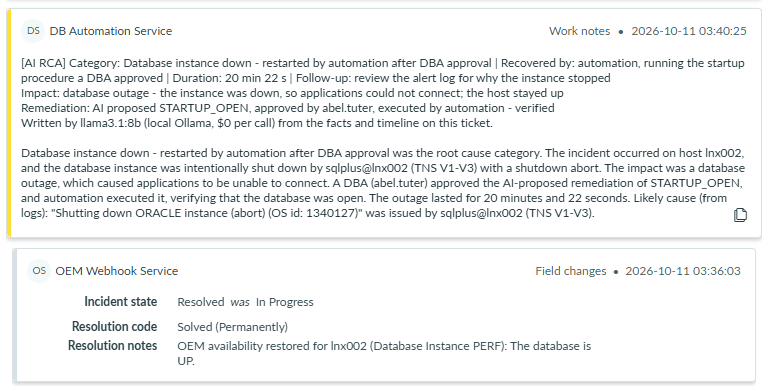
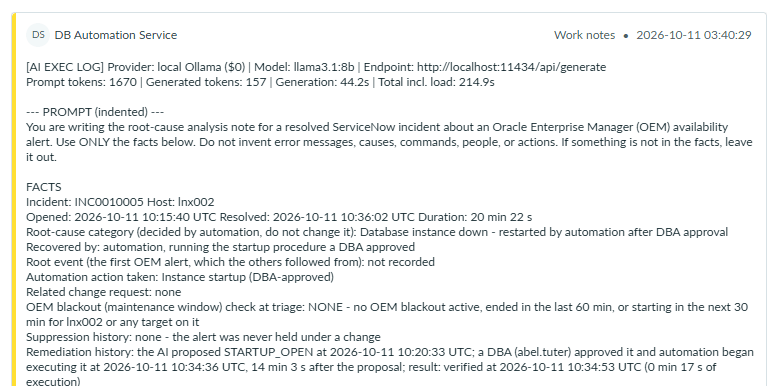
[AI EXEC LOG]: model, tokens, timings and the facts given to it, including the remediation history with times.Demo E. An alert delivered an hour late keeps OEM’s times (3.0.3)
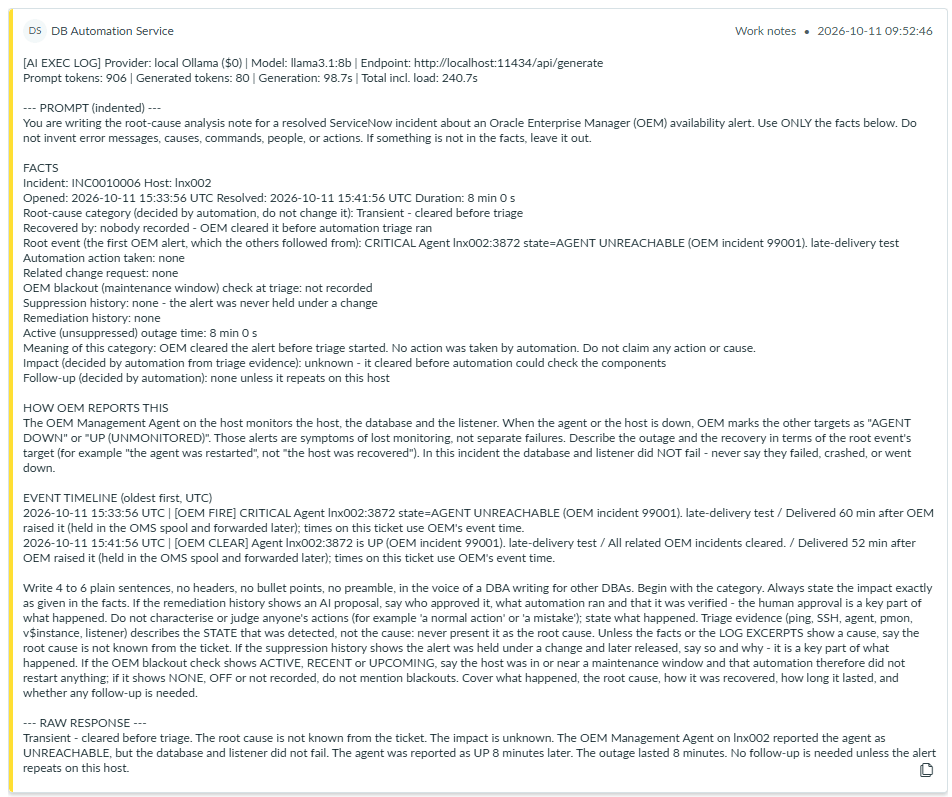
A FIRE stamped 60 minutes in the past and its CLEAR stamped 52 minutes in the past were posted to /unr, as the watchdog would after an outage. The incident opened at OEM’s FIRE time, resolved at OEM’s CLEAR time, and the AI note reported the real 8-minute outage.
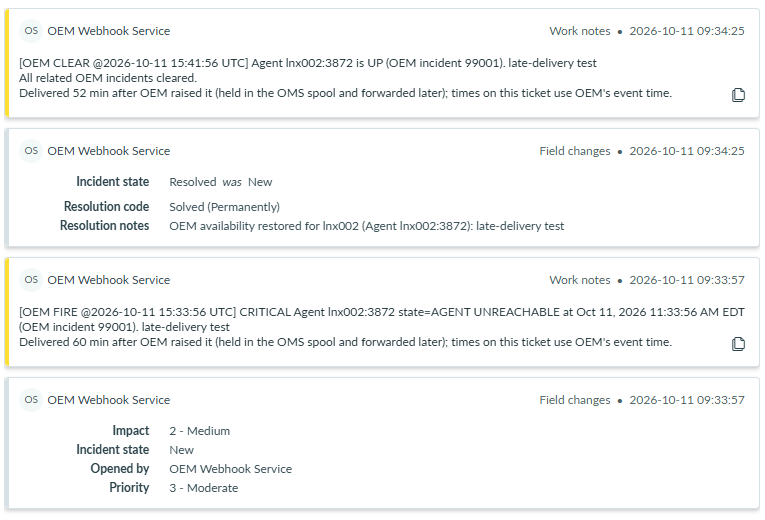
[OEM FIRE @2026-10-11 15:33:56 UTC] and [OEM CLEAR @… 15:41:56 UTC], each saying how late it arrived.
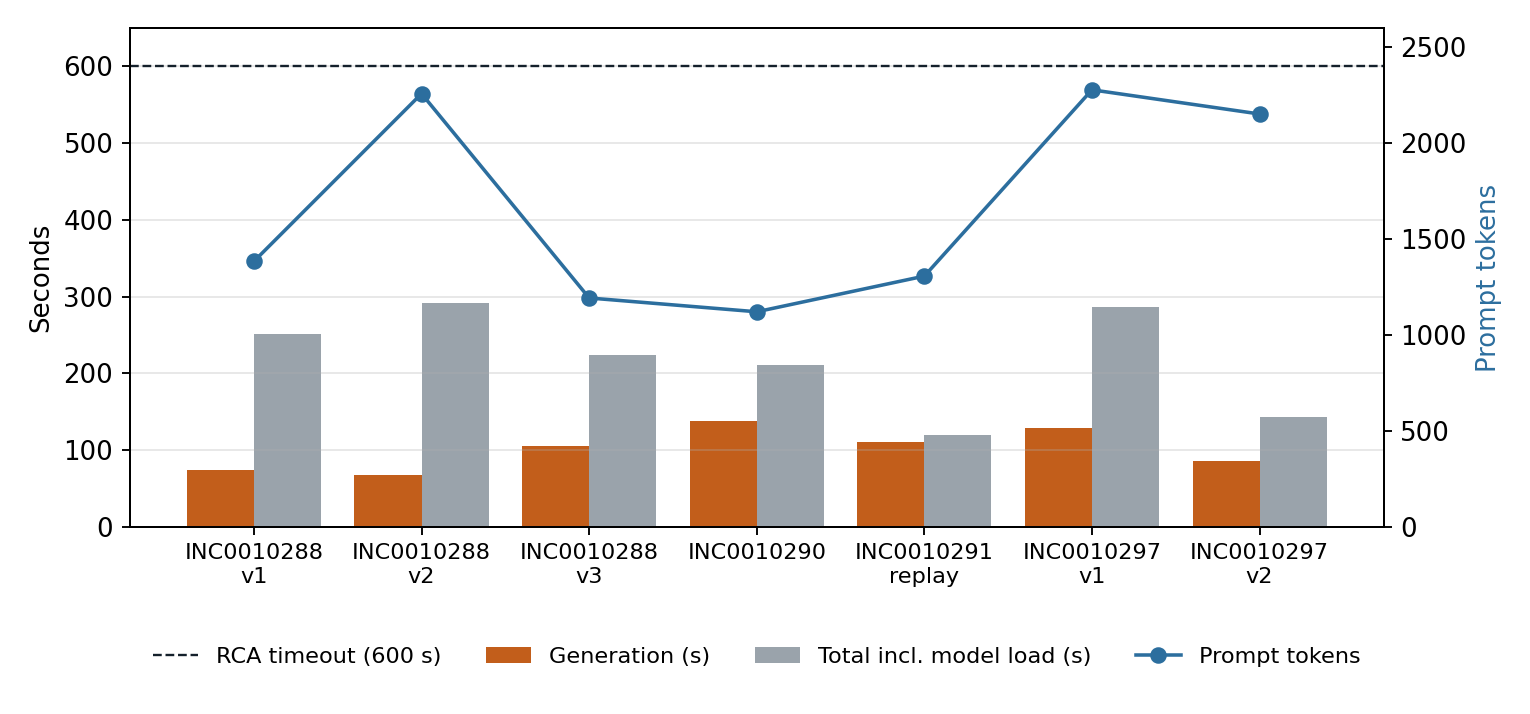
9. Timing
10. Clean-instance rebuild: what it found and fixed
To prove the Fix Script for production, the ServiceNow instance was reset to a vanilla state and everything was rebuilt from the script alone, then re-tested live. Each finding became a fix in 3.0.1–3.0.3 or a line in the setup guide.
| Finding | Effect | Fix |
|---|---|---|
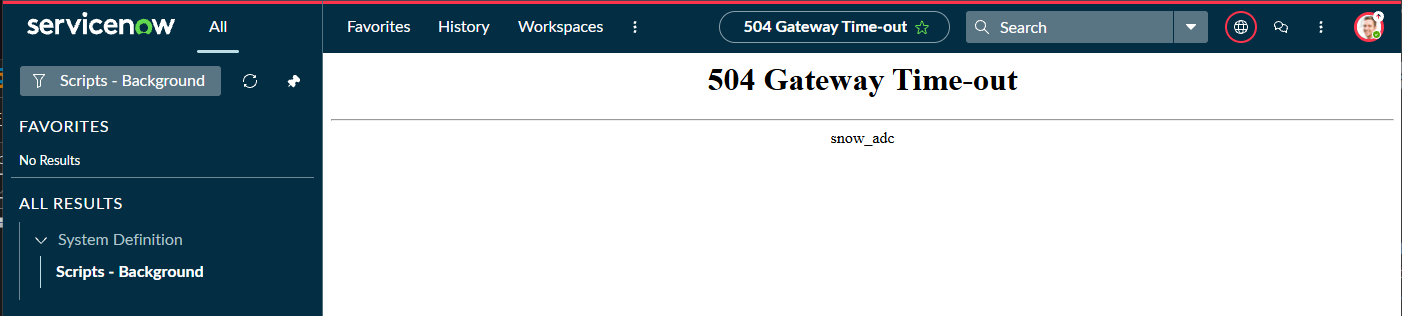
| First run took longer than the browser waits | Scripts - Background showed 504 Gateway Time-out while the script completed on the server, so its summary was lost | 3.0.1: every progress line also goes to the system log ([DB Automation setup], ending with FINISHED). Guide: run it with Proceed in Background |
| A re-run re-saved 26 unchanged access rules and 3 resources | Each save flushed security caches and notified MID servers; re-runs were slow and added update-set entries | 3.0.2: conditions and descriptions compared after normalising; resources updated only when the script, method, name or rule differ; each “updated” line says what differed. Re-run: 0 / 0 / 0 in 15 s |
Generated password contained { | Ansible read it as a template: Syntax error in template | Guide: sn_password: !unsafe '<password>' in main.yml |
| Approver group member could not open the incident | dbauto_approver lets a user change Remediation Approval but not open incidents | 3.0.3: Fix Script warns when the approver group has no itil role |
| Form Layout opens on the main section | Fields moved before choosing the section appeared twice on the form | Guide: choose Section → Automation first |
| Service accounts “missing” from the Users list | The list searches by name (DB Automation Service), not user ID | Guide: search by User ID or open sys_user_list.do?sysparm_query=user_name=svc_db_automation |
| Events held during the wipe replayed with delivery times | A day-old outage showed as 58 seconds | 3.0.3: late events keep OEM’s time (Demo E) |
| Escalated records had no root event in the RCA | “Root event: not recorded”, timeline started at the escalation note | 3.0.3: root event from the first OEM nnnn: line, timeline starts at the real alert |
AI called a SHUTDOWN ABORT clean | Inaccurate proposal wording | 3.0.3: known fact, menu wording and a wording correction; note that instance recovery runs at startup |
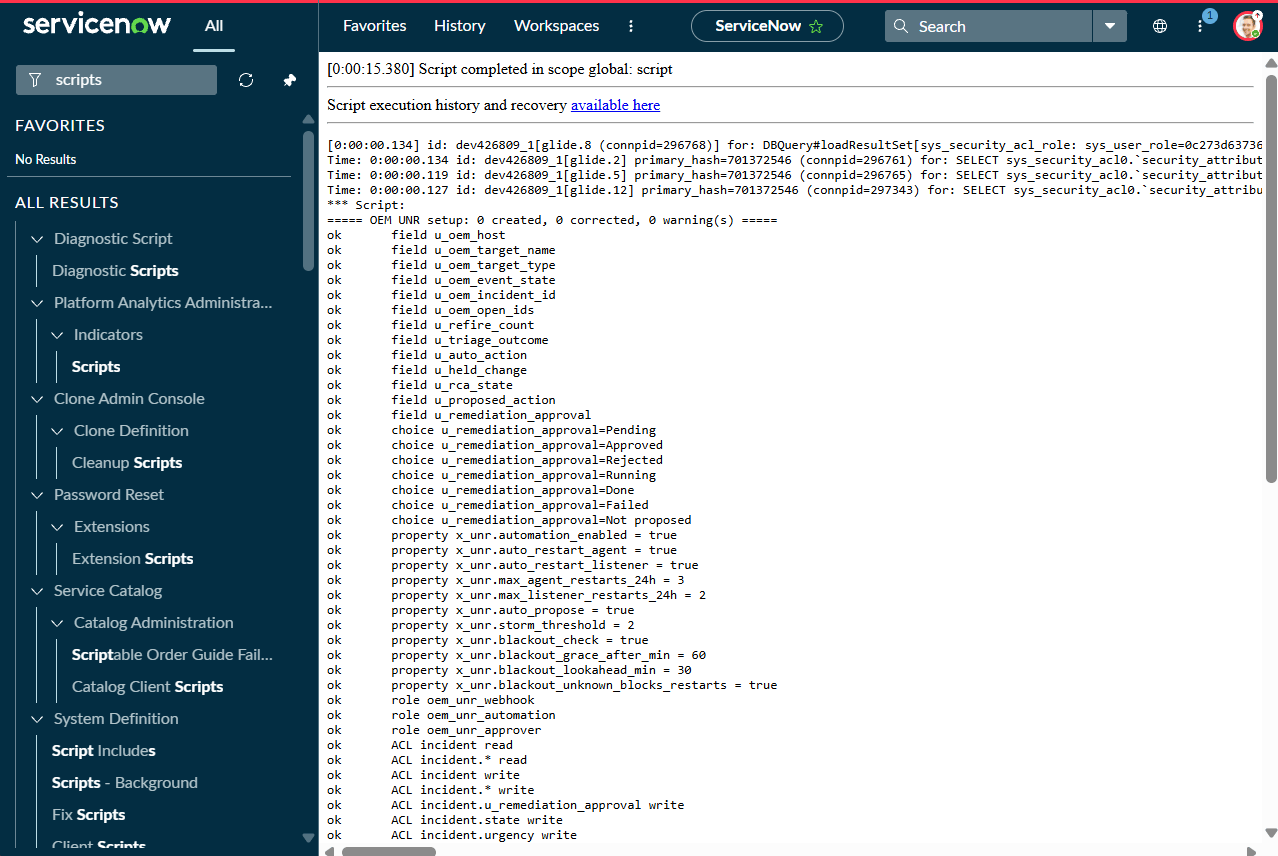
===== DB Automation setup (version 3.0.3): 0 created, 1 corrected, 0 warning(s) =====
...
updated  resource POST /unr (script)
ok       resource GET /config
ok       resource POST /auto
ok       routing group DBS-GLB-L2 OPERATIONS
ok       role dbauto_approver on group DBS-GLB-L2 OPERATIONS
ok       group DBS-GLB-L2 OPERATIONS has a fulfiller role (members can open incidents to approve)

Scripted REST base path: /api/2225661/db_automation_events
  -> Ansible  /etc/ansible/vars/main.yml : sn_unr_api: "https://<instance>.service-now.com/api/2225661/db_automation_events"
  -> OMS      oem_unr_webhook.sh          : SNOW_URL="https://<instance>.service-now.com/api/2225661/db_automation_events/unr"
11. Safety controls
| Control | What it does |
|---|---|
| Kill switch | x_dbauto.automation_enabled = false stops all automatic diagnosis and action within 10 minutes (the switches are cached for 10 minutes); every outage becomes an ordinary incident. |
| Per-action switches | auto_restart_agent, auto_restart_listener, auto_propose. Production default: restarts off; proposals on (they never run without approval). |
| Restart caps | max_agent_restarts_24h, max_listener_restarts_24h (default 2 per host per 24 h). Over the cap, the outage is escalated (AGENT_RESTART_LIMIT). |
| Storm threshold | storm_threshold (default 5): many hosts down at once is treated as one wider problem, not many restarts. |
| Maintenance windows | Approved changes and OEM blackouts (60 min grace after, 30 min look-ahead) block every action, every proposal and every approved startup. Unknown blackout state blocks restarts (fail safe). |
| Verification | A fix counts only after the component is checked healthy; every ServiceNow write is read back, and a silently dropped write stops the run loudly. |
| AI limits | The model never acts. Fixed menu; deterministic vetoes; quotes checked against the logs; grounding check on notes. |
| Least privilege | Two web-service-only accounts with one role each; 29 Allow-If rules; no create or delete on incident; the automation sees only incidents labelled OEM_UNR. |
| No lost alerts | Spool plus watchdog: if the automation stops reading, events go to ServiceNow after 10 minutes with their original times. |
12. Installation
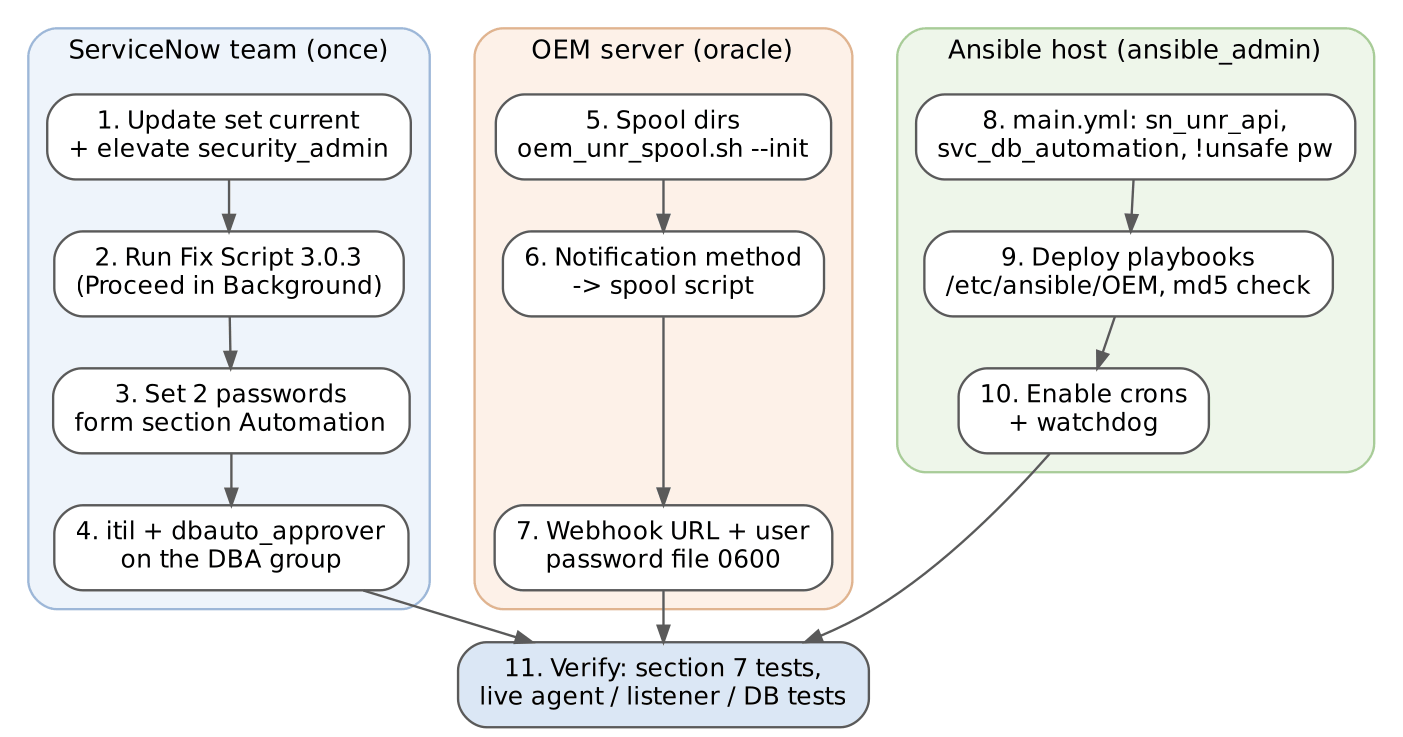
ServiceNow (ServiceNow team, once)
- Create and make current an update set (for example DB Automation v3.0.3); elevate to
security_admin. - System Definition → Fix Scripts → New, paste
DB_Automation_setup_fix_script_V3.0.3.js, review the CONFIG block, Run Fix Script → Proceed in Background. If it reports a new REST resource, rungs.cacheFlush(). - Set passwords on
svc_oem_webhookandsvc_db_automation; add the Automation form section with the 13 fields. - Make sure the approver group has
itilas well asdbauto_approver.
OEM server (as oracle)
/u01/app/oracle/emcli/oem_unr_spool.sh --init          # create the spool directories
# OEM console: notification method -> OS command /u01/app/oracle/emcli/oem_unr_spool.sh
# oem_unr_webhook.sh (watchdog path), lines 7-8:
SNOW_URL="https://<instance>.service-now.com/api/<namespace>/db_automation_events/unr"
SNOW_USER="svc_oem_webhook"
# password in /home/oracle/.oem_snow/snow_cred (oracle:oinstall, 0600), written with read -rs
Ansible host (as ansible_admin)
# /etc/ansible/vars/main.yml
sn_instance: "https://<instance>.service-now.com"
sn_unr_api:  "https://<instance>.service-now.com/api/<namespace>/db_automation_events"
sn_username: svc_db_automation
sn_password: !unsafe '<from the ServiceNow team>'
oracle_instance_map: { ... }        # SID and Oracle home per host, used for startups

# playbooks
unzip DB_Automation_UNR_V3.0.3.zip && md5sum -c MD5SUMS && cp -p ansible/* /etc/ansible/OEM/

# schedules
* * * * *   /etc/ansible/OEM/SNOW_UNR_auto_cron_wrapper.sh
*/2 * * * * /etc/ansible/OEM/SNOW_UNR_cron_wrapper.sh
*/2 * * * * /etc/ansible/OEM/SNOW_UNR_rca_cron_wrapper.sh
# OEM server (oracle)
* * * * *   /u01/app/oracle/emcli/oem_unr_watchdog.sh
Smoke tests
# Ansible account can read the switches (expect HTTP 200 and the x_dbauto values)
ansible localhost -e @/etc/ansible/vars/main.yml -m uri \
  -a 'url={{ sn_unr_api }}/config user={{ sn_username }} password={{ sn_password }} force_basic_auth=yes return_content=no'

# OEM webhook account is authenticated (expect HTTP 400 "host_name and oem_incident_id are required")
curl -s -w '\nHTTP %{http_code}\n' -u "svc_oem_webhook:$(cat /home/oracle/.oem_snow/snow_cred)" \
  -H "Content-Type: application/json" -X POST -d '{}' "$SNOW_URL"
13. Operating it
| To do this | Do this |
|---|---|
| Stop all automatic actions | Set x_dbauto.automation_enabled = false (effective within 10 minutes) |
| Allow or stop agent / listener restarts | x_dbauto.auto_restart_agent, x_dbauto.auto_restart_listener |
| See what the automation fixed | Incidents with Resolution code = Resolved by automation, or group Automation |
| Approve a proposed startup | As a member of the approver group: Remediation Approval = Approved; to decline, Rejected |
| Follow a run | /var/log/ansible/SNOW_UNR_auto.log, SNOW_UNR_dispatcher.log, SNOW_UNR_rca.log |
| Check the OEM side | /tmp/oem_unr_spool.log, /tmp/oem_unr_watchdog.log, /tmp/oem_unr_webhook.log |
| Re-run an RCA | ansible-playbook SNOW_UNR_rca.yml -e rca_incident=INC00100xx |
| Health-check the ServiceNow build | Re-run the Fix Script: expect 0 created, 0 corrected, 0 warnings |
| Revoke the automation | Stop the automation cron jobs first (the watchdog takes over after 10 minutes), then deactivate svc_db_automation |
14. Names (version 3.0 and later)
Version 3.0 uses source-neutral ServiceNow names so the same API, columns and roles can later serve other alert sources, for example RedGate SQL Monitor for SQL Server. Each source is told apart by its label in Correlation display (OEM_UNR for this one).
| Item | Before 3.0 | 3.0 and later |
|---|---|---|
| Incident fields | u_oem_host, u_oem_target_name, u_oem_target_type, u_oem_event_state, u_oem_incident_id, u_oem_open_ids | u_alert_host, u_alert_target, u_alert_target_type, u_alert_state, u_alert_id, u_alert_open_ids |
| Form section / group | OEM Automation | Automation |
| Switches | x_unr.* | x_dbauto.* |
| Roles | oem_unr_webhook, oem_unr_automation, oem_unr_approver | dbauto_oem_webhook, dbauto_automation, dbauto_approver |
| Automation account | svc_oem_automation | svc_db_automation (DB Automation Service) |
| REST API | OEM ALR Webhook (/unr, /unr_config, /unr_auto) | DB Automation Events (/unr, /config, /auto) |
| DBA group | Database Atlanta (lab) | DBS-GLB-L2 OPERATIONS |
15. Known behaviours and open items
- New REST resources answer HTTP 400 (“Requested URI does not represent any resource”) until a platform cache flush, when they were created by a script. Updating an existing resource refreshes the catalog by itself.
- OEM’s detection time dominates. OEM takes about 2–5 minutes to raise and clear agent and listener alerts; the automation acts within a minute of the alert.
- The RCA waits for its gate. To save API calls the AI worker queries ServiceNow when the OEM webhook log grows, when work is waiting, or on its 15-minute heartbeat. Events posted by hand (tests) wait for the heartbeat.
- Revocation order matters. Deactivating
svc_db_automationwhile the automation runs stops new incidents, because the watchdog does not take over while the spool is being read. - Update sets carry configuration, not data. Accounts, groups and group roles are created by the Fix Script in each instance; switch values set during lab tests should be removed from an exported update set.
- Open: let the watchdog take over when ServiceNow is unreachable; database auto-start behind its own switch (decided, not built).
16. Rollout
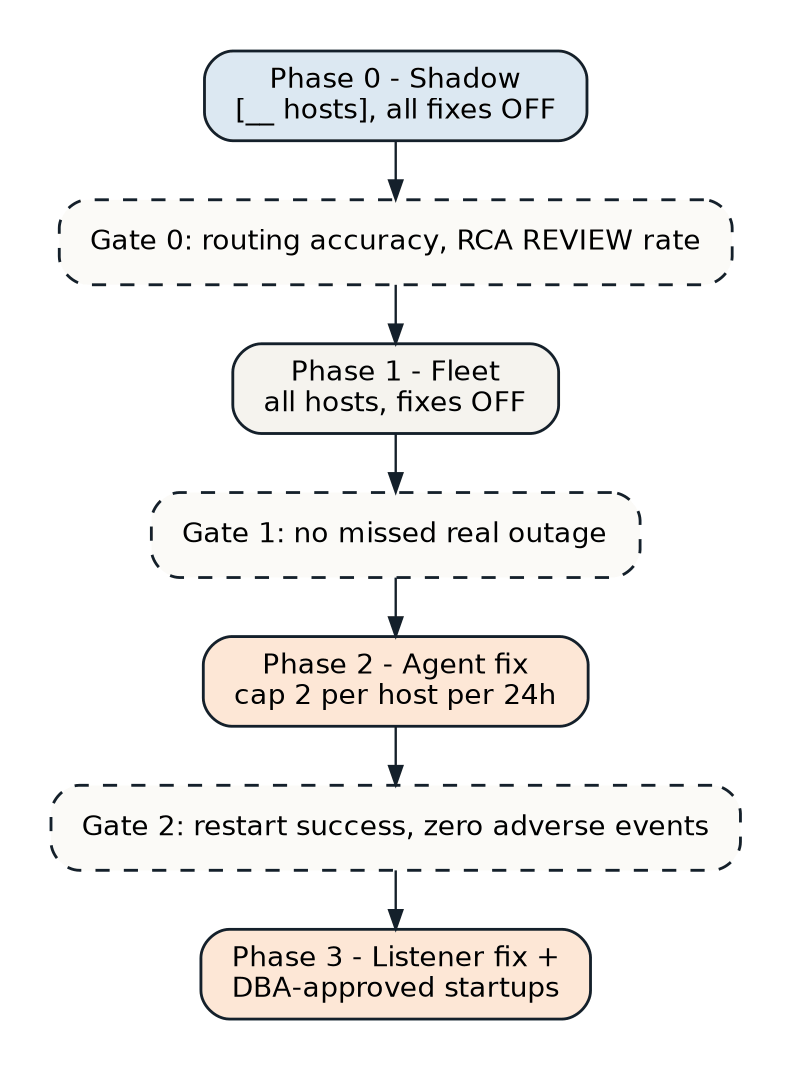
| Phase | Switches | Gate to the next phase |
|---|---|---|
| 0. Shadow | All fixes off on a few hosts; diagnosis and routing only | Routing accuracy; RCA REVIEW rate |
| 1. Fleet | All hosts, fixes off | No missed real outage |
| 2. Agent fix | auto_restart_agent on, cap 2 per host per 24 h | Restart success rate; zero adverse events |
| 3. Listener fix and approved startups | auto_restart_listener on; auto_propose on | Ongoing monthly review |
17. Files and versions
| File | What it is |
|---|---|
DB_Automation_setup_fix_script_V3.0.3.js | Builds and health-checks the ServiceNow side |
DB_Automation_UNR_V3.0.3.zip | ansible/ playbooks, oms/ spool and watchdog, servicenow/ scripts, MD5SUMS, DEPLOY.txt |
DB_Automation_ServiceNow_Setup_Guide_V3.0.3.docx | Step-by-step build, access rules, verification tests, findings |
DB_Availability_Automation_Report_v3.0.docx | Design, lab validation, KPIs and rollout plan |
| Version | Date | Change |
|---|---|---|
| 3.0.3 | 11 Oct 2026 | Late events keep OEM’s time; RCA root event for /auto records; no “clean” abort; approver itil warning |
| 3.0.2 | 10 Oct 2026 | Re-runs change only what really differs |
| 3.0.1 | 10 Oct 2026 | Progress written to the system log |
| 3.0 | 9 Oct 2026 | Source-neutral names; DBA group DBS-GLB-L2 OPERATIONS |
| 2.1 | 7 Oct 2026 | Real event times on auto-resolved records |
| 2.0 | Oct 2026 | Automation first: spool, watchdog, /auto, auto-resolved records |
| 1.x | Sep 2026 | Webhook, correlation, triage ladder, change holds, blackout gate, AI RCA and approvals |
Appendix: real outputs
{
  "host_name": "lnx002",
  "target_name": "lnx002:3872",
  "target_type": "Agent",
  "severity_code": "CRITICAL",
  "event_state": "AGENT UNREACHABLE",
  "oem_incident_id": "1703",
  "event_time": "Oct 11, 2026 5:53:21 AM EDT",
  "message": "Agent Unreachable (REASON = Unable to connect to the agent at https://lnx002:3872/emd/main/ ...)"
}{"result":{"action":"created","number":"INC0010006","sys_id":"0b2cb4b2...","late_min":60}}
{"result":{"action":"partial_clear","number":"INC0010004"}}
{"result":{"action":"resolved","number":"INC0010006","late_min":52}}
{"result":{"action":"correlated","number":"INC0010004"}}
{"result":{"error":"host_name and oem_incident_id are required"}} # HTTP 400{"result":{"automation_enabled":"true","storm_threshold":5.0,"max_agent_restarts_24h":2.0,
"auto_restart_agent":"true","auto_restart_listener":"true","max_listener_restarts_24h":2.0,
"auto_propose":"true","blackout_check":"true","blackout_grace_after_min":60.0,
"blackout_lookahead_min":30.0,"blackout_unknown_blocks_restarts":"true"}}[AUTOMATION @2026-10-11 09:39:06 UTC] OEM cleared all related incidents (1697, 1698, 1699, 1700).
Outage about 3 min 13 s. Recorded as auto-resolved.
[AUTOMATION @2026-10-11 09:38:38 UTC] Log evidence (collected at diagnosis)
--- emctl.log ---
1309861 :: 2026-10-11 05:33:13,534::AgentLifeCycle.pm: Processing stop agent
[AUTOMATION @2026-10-11 09:38:38 UTC] Diagnosis: AGENT_ONLY
Decision: AUTOMATIC AGENT RESTART (emctl stop/start, restart 1 of 2 allowed in 24 h) - verified running.
Host lnx002 ping: ok ssh: ok
Agent: DOWN pmon (PERF): UP v$instance: OPEN/ACTIVE listener: UP
OEM blackout: NONE
Starting agent ............... started.
Heartbeat Status : Ok
Agent is Running and Ready
[AUTOMATION @2026-10-11 09:35:53 UTC] Fixed by the OEM UNR automation without a ticket in any queue.
OEM 1697: CRITICAL Agent lnx002:3872 AGENT UNREACHABLE
OEM 1698: WARNING Database Instance PERF AGENT UNREACHABLE
OEM 1699: WARNING Host lnx002 AGENT UNREACHABLE
OEM 1700: WARNING Listener LISTENER_lnx002 AGENT UNREACHABLE
Resolution code: Resolved by automation Priority: 4 - Low Opened by: DB Automation ServiceYou are writing the root-cause analysis note for a resolved ServiceNow incident about an Oracle Enterprise
Manager (OEM) availability alert. Use ONLY the facts below. Do not invent error messages, causes, commands,
people, or actions. If something is not in the facts, leave it out.
FACTS
Incident: INC0010004 Host: lnx002
Opened: 2026-10-11 09:53:21 UTC Resolved: 2026-10-11 10:08:07 UTC Duration: 14 min 46 s
Root-cause category (decided by automation, do not change it): OEM agent failure - escalated (automatic restart switched off)
Recovered by: the DBA team (their manual action is not recorded by automation)
Automation action taken: None - escalated
OEM blackout (maintenance window) check at triage: NONE ...
Impact (decided by automation from triage evidence): monitoring blind spot only - triage found the host,
database and listener up; no user impact while the agent was down
KNOWN LOG SIGNATURES (matched by automation - these ARE the cause shown in the logs)
- emctl.log records an agent stop request at 2026-10-11 05:51:49 (host local time) - someone ran
"emctl stop agent" (an intentional stop, not a crash). Line to quote: "... Processing stop agent"
EVENT TIMELINE (oldest first, UTC) ...
Write 4 to 6 plain sentences, no headers, no bullet points, no preamble, in the voice of a DBA writing for
other DBAs. Begin with the category. End with one sentence that starts exactly with 'Likely cause (from logs):' ...The point
"Unreachable" was never really the problem. The problem was that a person had to wake up just to find out which kind of unreachable it was, and most of the time the answer was "the agent stopped, restart it."
Now the routine outages fix themselves, verified, and leave a complete record. The real ones reach a DBA already diagnosed. The risky one, starting a database, waits for a human decision, with an AI-written proposal to make that decision quicker. And every resolved incident gets a root-cause note nobody had to write.
And just like the tablespace automation, almost none of this is specific to unreachable alerts. The spool, the per-host correlation, the change and blackout gates, the least-privilege ServiceNow API, the approval loop and the fact-checked AI notes are reusable plumbing. The next alert type is mostly a new diagnosis script.
If you're running Oracle Enterprise Manager, ServiceNow and Ansible and you're tired of being paged for agents, there's a better way, and it's more straightforward to build than you'd expect. Drop us a line.